• There is NO official Otland's Discord server and NO official Otland's server list. The Otland's Staff does not manage any Discord server or server list. Moderators or administrator of any Discord server or server lists have NO connection to the Otland's Staff. Do not get scammed!
  • 2026 staff recruitment is open! Check it out and consider applying!

zaypay problem

Glidarn

Member
Joined
May 9, 2009
Messages
970
Reaction score
16
Location
Åkersberga, Sweden
I'm founding it abit hard to fix this zaypay stuff and i feel quite dumb since Stian wrote this
If your IQ is below 95, just stop reading beyond this point.

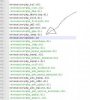
anyway i will attach a pic zaypay.jpg http://imageshack.us/f/818/zaypay.png/ here the ssl thing: php.jpg
and i also don't understand this
ogin on your phpmyadmin and insert the code in insertME.sql in the same database as your geisor installation.
what code? :blink:

anyway hope someone understands it better then i do...
 
Last edited:
Did you open extension=openssl.so in your PHP file?

If not do that. It should be written like this:

extension=openssl.so
insteed of
;extension=openssl.so

Remember that you can have more than 1 PHP.ini file. Search for all your PHP.ini files in your XAMPP folder.
 
I have php.ini and php-pear.ini and the one you posted looks the same as my php-pear.ini and i took yours and tried
Go to http://<your hostname>/zaypay/pay.php
still the same

Xampp Control Panel Version 2.5 (9 may 2007) That is what it says, dno if it changes anything
 
Last edited:
I just stopped apache and started it at first but then i turned it off with my php-pear.ini and then started it this morning and it was still the same.

Do i really need to restart the comp? Gotta be something else?
 
poste by stian:
Here is the exact same script as used by Eternia. Released under Creative Common for you. It gives you automatic points using the Zaypay report system, and it should be no SQL injection possibilities as I see it. It is standalone, but use Geisor login session and can be integrated just as on Eternia.
 
It most be your PHP that's configured wrong... or you maby forgot to edit things in zaypay.


you should try to take my PHP.ini and then restart the computer, I had the same problem before. Worked when I restarted the computer. (I tryed to restart APACHE, but didn't work.)
 
Back
Top