
• There is NO official Otland's Discord server and NO official Otland's server list. The Otland's Staff does not manage any Discord server or server list. Moderators or administrator of any Discord server or server lists have NO connection to the Otland's Staff. Do not get scammed!
  • 2026 staff recruitment is open! Check it out and consider applying!

SynCap - Window Screenshot Tool

Syntax

Developer
Joined
Oct 10, 2007
Messages
2,890
Reaction score
466
Location
Texas
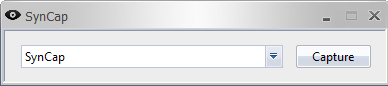
SynCap
imaQM.png


Features

Currently as version 1.0 it only supports choosing windows and saving to BitMap.
In later releases it will automatically upload to a image hosting service.
Convert to desired image format.
Any suggestions you have?

Download Links

D3S Official Download Link
 
Approved, seems like not needed because there are many applications to capturing the screenshoots but anyway thanks for sharing :).
 
Last edited:
What does it really do? cuz I could RLY need an software, that AUTOMATICALLY saves the img, when I press print screen, so I wont have to go to paint > ctrl +v > save ~
 
I can't make it the print screen button but I can make it a hotkey to automatically save an image/upload an image.
 
Chris next version will have the option to upload to an image host or to your ftp. :D
 
updated:
-added hotkey (printscreen saves to capture folder on desktop)
-sends to tray on minimize

coming soon:
-options
-ftp upload

Waiting for mod to update post.
 
so now its already better than PAID app fast stone capture?(all useful options of that app: minimize to tray and of course taking ss but fsc changes focus for a sec when takingss what is really annoying)

ROX
 
right now the window its taking a screenshot of cant be minimized, so it makes it show right before taking the screenshot, i can make it minimize it again afterwards though.
 
DAMN, it cannot take correct screen of tibia client(at least for me, dx9 engine screen contains only window frame with black windows content)
 
cant edit post sorry, but the screenshot tool works both on hotkey and window capture...on directx9 x5 and opengl :S

Whats your operating system...
 
xp pro sp3, tool in tray(tested this way for firefox and explorer: works nice)(also, it would be nice to have mid quality png output, uploading bmp of my res takes AGES, even that black one...)
damn, failed at ~80%, trying at speedyshare


07 15 2010 13 45 20 bmp
 
file conversion will come in the near future. I'm not entirely sure of the problem. I'm pretty sure XP is the culprit though :/
 
SynCap UPDATED!
syncap1.bmp


Features

Captures windows from drop down box and saves to a specified folder.
Saves screenshots from a select window and hotkeys now.
Save a full screen with (ctrl+printscreen) or your working window with (printscreen)
Supports .png, .bmp, .gif, .jpg, .tif
Will support FTP upload soon.
Options supported in future.

Download Links

D3S Official Download Link
 
Back
Top