• There is NO official Otland's Discord server and NO official Otland's server list. The Otland's Staff does not manage any Discord server or server list. Moderators or administrator of any Discord server or server lists have NO connection to the Otland's Staff. Do not get scammed!
  • 2026 staff recruitment is open! Check it out and consider applying!

OTClient Why does my OTClient look like this?

Izaack

Member
Joined
Jun 18, 2012
Messages
89
Solutions
2
Reaction score
23
Location
México
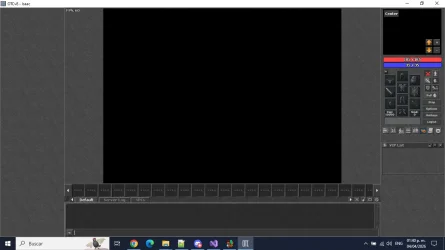
Hi Otland, I'm installing the mounts but when I log in I get a black screen and the following error.
LUA:
ERROR: ProtocolGame parse message exception (3475 bytes, 3437 unread, last opcode is 0x09 (9), prev opcode is 0xa0 (160)): unhandled opcode 9
Packet has been saved to packet.log, you can use it to find what was wrong. (Protocol: 860)
ERROR: lua function callback failed: C++ call failed: LUA ERROR: attempt to cast a 'nil' lua value to 'class Position'
stack traceback:
    [builtin#146]: at 0x00fbd800
    [C]: in function 'getSpectatorsInRangeEx'
    /modules/game_battle/battle.lua:238: in function 'checkCreatures'
    /modules/game_battle/battle.lua:224: in function </modules/game_battle/battle.lua:221>

1775432000102.webp

It's worth mentioning that I enabled the feature in version 860: g_game.enableFeature(GamePlayerMounts)

Does anyone have any idea how to fix this?

I am using Downgraded and further developed by Nekiro / MillhioreBT
 
Solution
Thanks everyone for your opinions. I discovered that when I create a player, I enter the game normally without errors, but when I log back in, the screen is black like in the photo I uploaded. Does anyone have any idea what it could be?
Post automatically merged:

I've solved it; I just needed to add some features to the client's const.lua file. Thank you all so much for your help! :D1775580424628.webp
I think mounts are not supported in protocol 860. It was added to the outfit structure starting in protocol 870+.

Simply enabling the feature on the client side is not enough. You would need to modify both the server and the client to add mount data to the outfit protocol messages.

But I'm married, so I may be wrong.
 
Hi there,
The issue you're facing is a protocol mismatch. Even though you enabled GamePlayerMounts in the client, the 8.60 protocol doesn't natively handle the packet structure for mounts (which was introduced in 8.70).

1. The unhandled opcode 9 error means the server is sending data that the client's protocol 8.60 doesn't know how to parse. This is likely the mount data packet.

2. The LUA error in battle.lua happens because getSpectatorsInRangeEx is receiving a nil value for the player's position, causing the C++ callback to fail and resulting in the black screen.
Possible solutions:

  • Source-side Fix: You likely need to ensure that your server sources (Nekiro/MillhioreBT) are correctly sending the mount data as a custom extended opcode or that you have the correct protocolgame.cpp changes to support mounts on 8.60.
  • Client-side workaround: You can try to wrap the battle check in a nil-check to prevent the crash, although it might not fix the black screen if the protocol is already broken. In modules/game_battle/battle.lua, around line 238, try adding:
LUA:
local player = g_game.getLocalPlayer()
if not player then return end

local pos = player:getPosition()
if not pos then return end -- Adicione isso para evitar o crash

However, the real fix is ensuring your server and client are using the same "extended" protocol for mounts on 8.60.
 
On 8.60 I would not enable GamePlayerMounts unless your server protocol was changed for it too.

That flag only changes the client side. The server still has to send mount data in the outfit packets, and stock 8.60 stacks do not do that.

In old 8.60 projects mounts are usually done as a fake mount instead: outfit condition + speed bonus, not real protocol mounts.

So the black screen is just the follow-up symptom. The first real problem is the packet mismatch.
If you only want the visual/speed effect, disable GamePlayerMounts and do it server side.
If you want real mounts, you need matching server + client protocol edits, not only a client toggle.
 
Thanks everyone for your opinions. I discovered that when I create a player, I enter the game normally without errors, but when I log back in, the screen is black like in the photo I uploaded. Does anyone have any idea what it could be?
Post automatically merged:

I've solved it; I just needed to add some features to the client's const.lua file. Thank you all so much for your help! :D1775580424628.webp
 
Last edited:
Solution
Thanks everyone for your opinions. I discovered that when I create a player, I enter the game normally without errors, but when I log back in, the screen is black like in the photo I uploaded. Does anyone have any idea what it could be?
Post automatically merged:

I've solved it; I just needed to add some features to the client's const.lua file. Thank you all so much for your help!
for future generations it would be nice to know what features you enabled
 
for future generations it would be nice to know what features you enabled
Of course, this was what I enabled that I had not seen that came in the config.lua of Downgraded and further developed by Nekiro / MillhioreBT.

--OTC Features
-- NOTE: Features added in this list will be forced to be used on the client
-- These features can be found in "modules/gamelib/const.lua"
OTCFeatures = {
9, -- GameSkillsBase
12, -- GamePlayerMounts
29, -- GameDoubleSkills
53, -- GameBaseSkillU16
76 -- GameAdditionalSkills
}
 
Back
Top