
Hi,
I share here my version of Object builder compiled with three new/edited features, which should help you with merging 7.4 dat/spr with 772 dat/spr.
First change is:
-"New" button is adding new item right after the selected item on the list (originally it was adding new item at the end of the list and I did not found a way to move it to the middle for example). This one is required to fill the gaps. Cipsoft used to make empty objects between existing objects in newer versions. With this new "New" button fuctionality you can add "New" empty items in a place you want them to be. All further items are then moved by +1 (maximum amount od items is increased by 1).
Second change is:
-New option available from Tools menu - Insert Items from Version. It allows you to import specified amount of items from desired version (for example 772) to the loaded version (for example 7.4) - and place it exactly in a place you want.
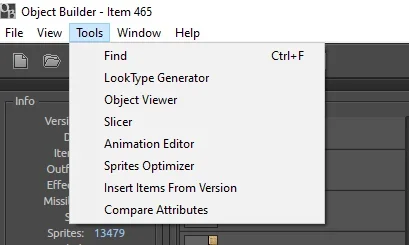
-Compare Attributes - the last feature. I compare the loaded dat attributes with the one which you select (path). So you can at the end compare the differencies between for example 7.4 and 772.
The Merge function was also edited. Now it scans how much items loaded dat/spr have - and it add only the difference between loaded and selected dat. For example if your dat is 772 and you have 5089 items - you can simply merge it with 8.0 versions and add new items from 5090 - till the end (i think 8.0 have like 7400 items).
With this you can simply build in easy way a 7.4 looking server using 772 engine (like tvp, nostalrius etc), and you can easly add for example sprites required to add svargrond to your 7.4 version.
With this new features I have build the attached _NewManual.zip - which match 772 dat/spr in like an hour. All new items (added after 74) are from 772 version, but all other items included in 74 - are untouched:
Dat size is 186KB
Spr size is 14 402KB
The base to create this was oryginal 7.4 dat/spr. So you can see, that it is already light weight, because we do not use "Replace" option with OTB files but use edited "Merge" function which do not create that many duplicates.
Thanks to @kay for explaining how to do it few years ago here:
I hope it helps with creating even more better looking ot server based on 74 - I already work on mine
You have also a source attached - you can adjust it to your needs. I used AIR SDK 51.3.1 to compile it - if you use the same- you should be good to go. Commands to compiler are as follow:
Compile worker:
apache-flex-sdk-4.16.1-air-51.3.1\bin\mxmlc.bat "+configname=air" "-locale=en_US,es_ES,pt_BR" "-source-path+=locale/{locale}" "-source-path+=src" "-library-path+=libs" "-allow-source-path-overlap=true" "-output" "workerswfs/ObjectBuilderWorker.swf" "src/ObjectBuilderWorker.as"
Compile SWF:
apache-flex-sdk-4.16.1-air-51.3.1\bin\mxmlc.bat "+configname=air" "-locale=en_US,es_ES,pt_BR" "-source-path+=locale/{locale}" "-source-path+=src" "-library-path+=libs" "-allow-source-path-overlap=true" "-output" "bin-debug/ObjectBuilder.swf" "src/ObjectBuilder.mxml"
And then pack the app with adt:
apache-flex-sdk-4.16.1-air-51.3.1\bin\adt.bat -package -storetype pkcs12 -keystore object_builder.p12 -storepass 123456789 -tsa https://freetsa.org/tsr -target bundle bin/ObjectBuilder src/ObjectBuilder-app.xml -C bin-debug ObjectBuilder.swf -C assets icon -C . versions.xml -C workerswfs ObjectBuilderWorker.swf
of course you will also need a generated certificate etc
apache-flex-sdk-4.16.1-air-51.3.1\bin\adt.bat -certificate -cn ObjectBuilder 2048-RSA object_builder_new.p12 123456789
All instructions are on Object Builder github page.
Soon a new update with applying all attributes for all items from desired version to downgraded one.
As always no support included in the things which I write im just a begginer.
Have fun - regards,
Gover
I share here my version of Object builder compiled with three new/edited features, which should help you with merging 7.4 dat/spr with 772 dat/spr.
First change is:
-"New" button is adding new item right after the selected item on the list (originally it was adding new item at the end of the list and I did not found a way to move it to the middle for example). This one is required to fill the gaps. Cipsoft used to make empty objects between existing objects in newer versions. With this new "New" button fuctionality you can add "New" empty items in a place you want them to be. All further items are then moved by +1 (maximum amount od items is increased by 1).
Second change is:
-New option available from Tools menu - Insert Items from Version. It allows you to import specified amount of items from desired version (for example 772) to the loaded version (for example 7.4) - and place it exactly in a place you want.
-Compare Attributes - the last feature. I compare the loaded dat attributes with the one which you select (path). So you can at the end compare the differencies between for example 7.4 and 772.
The Merge function was also edited. Now it scans how much items loaded dat/spr have - and it add only the difference between loaded and selected dat. For example if your dat is 772 and you have 5089 items - you can simply merge it with 8.0 versions and add new items from 5090 - till the end (i think 8.0 have like 7400 items).
With this you can simply build in easy way a 7.4 looking server using 772 engine (like tvp, nostalrius etc), and you can easly add for example sprites required to add svargrond to your 7.4 version.
With this new features I have build the attached _NewManual.zip - which match 772 dat/spr in like an hour. All new items (added after 74) are from 772 version, but all other items included in 74 - are untouched:
Dat size is 186KB
Spr size is 14 402KB
The base to create this was oryginal 7.4 dat/spr. So you can see, that it is already light weight, because we do not use "Replace" option with OTB files but use edited "Merge" function which do not create that many duplicates.
Thanks to @kay for explaining how to do it few years ago here:

@yexos71065
In short: there are two ways to achieve that. One is easy (in terms of technical knowledge needed), but tedious, and doesn't guarantee you will have all the sprites replaced correctly. The second is harder, but less tedious and cleaner.
So the first method would be to simply extract all the sprites from both versions of .spr files. Then manually replace pictures from 7.7 with their older equivalent from 7.4. Then compile it to a new .spr file. This involves a lot of manual works, because the sprites ids may not always match. But the only tool you need is some simple...
In short: there are two ways to achieve that. One is easy (in terms of technical knowledge needed), but tedious, and doesn't guarantee you will have all the sprites replaced correctly. The second is harder, but less tedious and cleaner.
So the first method would be to simply extract all the sprites from both versions of .spr files. Then manually replace pictures from 7.7 with their older equivalent from 7.4. Then compile it to a new .spr file. This involves a lot of manual works, because the sprites ids may not always match. But the only tool you need is some simple...


I hope it helps with creating even more better looking ot server based on 74 - I already work on mine
You have also a source attached - you can adjust it to your needs. I used AIR SDK 51.3.1 to compile it - if you use the same- you should be good to go. Commands to compiler are as follow:
Compile worker:
apache-flex-sdk-4.16.1-air-51.3.1\bin\mxmlc.bat "+configname=air" "-locale=en_US,es_ES,pt_BR" "-source-path+=locale/{locale}" "-source-path+=src" "-library-path+=libs" "-allow-source-path-overlap=true" "-output" "workerswfs/ObjectBuilderWorker.swf" "src/ObjectBuilderWorker.as"
Compile SWF:
apache-flex-sdk-4.16.1-air-51.3.1\bin\mxmlc.bat "+configname=air" "-locale=en_US,es_ES,pt_BR" "-source-path+=locale/{locale}" "-source-path+=src" "-library-path+=libs" "-allow-source-path-overlap=true" "-output" "bin-debug/ObjectBuilder.swf" "src/ObjectBuilder.mxml"
And then pack the app with adt:
apache-flex-sdk-4.16.1-air-51.3.1\bin\adt.bat -package -storetype pkcs12 -keystore object_builder.p12 -storepass 123456789 -tsa https://freetsa.org/tsr -target bundle bin/ObjectBuilder src/ObjectBuilder-app.xml -C bin-debug ObjectBuilder.swf -C assets icon -C . versions.xml -C workerswfs ObjectBuilderWorker.swf
of course you will also need a generated certificate etc
apache-flex-sdk-4.16.1-air-51.3.1\bin\adt.bat -certificate -cn ObjectBuilder 2048-RSA object_builder_new.p12 123456789
All instructions are on Object Builder github page.
Soon a new update with applying all attributes for all items from desired version to downgraded one.
As always no support included in the things which I write
im just a begginer.Have fun - regards,
Gover
Attachments
-
ObjectBuilder-0.5.0_working.zip19.3 MB · Views: 9 · VirusTotal
-
_NewManual.zip6.7 MB · Views: 5 · VirusTotal
Last edited:


