• There is NO official Otland's Discord server and NO official Otland's server list. The Otland's Staff does not manage any Discord server or server list. Moderators or administrator of any Discord server or server lists have NO connection to the Otland's Staff. Do not get scammed!
  • 2026 staff recruitment is open! Check it out and consider applying!

Programmer Edit skills menu (add stamina) in Tibianic DLL client - 50$

Gover

Well-Known Member
Joined
Sep 3, 2009
Messages
129
Reaction score
67
Hello,
I can offer a paid job to help me edit the Skills menu in Tibianic DLL client 772.
The client does not support stamina (it was introduced in tibia 7.8), but my server support it.
I need to just display information about current player stamina in skills menu (like it is in tibia 7.8+).

I know that client doesn't store this information in any bytes like:
PLAYER_SOUL_ADDRESS = 0x005C6824,
PLAYER_CAP_ADDRESS = 0x005C6820,
I checked over 1000 bytes above and below.

I already know how to get information about stamina inside the client (client have to request it (main.cpp), and server have to provide this information (protocolgame.cpp and game.cpp in dispatcher thread). I just need a solution to display it in "Skills" menu.

I'm not sure if it is doable in DLL, but I believe it is.
Payment methods: Crypto/Paypal
I will pay half the price for the service after I see it is working on discord screen share. After you provide all necessary changes I will pay the second half.

You can work on Tibianic DLL Sources (SaiyansKing MSVC sources) and Nekiro 1.5 Downgrade 772 Server Files.

If the price for this job is too small - I will try to figure it out on my own (or make a walkaround for it to display it somewhere on screen all the time).

Thanks in advance for help.
Regards,
Gover
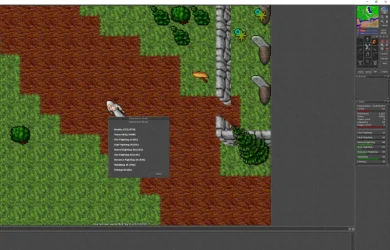
 
Maybe you are right! but my project is based on old tibia features (7.4) and all clients above this 7.72/7.6 have features like hotkeys with runes coded. I would like to keep the old client without this features.

At the end I can always display it in left upper corner for example (next to the Ping and FPS) to be always on top (visible all the time), but it would be nices to fit it in skills menu. Editing the skills menu would be a great knowledge for future changes (like adding new skills for example).

Maybe the solution to solve this is replacing the original "Skills" button with edited one. I solved how to display all the skills and their progress in different window:
1756636806352.webp

since all the bytes for this informations are already known - I can build this window from scratch. But maybe there is a better solution.
 
Last edited:
Maybe you are right! but my project is based on old tibia features (7.4) and all clients above this 7.72/7.6 have features like hotkeys with runes coded. I would like to keep the old client without this features.

At the end I can always display it in left upper corner for example (next to the Ping and FPS) to be always on top (visible all the time), but it would be nices to fit it in skills menu. Editing the skills menu would be a great knowledge for future changes (like adding new skills for example).

Maybe the solution to solve this is replacing the original "Skills" button with edited one. I solved how to display all the skills and their progress in different window:
View attachment 94511

since all the bytes for this informations are already known - I can build this window from scratch. But maybe there is a better solution.
did you ever thought to force send it from server and keep it on the client onLogin and advance? since the client need to request it, it is not a need it is a requirement for the information passage to be satisfied, other way is serverSide information directly sent which takes actions in client.

there is a completely different way im sure its possible to go through, send it from server onAdvance, onLogin, save them on the dll make a new protocol packet to receive them in your dll and you already have them in your class which means you can use them whenever you want right?
 
Yes, I know how to display current stamina in game client (I already have a Premium Store feature which displays current account Premium_Points from database - which is not stored in game client by default).
1756637942080.webp

I would like to just fit this information inside the "Skills" windows like it is in newer version of game client.
 
A long time ago, I purchased the source code for the DLL from Ryan, who had originally bought them from Iryont.
I can say for sure that the leaked sources are not identical, some even contain memory leaks.
Before I switched over to OTClient, I had already worked quite a bit on my DLL and even managed to modify the skills window.
That said, only a handful of people actually know how to properly modify the DLL, and I highly doubt any of them would take on such a job for just $50.

IYQf9nv.png
 
Ok, I will stick with displaying it below FPS and Ping.

If someone is interested I provide the necessary changes below:

Client Side:
main.cpp below bool g_lastControl;
C++:
uint32_t g_stamina = 0;

main cpp in render before "if(cam->isPlayerEnabled()){ // CAM player is enabled"
C++:
    // Display stamina if enabled
    if (g_dll.m_displayStamina) {
        uint32_t hours = g_stamina / 60;
        uint32_t minutes = g_stamina % 60;
        sprintf(messageBuffer, "Stamina: %uh %um", hours, minutes);
        Painter::drawText(nSurface, 4, 32, FONT_NORMAL_OUTLINED, 255, 255, 0, messageBuffer, 0);
    }

main.cpp in hooked timer:
C++:
  // Periodic stamina refresh (initial after 2 seconds, then every minute)
  static uint32_t staminaRefreshTicks = 0;
  static bool initialStaminaRequested = false;
 
  if(Tibia::IsOnline()){
    staminaRefreshTicks++;
    
    // Initial request after 2 seconds (20 ticks)
    if(!initialStaminaRequested && staminaRefreshTicks >= 20) {
      g_dll.RequestStamina();
      initialStaminaRequested = true;
      staminaRefreshTicks = 0; // Reset for periodic updates
    }
    // Periodic updates every minute (600 ticks)
    else if(initialStaminaRequested && staminaRefreshTicks >= 600) {
      g_dll.RequestStamina();
      staminaRefreshTicks = 0;
    }
  } else {
    staminaRefreshTicks = 0; // Reset when offline
    initialStaminaRequested = false; // Reset initial request flag
  }
main.cpp case
C++:
    /* Stamina response */
    case 0xF5: {
        g_stamina = Tibia::NetworkGetU32();
        // Update stamina display in main window
        g_dll.updateStamina(g_stamina);
        break;
    }

main.cpp LIB::LIB:

C++:
  m_displayStamina = true;
(below m_gameFps = false;)


// Create stamina label
  m_staminaLabel = new Label(4, 32);
  m_staminaLabel->setText("Stamina: 0");
  g_gui->pushElement(m_staminaLabel);

(somewhere at the bottom of LIB::LIB)

main.cpp bottom LIB section

C++:
void LIB::RequestStamina() {
    if (!Tibia::IsOnline()) {
        return;
    }

    NetworkMessage* msg = new NetworkMessage(NetworkMessage::XTEA);
    msg->AddByte(0xF4); // Stamina request packet
    SendXTEANetworkMessage(msg);
}

void LIB::HandleStamina(NetworkMessage* msg) {
    g_stamina = msg->GetU32();
    // Update stamina display in main window
    updateStamina(g_stamina);
}


uint32_t LIB::GetStamina() {
    return g_stamina;
}

void LIB::updateStamina(uint32_t stamina) {
    if (m_staminaLabel) {
        char buffer[64];
        uint32_t hours = stamina / 60;
        uint32_t minutes = stamina % 60;
        sprintf(buffer, "Stamina: %uh %um", hours, minutes);
        m_staminaLabel->setText(buffer);
    }
}

main.h all in proper sections:

C++:
        bool m_displayStamina;
        Label* m_staminaLabel;

        void RequestStamina();
        void HandleStamina(NetworkMessage* msg);
        uint32_t GetStamina();
        void updateStamina(uint32_t stamina);


Server side:
protocolgame.cpp:
C++:
    case 0xF4: addGameTaskTimed(DISPATCHER_TASK_EXPIRATION, &Game::playerRequestStamina, player->getID()); break; //Premium Points update in Tibianic-DLL Store

void ProtocolGame::sendStamina(uint32_t stamina) {
    NetworkMessage msg;
    msg.addByte(0xF5); // New packet identifier for premium points response
    msg.add<uint32_t>(stamina);
    writeToOutputBuffer(msg);
}

protocolgame.h:
C++:
        void sendStamina(uint32_t stamina); //Stamina update in Tibianic-DLL


game.cpp
C++:
void Game::playerRequestStamina(uint32_t playerId)
{
    Player* player = getPlayerByID(playerId);
    if (!player) {
        return;
    }

    // Get account ID and query premium points
    uint32_t stamina = player->getStaminaMinutes();

    // Send response packet
    if (player->client) {
        if (stamina) {
            player->client->sendStamina(stamina);
        }
        else {
            player->client->sendStamina(0);
        }
    }
}

game.h:
C++:
        void playerRequestStamina(uint32_t playerId); //Stamina in Tibianic-CLL Client


It is working good and is dislpayed below FPS and Ping. Maybe someone find it usefull.
 
A long time ago, I purchased the source code for the DLL from Ryan, who had originally bought them from Iryont.
I can say for sure that the leaked sources are not identical, some even contain memory leaks.
Before I switched over to OTClient, I had already worked quite a bit on my DLL and even managed to modify the skills window.
That said, only a handful of people actually know how to properly modify the DLL, and I highly doubt any of them would take on such a job for just $50.

IYQf9nv.png
paying more than 50 usd by adding a skill bar is crazy even, if it's "highly" difficult
 
I'm also in shock how much services like this can cost :) - but I guess that for knowledge you have to pay.
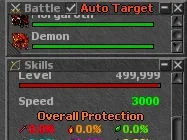
But maybe someone which proper skills will find this and send me PM.
I will aslo try to recreate the original skill tab and replace the button "Skills" with the edited one. Maybe this would be the easiest way to enchance this tab.
 
Last edited:
paying more than 50 usd by adding a skill bar is crazy even, if it's "highly" difficult
That’s your opinion, and that’s absolutely fine.
I’m just pointing out that there are hardly any people taking on DLL-related work, and those who do are very unlikely to spend their time on a job like this for just $50. That said, I still wish you the best of luck.

Maybe @kor can help you out here.
 
I can agree that price can be low, but i'm working on my project for fun and It's possible that this project will never pay off.
I think it require a lot of work to get it work like I want - I do not see a way to add a dialog which looks like Skills/Battle/Vip etc (and it would work in the same way as original do). I bet that it requires a lot of new code to achieve it - I can just replace the skills window to be poped out like other windows in this DLL (for example auto trade messanger). But it would annoy players, because when this window is poped out - then you cannot really move in game XD So I think I will stick with current option to display it in left upper corner. It looks nice, is visible all the time and it should not bother players.

Thanks for your opinions and general help. Have a great day all of you !
 
Keep in mind that job costs also vary depending on the developer's country of origin/location. Someone in Western Europe will charge far more than someone in South America because of the cost of living in that country, even if the quality of work is the same.... that's just how it is.
 
I would suggest an easy workaround that requires finding one address of a function that draws the title of the windows, like Skills, Battle, VIP, etc
If you can find this function's address, you can hook it and draw the stamina next to it
Modifying the skill window itself is just a lot of work
Screenshot 2025-09-01 152329.webp
C++:
HookCall(0x046AB9D, (DWORD)&MyInterfaceText); //address for client 8.71
void MyInterfaceText(int nSurface, int nX, int nY, int Font, int ColorRed, int ColorGreen, int ColorBlue, char* Text, int align, int nX2, int nY2, int clipX, int clipY)
{
    if (strstr(Text, "Battle") != 0)
    {
        Painter::drawTextClip(nSurface, nX+55, nY-1, FONT_NORMAL_OUTLINED, 254, 69, 19, "Auto Target", align, nX2, nY2, clipX+10, clipY);
    }
    Painter::drawTextClip(nSurface, nX, nY, Font, ColorRed, ColorGreen, ColorBlue, Text, align, nX2, nY2, clipX, clipY);
}
 
Thanks for a tip - I'm trying to get this, but i do not understand this aseembly code.

I think I found a proper section:

C++:
0043CA03  |. 895D EC        MOV DWORD PTR SS:[EBP-14],EBX
0043CA06  |. 33FF           XOR EDI,EDI
0043CA08  |. 3BDF           CMP EBX,EDI
0043CA0A  |. C645 FC 04     MOV BYTE PTR SS:[EBP-4],4
0043CA0E  |. 74 37          JE SHORT Lucky74M.0043CA47
0043CA10  |. 8B45 E8        MOV EAX,DWORD PTR SS:[EBP-18]
0043CA13  |. 6A 09          PUSH 9
0043CA15  |. 50             PUSH EAX
0043CA16  |. 8D4D D0        LEA ECX,DWORD PTR SS:[EBP-30]
0043CA19  |. 33F6           XOR ESI,ESI
0043CA1B  |. E8 10970500    CALL Lucky74M.00496130
0043CA20  |. 8B0D D4065C00  MOV ECX,DWORD PTR DS:[5C06D4]            ;  Lucky74M.0055CF04
0043CA26  |. 8B50 04        MOV EDX,DWORD PTR DS:[EAX+4]
0043CA29  |. 8B00           MOV EAX,DWORD PTR DS:[EAX]
0043CA2B  |. 56             PUSH ESI                                 ; /Arg8
0043CA2C  |. 51             PUSH ECX                                 ; |Arg7 => 0055CF04 ASCII "Maximise or minimise window"
0043CA2D  |. 52             PUSH EDX                                 ; |Arg6
0043CA2E  |. 50             PUSH EAX                                 ; |Arg5
0043CA2F  |. 68 8B000000    PUSH 8B                                  ; |Arg4 = 0000008B
0043CA34  |. 68 8A000000    PUSH 8A                                  ; |Arg3 = 0000008A
0043CA39  |. 57             PUSH EDI                                 ; |Arg2
0043CA3A  |. 56             PUSH ESI                                 ; |Arg1
0043CA3B  |. 8BCB           MOV ECX,EBX                              ; |
0043CA3D  |. E8 1E9E0200    CALL Lucky74M.00466860                   ; \Lucky74M.00466860
0043CA42  |. 8945 E0        MOV DWORD PTR SS:[EBP-20],EAX
0043CA45  |. EB 03          JMP SHORT Lucky74M.0043CA4A
0043CA47  |> 897D E0        MOV DWORD PTR SS:[EBP-20],EDI
0043CA4A  |> 6A 4C          PUSH 4C
0043CA4C  |. C645 FC 00     MOV BYTE PTR SS:[EBP-4],0
0043CA50  |. E8 926D0E00    CALL Lucky74M.005237E7
0043CA55  |. 8BC8           MOV ECX,EAX
0043CA57  |. 83C4 04        ADD ESP,4
0043CA5A  |. 894D EC        MOV DWORD PTR SS:[EBP-14],ECX
0043CA5D  |. 33DB           XOR EBX,EBX
0043CA5F  |. 3BCB           CMP ECX,EBX
0043CA61  |. C645 FC 05     MOV BYTE PTR SS:[EBP-4],5
0043CA65  |. 74 3B          JE SHORT Lucky74M.0043CAA2
0043CA67  |. A1 94D15C00    MOV EAX,DWORD PTR DS:[5CD194]
0043CA6C  |. 68 34E95500    PUSH Lucky74M.0055E934                   ;  ASCII "Skills"

 
    I set breakpoint here

0043CA6C  |. 68 34E95500    PUSH Lucky74M.0055E934                   ;  ASCII "Skills"
0043CA71  |. 83EC 14        SUB ESP,14
0043CA74  |. 8BD4           MOV EDX,ESP                              ; |
0043CA76  |. 8902           MOV DWORD PTR DS:[EDX],EAX               ; |
0043CA78  |. A1 98D15C00    MOV EAX,DWORD PTR DS:[5CD198]            ; |
0043CA7D  |. 8942 04        MOV DWORD PTR DS:[EDX+4],EAX             ; |
0043CA80  |. A1 9CD15C00    MOV EAX,DWORD PTR DS:[5CD19C]            ; |
0043CA85  |. 8942 08        MOV DWORD PTR DS:[EDX+8],EAX             ; |
0043CA88  |. A1 A0D15C00    MOV EAX,DWORD PTR DS:[5CD1A0]            ; |
0043CA8D  |. 8942 0C        MOV DWORD PTR DS:[EDX+C],EAX             ; |
0043CA90  |. A1 A4D15C00    MOV EAX,DWORD PTR DS:[5CD1A4]            ; |
0043CA95  |. 8942 10        MOV DWORD PTR DS:[EDX+10],EAX            ; |
0043CA98  |. E8 A3900200    CALL Lucky74M.00465B40                   ; \Lucky74M.00465B40
0043CA9D  |. 8945 EC        MOV DWORD PTR SS:[EBP-14],EAX
0043CAA0  |. EB 03          JMP SHORT Lucky74M.0043CAA5
0043CAA2  |> 895D EC        MOV DWORD PTR SS:[EBP-14],EBX
0043CAA5  |> 6A 28          PUSH 28
0043CAA7  |. C645 FC 00     MOV BYTE PTR SS:[EBP-4],0
0043CAAB  |. E8 376D0E00    CALL Lucky74M.005237E7
0043CAB0  |. 8BC8           MOV ECX,EAX
0043CAB2  |. 83C4 04        ADD ESP,4
0043CAB5  |. 894D D4        MOV DWORD PTR SS:[EBP-2C],ECX
0043CAB8  |. 3BCB           CMP ECX,EBX
0043CABA  |. C645 FC 06     MOV BYTE PTR SS:[EBP-4],6
0043CABE  |. 74 0C          JE SHORT Lucky74M.0043CACC
0043CAC0  |. 68 8E000000    PUSH 8E                                  ; /Arg1 = 0000008E
0043CAC5  |. E8 46AC0100    CALL Lucky74M.00457710                   ; \Lucky74M.00457710
0043CACA  |. 8BD8           MOV EBX,EAX
0043CACC  |> 8B75 E8        MOV ESI,DWORD PTR SS:[EBP-18]
0043CACF  |. 8BCE           MOV ECX,ESI
0043CAD1  |. C645 FC 00     MOV BYTE PTR SS:[EBP-4],0
0043CAD5  |. E8 968B0400    CALL Lucky74M.00485670
0043CADA  |. 8B4D E4        MOV ECX,DWORD PTR SS:[EBP-1C]
0043CADD  |. 8B11           MOV EDX,DWORD PTR DS:[ECX]
0043CADF  |. 8BF8           MOV EDI,EAX
0043CAE1  |. FF92 AC000000  CALL DWORD PTR DS:[EDX+AC]
0043CAE7  |. 8B16           MOV EDX,DWORD PTR DS:[ESI]
0043CAE9  |. 03C7           ADD EAX,EDI
0043CAEB  |. 50             PUSH EAX
0043CAEC  |. A1 4CD15C00    MOV EAX,DWORD PTR DS:[5CD14C]
0043CAF1  |. 50             PUSH EAX

I set a breakpoint on this "Skills" text string and after I open this skills menu the game freeze (so I think it is a correct place). But that's all :P

Which one is a drawing function - i dont know. Maybe some CALL bytes are responsible for this idk
 
Last edited:
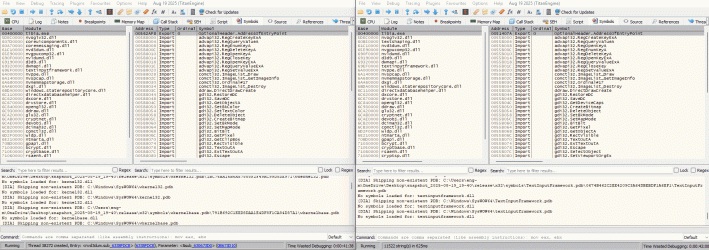
The easiest way to find an address with basically no assembly knowledge is to do a manual pattern matching between the two versions
on the left side client 871, on the right 772
ctrl+g to go to the address 0x046AB9D
try to scroll around for a special text like "_Text!=NULL"
on the 772 side, search for string references, fortunately it was the first one

Animation.gif
I just noticed that this function uses the DrawTextClip not the normal DrawText
LUA:
DWORD ptrPrintTextClip = 0x04B4B80;
_DrawTextClip *DrawTextClip = (_DrawTextClip*)Consts::ptrPrintTextClip;
void Painter::drawTextClip(int nSurface, int nX, int nY, int Font, int ColorRed, int ColorGreen, int ColorBlue, char* Text, int align, int nX2, int nY2, int clipX, int clipY){
    DrawTextClip(nSurface, nX, nY, Font, ColorRed, ColorGreen, ColorBlue, Text, align, nX2, nY2, clipX,  clipY);
}
Guess the only thing left is to find ptrPrintTextClip!
 
It's easy when you give me everything:
1756828421165.webp

Thanks - you are the best.

C++:
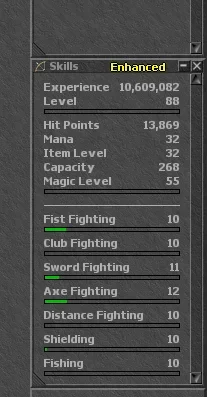
void __cdecl HookedSkillsText(int nSurface, int nX, int nY, int nFont, int nRed, int nGreen, int nBlue, char* lpText, int nAlign, int nX2, int nY2, int clipX, int clipY){
  // Call original function first
  reinterpret_cast<void(__cdecl *)(int, int, int, int, int, int, int, char*, int, int, int, int, int)>(0x004934E0)(nSurface, nX, nY, nFont, nRed, nGreen, nBlue, lpText, nAlign, nX2, nY2, clipX, clipY);
 
  // Check if this is Skills-related text
  if (lpText && strstr(lpText, "Skills") != 0) {
    // Add custom text next to Skills
    Painter::drawText(nSurface, nX + 60, nY, FONT_NORMAL_OUTLINED, 255, 255, 0, (char*)"Enhanced", 0);
  }
}


  // Hook Skills menu text drawing
  HookAsmCall(0x00455B2D, (DWORD)&HookedSkillsText);
 
I would suggest an easy workaround that requires finding one address of a function that draws the title of the windows, like Skills, Battle, VIP, etc
If you can find this function's address, you can hook it and draw the stamina next to it
Modifying the skill window itself is just a lot of work
View attachment 94545
C++:
HookCall(0x046AB9D, (DWORD)&MyInterfaceText); //address for client 8.71
void MyInterfaceText(int nSurface, int nX, int nY, int Font, int ColorRed, int ColorGreen, int ColorBlue, char* Text, int align, int nX2, int nY2, int clipX, int clipY)
{
    if (strstr(Text, "Battle") != 0)
    {
        Painter::drawTextClip(nSurface, nX+55, nY-1, FONT_NORMAL_OUTLINED, 254, 69, 19, "Auto Target", align, nX2, nY2, clipX+10, clipY);
    }
    Painter::drawTextClip(nSurface, nX, nY, Font, ColorRed, ColorGreen, ColorBlue, Text, align, nX2, nY2, clipX, clipY);
}
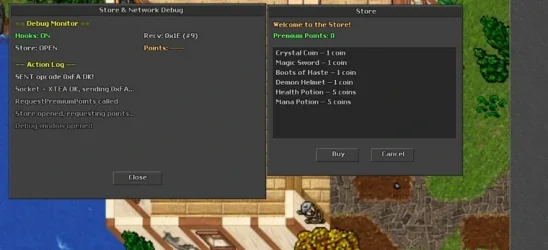
Hey SpiderOT, I’m starting to learn and make DLL hooks for the CIP client, and I’m having some trouble with the original client colors.

I can hook the draw text function and draw my own text/window, but I can’t figure out how to get or reuse the original CIP client colors correctly. For example, in my custom Store/Debug window, the colors are not the same as the original client UI.

Do you know the correct way to pull/use the original RGB colors from the client? Should I use the ColorRed, ColorGreen and ColorBlue parameters passed by the original draw function, or is there another palette/color table used by the client?

I’m trying to understand how the client handles the original UI colors, because I want my DLL drawings to look native, not custom or wrong.

1778847134881.webp
 
I think you're using a different font type
You can get the RGB values by using any eyedropper app or better yet, attach a console to your DLL to use std::cout and print the exact RGB values

The following code is a simple console generated by ChatGPT.
C++:
#include <Windows.h>
#include <iostream>

void CreateConsole()
{
    AllocConsole();

    FILE* f;
    freopen_s(&f, "CONOUT$", "w", stdout);
    freopen_s(&f, "CONIN$", "r", stdin);

    std::cout << "Console created!\n";
}

DWORD WINAPI MainThread(LPVOID)
{
    CreateConsole();

    while (true)
    {
        std::cout << "Hello\n";
        Sleep(1000);
    }

    return 0;
}

BOOL APIENTRY DllMain(HMODULE hModule, DWORD reason, LPVOID)
{
    if (reason == DLL_PROCESS_ATTACH)
    {
        CreateThread(nullptr, 0, MainThread, nullptr, 0, nullptr);
    }

    return TRUE;
}
 
I think you're using a different font type
You can get the RGB values by using any eyedropper app or better yet, attach a console to your DLL to use std::cout and print the exact RGB values

The following code is a simple console generated by ChatGPT.
C++:
#include <Windows.h>
#include <iostream>

void CreateConsole()
{
    AllocConsole();

    FILE* f;
    freopen_s(&f, "CONOUT$", "w", stdout);
    freopen_s(&f, "CONIN$", "r", stdin);

    std::cout << "Console created!\n";
}

DWORD WINAPI MainThread(LPVOID)
{
    CreateConsole();

    while (true)
    {
        std::cout << "Hello\n";
        Sleep(1000);
    }

    return 0;
}

BOOL APIENTRY DllMain(HMODULE hModule, DWORD reason, LPVOID)
{
    if (reason == DLL_PROCESS_ATTACH)
    {
        CreateThread(nullptr, 0, MainThread, nullptr, 0, nullptr);
    }

    return TRUE;
}
Thanks for answering, I really appreciate it.

When I get home I’ll test it with a console and print the RGB values like you suggested.

But I have one question: for example, if I want to hook something like the “Select Outfit” window and draw my own text/UI there, can I do it the same way as your previous example?

Something like:

if (strstr(Text, "Select Outfit") != 0)

and then draw whatever I want near that window/title?

Do you think this approach will work with your previous tip? I’m trying to understand the logic because I want to implement some of my own ideas in the client.

Thanks again for the help.
 
I think it should work
but there is a way to get the current dialog pointer
LUA:
    DialogPtr = 0x67B9F4,
    DialogLeft = 0x14,
    DialogTop = 0x18,
    DialogWidth = 0x1C,
    DialogHeight = 0x20,
    DialogCaption = 0x50,
void Render(int nSurface){
    int* DialogPointer = (int*)DialogPtr;

    if ((int)*DialogPointer != 0)

    {

        int dialog = *DialogPointer;

        char* DialogCaptionStr = (char*)(dialog + DialogCaption);

        int DialogLeftInt   = *(int*)(dialog + DialogLeft);
        int DialogTopInt    = *(int*)(dialog + DialogTop);
        int DialogWidthInt  = *(int*)(dialog + DialogWidth);
        int DialogHeightInt = *(int*)(dialog + DialogHeight);

        if (DialogCaptionStr && std::string(DialogCaptionStr) == "Enter Game")
        {

            //add your stuff here, can add buttons or anything

            Painter::drawSkin(nSurface, DialogLeftInt + 20, DialogTopInt + DialogHeightInt - 20, DialogWidthInt - 20, 2, 142, 0, 3);

            g_dll.m_newButtons->setPosition(DialogLeftInt + 20, DialogTopInt + DialogHeightInt - 20);

        }

    }
}
DialogPtr is the pointer used in HasDialog()
 
Last edited:
Back
Top