• There is NO official Otland's Discord server and NO official Otland's server list. The Otland's Staff does not manage any Discord server or server list. Moderators or administrator of any Discord server or server lists have NO connection to the Otland's Staff. Do not get scammed!
  • 2026 staff recruitment is open! Check it out and consider applying!

Myacc Problem with shop

Otsserwer

New Member
Joined
Aug 12, 2025
Messages
7
Reaction score
0
GitHub
Otsserwer
I have a problem with the Gesior shop. I loaded the Gesior shop plugin, but no shop category appears on the website. I don’t understand what I need to do to make the shop category show up. If anyone knows or knows how to add a new category in general, I would appreciate it, because it doesn’t have to be strictly a shop it can be something like donate/support for the creator. Or simply the possibility to buy Tibia coins, and to be able to purchase items directly from the in-game shop client instead of using the websiteCapture.PNG12.webpCapture.PNGedqeqe.webp

 
Hi,


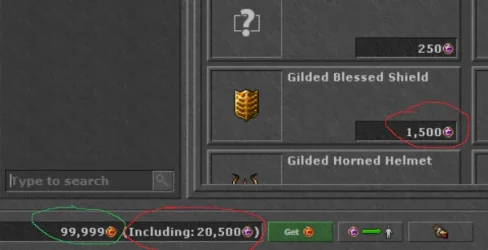
I'm having a problem with my MyAAC online store. When a player buys Tibia Coins, the store adds regular Tibia Coins to the account.
However, my in-game store only accepts Transferable Tibia coins, so players cannot use coins received from the online store.
Is there a way to configure MyAAC so that purchased coins are added as Transferable Tibia Coins instead of regular Tibia Coins?
Alternatively, is there a setting in the game client or server that allows the in-game store to use regular Tibia Coins instead of just Transferable Tibia Coins?
 

Attachments

  • zdjdonapisania.webp
    zdjdonapisania.webp
    19.7 KB · Views: 9 · VirusTotal
Hi,


I'm having a problem with my MyAAC online store. When a player buys Tibia Coins, the store adds regular Tibia Coins to the account.
However, my in-game store only accepts Transferable Tibia coins, so players cannot use coins received from the online store.
Is there a way to configure MyAAC so that purchased coins are added as Transferable Tibia Coins instead of regular Tibia Coins?
Alternatively, is there a setting in the game client or server that allows the in-game store to use regular Tibia Coins instead of just Transferable Tibia Coins?

I suppose you are using the gesior-shop-system plugin, right?

If so, you can set in plugins/gesior-shop-system/config.php the transferable coins as column.

Open it, and set:

Code:
$config['donation_type'] = 'coins_transferable';
 
Thank you , yep I use gesior-shop ,one more question how can I configure MyAAC so that when I add coins through the admin panel, it adds Transferable Tibia Coins instead of regular Tibia Coins?
 

Attachments

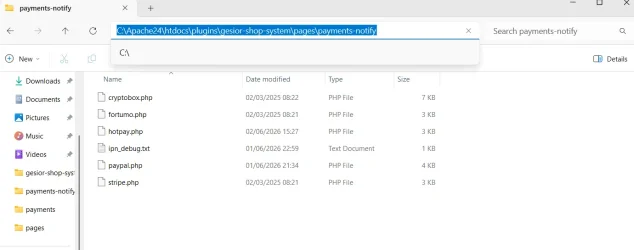
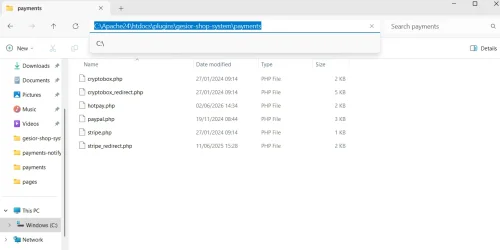
Even ignoring my previous question, how do I correctly set this up so that a callback (for example from HotPay or PayPal) works properly and automatically adds points after a purchase? Maybe I have the files in the wrong folders or the file itself is configured incorrectly
 

Attachments

  • Capture.PNG123321.webp
    Capture.PNG123321.webp
    37 KB · Views: 11 · VirusTotal
  • Capture.PNG1233211.webp
    Capture.PNG1233211.webp
    37.3 KB · Views: 11 · VirusTotal
Last edited:
Even ignoring my previous question, how do I correctly set this up so that a callback (for example from HotPay or PayPal) works properly and automatically adds points after a purchase?
first question i dont rlly know what you mean , but i think slaw can help you in it
in this one open plugins\gesior-shop-system , config.php search for , paypal.com configuration in enabled make it true in email . add your email
hotpay in same file too
 
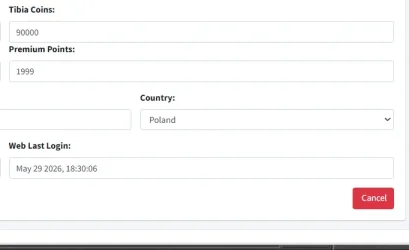
Thank you , yep I use gesior-shop ,one more question how can I configure MyAAC so that when I add coins through the admin panel, it adds Transferable Tibia Coins instead of regular Tibia Coins?

I've added transferable coins to myaac in version v1.8, do you use this version or higher? Also do you have coins_transferable column in accounts table in database?

About payments delivery: normally it works out of the box. For paypal you can check here the solutions: Troubleshooting | MyAAC (https://docs.my-aac.org/troubleshooting#id-1.-gesior-shop-system-paypal-points-are-not-being-delivered-not-coming)

For hotpay, you can open plugins\gesior-shop-system\pages\payments-notify\hotpay.php

And uncomment (remove //) following line:

Code:
//log_append('hotpay-debug.log', json_encode($_POST, JSON_PRETTY_PRINT));

Then you should see errors saved after transaction has been made into system/logs/hotpay-debug.log
 
Earlier I managed to set up HotPay on my own in a slightly different way so that it adds points to the account after a purchase. Tomorrow I’ll try to do the same with PayPal, because today I just don’t have the energy for it anymore ^^
 
Back
Top