
• There is NO official Otland's Discord server and NO official Otland's server list. The Otland's Staff does not manage any Discord server or server list. Moderators or administrator of any Discord server or server lists have NO connection to the Otland's Staff. Do not get scammed!

Windows Console Crash

Dagh

New Member
Joined
Nov 3, 2008
Messages
80
Reaction score
1
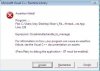
Hello people! I've got this particular problem where my server console crashes with the pop-up of a weird window I've never seen before. I'm guessing is something about my pc, but still don't know. Here's the image:
34277_770654_00.jpg

The 3 buttons say: Nullify | Retry | Skip
Also there is no directory on my pc called user/joey~

Does anyone knows what the truck this is? And mostly how to solve it? ;p
Thanks a lot guys!
 
try this

1.On the Tools menu, click Options.

2.In the Options dialog box, select the Debugging folder.

3.In the Debugging folder, select the Just-In-Time page.

4.In the Enable Just-In-Time debugging of these types of code box, select or clear the relevant program types: Managed, Native, or Script.

To disable Just-In-Time debugging, once it has been enabled, you must be running with Administrator privileges. Enabling Just-In-Time debugging sets a registry key, and Administrator privileges are required to change that key.

5.Click OK.
 
try this

1.On the Tools menu, click Options.

2.In the Options dialog box, select the Debugging folder.

3.In the Debugging folder, select the Just-In-Time page.

4.In the Enable Just-In-Time debugging of these types of code box, select or clear the relevant program types: Managed, Native, or Script.

To disable Just-In-Time debugging, once it has been enabled, you must be running with Administrator privileges. Enabling Just-In-Time debugging sets a registry key, and Administrator privileges are required to change that key.

5.Click OK.

Sorry but, wich Tools menu? lol
 
Back
Top