• There is NO official Otland's Discord server and NO official Otland's server list. The Otland's Staff does not manage any Discord server or server list. Moderators or administrator of any Discord server or server lists have NO connection to the Otland's Staff. Do not get scammed!
  • 2026 staff recruitment is open! Check it out and consider applying!

Linux How can I stress test my OTServer (simulate 300~500 players) and check DDoS protection?

Lukinhah

New Member
Joined
Sep 25, 2017
Messages
16
Reaction score
4
Location
Portugal
Hey everyone,


I’m currently hosting my OTServer on a VPS and I’d like to perform some stress tests to check how the server handles high player counts and network load.


Specifically, I’d like to:


  1. Simulate 300~500 online players to see how the RAM usage and CPU performance behave.
  2. Check the server stability under heavy load (e.g. spells, creatures, movement, etc).
  3. Test my DDoS protection or at least make sure the infrastructure and firewall are properly configured.

I’m not sure what’s the best approach for this.


  • Is there any tool or script that can simulate multiple players connecting to the server?
  • What’s the recommended way to test performance limits safely?
  • And for DDoS, is there any legit way to check if the protection is working without breaking any hosting rules?

Any tips, tools, or best practices to ensure server security and performance would be super helpful.


Thanks in advance!
 
Maybe this can give some sort of player simulation
 
I don't have much experience in testing OTS and its protection. Hovewer I used to test APIs and I would recommend JMeter. That's pretty straight forward tool to simulate even heavy load. If I remember correctly there was TCP sampler to send packets.

I haven't tested it personally but maybe you could prepare some test data (packets) by logging in, walking / spamming spells. Then register it as a test scenario and use multiple threads to run such scenario parallelly.
 
  1. Simulate 300~500 online players to see how the RAM usage and CPU performance behave.
  2. Check the server stability under heavy load (e.g. spells, creatures, movement, etc).

There's no out-of-the-box solution available, afaik. However, you could, write a headless client from scratch in, for example, Python that reads and sends packets and logs in an infinite number of players that do whatever you want, login wherever you want etc (ensure they are immortal, login in random spot on map each relog, and you can spam any spell/text/private message/do whatever in a loop).

Have fun rewriting your whole protocol!

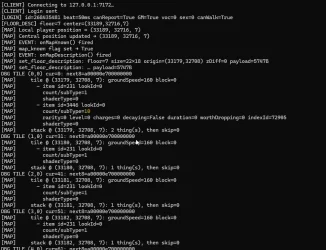
darkrest_gl_KsRiFkP7M8.gif
 
Last edited:
There's no out-of-the-box solution available, afaik. However, you could, write a headless client from scratch in, for example, Python that reads and sends packets and logs in an infinite number of players that do whatever you want, login wherever you want etc (ensure they are immortal, login in random spot on map each relog, and you can spam any spell/text/private message/do whatever in a loop).

Have fun rewriting your whole protocol!

View attachment 95018

There is some starting code for what you said here:
It's quite simple to do that, here is an example with python:

Python:
import asyncio
import socket
import time
import random
import uuid


character_login = <hex bytes (capture yours with wireshark)>
north = bytes.fromhex('0c0042032711b5ec00c8060821a9')
east = bytes.fromhex('0c00f8030912707a939926bcf10e')
south = bytes.fromhex('0c00ce02c70b774a1860399822a1')
west = bytes.fromhex('0c007103701057d9803a324ceb1d')
pong = bytes.fromhex('0c00e803011495dc0cefca223d52')
logout = bytes.fromhex('0c0008050f1ae4a4f6c83ff94f3a')
attack = bytes.fromhex('0c000e058717f0697183fbb5d040')


response = bytearray()

async def tcp_client(host: str, port: int):
    reader, writer = await asyncio.open_connection(host, port)

    sock = writer.get_extra_info('socket')
    if sock is not None:
        sock.setsockopt(socket.IPPROTO_TCP, socket.TCP_NODELAY, 1)

    print(f'Connected to {host}:{port}')
    try :
        pkt_length = await reader.read(2)
        packet_length = int.from_bytes(pkt_length, 'little')
        chunk = await reader.read(packet_length)
        print(packet_length, chunk[:20])

        data = bytes.fromhex(character_login)
        writer.write(data)
        await writer.drain()
        print('Data sent')

        start = time.time()
        last_ping = time.time()

        count = 0
        count_attack = 0
        previous_val = 0
        global response
        response = bytearray()
        response.extend(pkt_length + chunk)
        while True:
            pkt_length = await reader.read(2)
            packet_length = int.from_bytes(pkt_length, 'little')
            chunk = await reader.read(packet_length)
            chunk = pkt_length + chunk
            if not chunk:
                break

            if time.time() - last_ping >= 5:
                last_ping = time.time()
                writer.write(pong)
                print('sending pong')
                await writer.drain()
                await asyncio.sleep(0.1)
                count_attack += 1

            #print(time.time() - start, packet_length, chunk[:20])
#            if count_attack == 4:
#                writer.write(attack)
#                await writer.drain()
            if random.random() > 0.75:
                val = (count + random.randrange(4)) % 4
            else:
                val = previous_val
            previous_val = val
            match val:
                case 0:
                    writer.write(east)
                    await writer.drain()
                case 1:
                    writer.write(south)
                    await writer.drain()
                case 2:
                    writer.write(west)
                    await writer.drain()
                case 3:
                    writer.write(north)
                    await writer.drain()
            await asyncio.sleep(0.1)
            count += 1
            response.extend(chunk)
    except asyncio.CancelledError as e:
        print('exception', e)

    writer.write(logout)
    await writer.drain()

    end = time.time()
    print(f'took {end-start}')

    writer.close()
    await writer.wait_closed()
    print('Connection closed')
    with open(f'{time.time()}_{uuid.uuid4().hex}', 'wb') as f:
        f.write(response)

if __name__ == "__main__":
    client = tcp_client('192.168.1.8', 7172)
    asyncio.run(client)

Just copy the tibia packet part from wireshark.
That script will login to the character and start a random walk around the map.
You can also modify to send the account login by changing the packet and removing the walking part.
It is quite light, each python process consume only around 20mb of ram and it is not CPU heavy.
Remember to copy the encrypted packet.


View attachment 91236
 
There is some starting code for what you said here:
If I had to use this as a base, I'd rather start from scratch. In theory I could share mine, but that would leak whole server/client protocol which is probably not a good idea (+ it wouldn't work for other servers anyway without heavy protocol edits).

Python:
# utils.py
import network_utils as net, crypto_utils as crypt, protocol_constants as op

class ActionMixin:
    def _send_action(self, opcode: int):
        data = bytes([opcode])
        inner = net.u16_to_bytes_le(len(data)) + data
        pad = (-len(inner)) & 7
        inner += b"\xBC" * pad
        enc = crypt.xtea_process_data(inner, self.xtea_key, encrypt=True)
        self.sock.sendall(net.frame_packet(enc, True))

    # 4-way walk
    def walk_north(self):   self._send_action(op.OpCodeClient.OPCODE_CLIENT_WALK_NORTH)
    def walk_east(self):    self._send_action(op.OpCodeClient.OPCODE_CLIENT_WALK_EAST)
    def walk_south(self):   self._send_action(op.OpCodeClient.OPCODE_CLIENT_WALK_SOUTH)
    def walk_west(self):    self._send_action(op.OpCodeClient.OPCODE_CLIENT_WALK_WEST)

    # turning
    def turn_north(self):   self._send_action(op.OpCodeClient.OPCODE_CLIENT_TURN_NORTH)
    def turn_east(self):    self._send_action(op.OpCodeClient.OPCODE_CLIENT_TURN_EAST)
    def turn_south(self):   self._send_action(op.OpCodeClient.OPCODE_CLIENT_TURN_SOUTH)
    def turn_west(self):    self._send_action(op.OpCodeClient.OPCODE_CLIENT_TURN_WEST)

    # diagonals
    def walk_north_east(self):
        self._send_action(op.OpCodeClient.OPCODE_CLIENT_WALK_NORTH_EAST)
    def walk_south_east(self):
        self._send_action(op.OpCodeClient.OPCODE_CLIENT_WALK_SOUTH_EAST)
    def walk_south_west(self):
        self._send_action(op.OpCodeClient.OPCODE_CLIENT_WALK_SOUTH_WEST)
    def walk_north_west(self):
        self._send_action(op.OpCodeClient.OPCODE_CLIENT_WALK_NORTH_WEST)

WindowsTerminal_OfZuKyxO6r.webp
 
If I had to use this as a base, I'd rather start from scratch. In theory I could share mine, but that would leak whole server/client protocol which is probably not a good idea (+ it wouldn't work for other servers anyway without heavy protocol edits).

Python:
# utils.py
import network_utils as net, crypto_utils as crypt, protocol_constants as op

class ActionMixin:
    def _send_action(self, opcode: int):
        data = bytes([opcode])
        inner = net.u16_to_bytes_le(len(data)) + data
        pad = (-len(inner)) & 7
        inner += b"\xBC" * pad
        enc = crypt.xtea_process_data(inner, self.xtea_key, encrypt=True)
        self.sock.sendall(net.frame_packet(enc, True))

    # 4-way walk
    def walk_north(self):   self._send_action(op.OpCodeClient.OPCODE_CLIENT_WALK_NORTH)
    def walk_east(self):    self._send_action(op.OpCodeClient.OPCODE_CLIENT_WALK_EAST)
    def walk_south(self):   self._send_action(op.OpCodeClient.OPCODE_CLIENT_WALK_SOUTH)
    def walk_west(self):    self._send_action(op.OpCodeClient.OPCODE_CLIENT_WALK_WEST)

    # turning
    def turn_north(self):   self._send_action(op.OpCodeClient.OPCODE_CLIENT_TURN_NORTH)
    def turn_east(self):    self._send_action(op.OpCodeClient.OPCODE_CLIENT_TURN_EAST)
    def turn_south(self):   self._send_action(op.OpCodeClient.OPCODE_CLIENT_TURN_SOUTH)
    def turn_west(self):    self._send_action(op.OpCodeClient.OPCODE_CLIENT_TURN_WEST)

    # diagonals
    def walk_north_east(self):
        self._send_action(op.OpCodeClient.OPCODE_CLIENT_WALK_NORTH_EAST)
    def walk_south_east(self):
        self._send_action(op.OpCodeClient.OPCODE_CLIENT_WALK_SOUTH_EAST)
    def walk_south_west(self):
        self._send_action(op.OpCodeClient.OPCODE_CLIENT_WALK_SOUTH_WEST)
    def walk_north_west(self):
        self._send_action(op.OpCodeClient.OPCODE_CLIENT_WALK_NORTH_WEST)

View attachment 95029
The code is ugly but it works and it was meant for the op.
I just pointed out that it is not that hard to hack something to do the load testing.
Congrats on the beautiful code of yours!
 
Back
Top