

Hello, I have this problem witch I have been trying to solve for 5hours without success...
Can't log in to to my OT via internet or locally by:127.0.0.1.
This is my first time trying to open an OT so I have no experience in this.
I can acess my webpage(locally)
I can use phpMyAdmin
I can Start the server without errors or problems (mysql & apache)
I can't log in to the tibia client.
My setup:
Uniform 5.7.5-Nano server.
cryingdamson 0.3.6 (8.60) V3.
Widnet template.
I've followed this guide to set it up: [Tutorial] Uniform Server+ModernACC.
C: \ UniServer \ home \ admin \ www \ phpMyAdmin\config.inc.php :
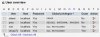
My phpMyAdmin Privileges looks like this:
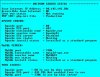
My server status log:
php.ini "Un-semicoloned"
I have value 5 in page access on "accounts"
My Lua Connection & Database looks like this:
Ports Forwarded in Router & Windows firewall: 433, 80, 3306.
However if I check if any of my ports are accessible I get this: "Connection timed out"
So, does anyone have an idea/suggestion of what I should try next?
Can't log in to to my OT via internet or locally by:127.0.0.1.
This is my first time trying to open an OT so I have no experience in this.
I can acess my webpage(locally)
I can use phpMyAdmin
I can Start the server without errors or problems (mysql & apache)
I can't log in to the tibia client.
My setup:
Uniform 5.7.5-Nano server.
cryingdamson 0.3.6 (8.60) V3.
Widnet template.
I've followed this guide to set it up: [Tutorial] Uniform Server+ModernACC.
C: \ UniServer \ home \ admin \ www \ phpMyAdmin\config.inc.php :
PHP:
/* Authentication section */
$cfg['Servers'][$i]['auth_type']       = 'cookie';  // Authentication method (config, http or cookie based)?
$cfg['Servers'][$i]['user']            = 'root';    // MySQL user
$cfg['Servers'][$i]['password']        = $password; // MySQL password (only needed with 'config' auth_type)
$cfg['Servers'][$i]['AllowNoPassword'] = false;     // Must use password

/* Server parameters */
$cfg['Servers'][$i]['verbose']      = 'Uniform Server'; // Verbose name for this host - leave blank to show the hostname
$cfg['Servers'][$i]['host']         = '127.0.0.1';      // MySQL hostname or IP address
$cfg['Servers'][$i]['port']         = $port_ini;        // Port set in ini See above
$cfg['Servers'][$i]['socket']       = '';               // Leave blank for default socket
$cfg['Servers'][$i]['connect_type'] = 'tcp';            // How to connect to MySQL server ('tcp' or 'socket')
$cfg['Servers'][$i]['extension']    = 'mysqli';         // MySQL extension to use ('mysql' or 'mysqli')
$cfg['Servers'][$i]['compress']     = false;            // No compression


/* PMA User advanced features */
$cfg['Servers'][$i]['controluser']    = 'pma';
$cfg['Servers'][$i]['controlpass']    = '********';
My phpMyAdmin Privileges looks like this:
My server status log:
php.ini "Un-semicoloned"
PHP:
extension=php_pdo_mysql.dllI have value 5 in page access on "accounts"
My Lua Connection & Database looks like this:
PHP:
	-- Connection config
	worldId = 0
	ip = "127.0.0.1"
	bindOnlyConfiguredIpAddress = false
	loginPort = 7171
	gamePort = 7172
	adminPort = 7171
	statusPort = 7171
	loginTries = 10
	retryTimeout = 5 * 1000
	loginTimeout = 60 * 1000
	maxPlayers = 1000
	motd = "Welcome to the Forgotten Server 8.60!"
	displayOnOrOffAtCharlist = false
	onePlayerOnlinePerAccount = true
	allowClones = false
	serverName = "Forgotten 8.60"
	loginMessage = "Welcome to the Forgotten Server 8.60!"
	statusTimeout = 5 * 60 * 1000
	replaceKickOnLogin = true
	forceSlowConnectionsToDisconnect = false
	loginOnlyWithLoginServer = false
	premiumPlayerSkipWaitList = false

	-- Database
	-- NOTE: sqlFile is used only by sqlite database, and sqlKeepAlive by mysql database.
	-- To disable sqlKeepAlive such as mysqlReadTimeout use 0 value.
	sqlType = "mysql"
	sqlHost = "localhost"
	sqlPort = 3306
	sqlUser = "otland"
	sqlPass = "****************"
	sqlDatabase = "otland"
	sqlFile = "forgottenserver.s3db"
	sqlKeepAlive = 0
	mysqlReadTimeout = 10
	mysqlWriteTimeout = 10
	encryptionType = "sha1"
Ports Forwarded in Router & Windows firewall: 433, 80, 3306.
However if I check if any of my ports are accessible I get this: "Connection timed out"
So, does anyone have an idea/suggestion of what I should try next?
Last edited: