Sizaro
Advanced OT User
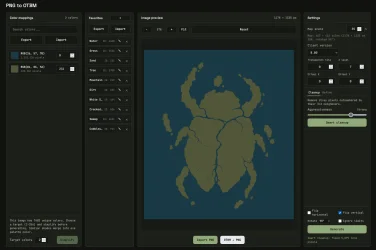
I have created a small browser-based tool that turns a PNG into an OTBM (Open Tibia Binary Map) file. Each distinct color in the image becomes a ground tile using the item ID you assign, handy for sketching map layouts from pixel art or reference images.
Requirements
Quick Start
1. Clone or download the repository.
2. Open index.html in your browser (double-click or use a simple static file server if your browser blocks local file access for some features).
3. Click Import PNG (or drag and drop) and load your image.
4. For each detected color, enter the Tibia item ID that should represent that color on the map.
5. Pick the client version that matches your OTB/dat setup (this sets OTBM/OTB version fields used by editors like RME).
6. Adjust Z level, offset X/Y, and transparent tile ID if needed (0 for transparent usually means “skip”).
7. Click Generate and save the .otbm file when prompted.
You can try the tool without cloning or downloading anything using the Github page.
GitHub - Coldensjo/PNGtoOTBMConverter: A tool that turns a PNG into an OTBM (Open Tibia Binary Map) file. Each color in the image becomes a ground tile using the item ID you assign. handy for sketching map layouts from pixel art. (https://github.com/Coldensjo/PNGtoOTBMConverter)
Requirements
- A modern desktop browser (Chrome, Firefox, Edge, Safari).
- No install, no build step, no backend. Everything runs locally in the page.
Quick Start
1. Clone or download the repository.
2. Open index.html in your browser (double-click or use a simple static file server if your browser blocks local file access for some features).
3. Click Import PNG (or drag and drop) and load your image.
4. For each detected color, enter the Tibia item ID that should represent that color on the map.
5. Pick the client version that matches your OTB/dat setup (this sets OTBM/OTB version fields used by editors like RME).
6. Adjust Z level, offset X/Y, and transparent tile ID if needed (0 for transparent usually means “skip”).
7. Click Generate and save the .otbm file when prompted.
You can try the tool without cloning or downloading anything using the Github page.
GitHub - Coldensjo/PNGtoOTBMConverter: A tool that turns a PNG into an OTBM (Open Tibia Binary Map) file. Each color in the image becomes a ground tile using the item ID you assign. handy for sketching map layouts from pixel art. (https://github.com/Coldensjo/PNGtoOTBMConverter)