
You are using an out of date browser. It may not display this or other websites correctly.
You should upgrade or use an alternative browser.
You should upgrade or use an alternative browser.
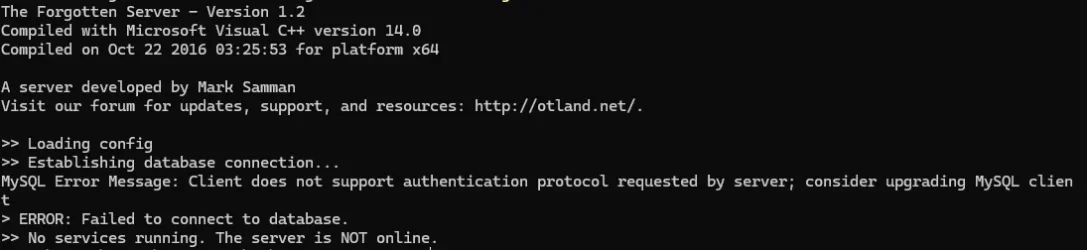
SQL error. client dont suport auth
- Thread starter The Pico
- Start date

Allynn
Well-Known Member
For tfs 1.2, znoteaac 1.6, xampp 7.3 or uniform (you must check some older version then the newest one)
Use older xampp or uniform version, because engine is older and require older tools.
Same with the new tfs's.
Myaac support most tfs versions,
section, here, "what are supported servers ?".
Use older xampp or uniform version, because engine is older and require older tools.
Same with the new tfs's.
Myaac support most tfs versions,
section, here, "what are supported servers ?".

Yes bro, I deleted the entire folder and reinstalled it and I still get the same error, I even deleted the mysql.sql file and put it back and nothing.Did you delete the instalation folder and try to refresh the site?
Also, check the paths if everything is fine, cuz their kinda big
P.S: Wrong section, you should post on support section
Post automatically merged:
It looks like you have problem to run OTS, not to install AAC.
You are trying to run 2012 OTS .exe with 2025 MySQL database. It probably won't work.
Maybe on some old Linux or in Docker it would work, but you probably do not...
Last edited:
or simply runFor tfs 1.2, znoteaac 1.6.
Use older xampp or uniform version, because engine is older and require older tools.
Same with the new tfs's.
Myaac support most tfs versions,
section, here, "what are supported servers ?".
Yes bro, I deleted the entire folder and reinstalled it and I still get the same error, I even deleted the mysql.sql file and put it back and nothing.Did you delete the instalation folder and try to refresh the site?
Also, check the paths if everything is fine, cuz their kinda big
P.S: Wrong section, you should post on support section
Post automatically merged:
It looks like you have problem to run OTS, not to install AAC.
You are trying to run 2012 OTS .exe with 2025 MySQL database. It probably won't work.
Maybe on some old Linux or in Docker it would work, but you probably do not...
ALTER USER 'theforgottenserver'@'localhost' IDENTIFIED WITH mysql_native_password BY '';
FLUSH PRIVILEGES;
?
OP
OP

The Pico
New Member
- Joined
- Oct 8, 2023
- Messages
- 6
- Reaction score
- 2
where did i use this? i'm using windows 11or simply run
ALTER USER 'theforgottenserver'@'localhost' IDENTIFIED WITH mysql_native_password BY '';
FLUSH PRIVILEGES;
?
Allynn
Well-Known Member
where did i use this? i'm using windows 11
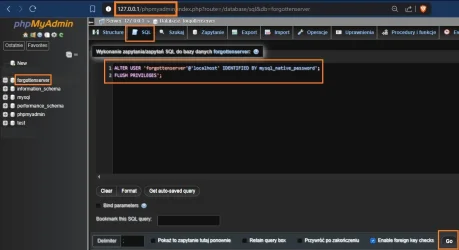
1. Open website: 127.0.0.1/phpmyadmin
2. Click your database, forgottenserver
3. Click SQL
4. Copy this, and paste.
LUA:
ALTER USER 'forgottenserver'@'localhost' IDENTIFIED BY mysql_native_password';
FLUSH PRIVILEGES';If this will not help.
Let me know, i will make this working through anydesk.
Last edited: