• There is NO official Otland's Discord server and NO official Otland's server list. The Otland's Staff does not manage any Discord server or server list. Moderators or administrator of any Discord server or server lists have NO connection to the Otland's Staff. Do not get scammed!
  • 2026 staff recruitment is open! Check it out and consider applying!

Html table.

Faraonekkk

New Member
Joined
Feb 15, 2010
Messages
686
Reaction score
4
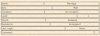
Hi i have a problem
39569754420315487849.jpg

how i can make this table to be right?


<table border="1" width="100%">
<tr>
<td align="left">Name:</td><td align="center">$name</td></table>
</tr>
 
Last edited:
I'm pretty sure he would like to adjust the table so the width is the same on each row.
 
<table border="1" align="right">

content etc

</table>


edit; If you want all the cells the same width

Code:
<!DOCTYPE html PUBLIC "-//W3C//DTD XHTML 1.0 Transitional//EN" "http://www.w3.org/TR/xhtml1/DTD/xhtml1-transitional.dtd">
<html xmlns="http://www.w3.org/1999/xhtml">
<head>
<meta http-equiv="Content-Type" content="text/html; charset=utf-8" />
<title>Untitled Document</title>
<style type="text/css">
table {
	height: 400px;
	width: 400px;
	margin: 0; padding: 0;
	border-collapse: collapse;
}
td { 
	border: 1px solid #CC3;
	border-spacing: 0;
	height: 100px;
	width: 100px;
	margin: 0; padding: 0;
}
</style>
</head>

<body>
<table>
  <tr>
    <td>&nbsp;</td>
    <td>&nbsp;</td>
    <td>&nbsp;</td>
    <td>&nbsp;</td>
  </tr>
  <tr>
    <td>&nbsp;</td>
    <td>&nbsp;</td>
    <td>&nbsp;</td>
    <td>&nbsp;</td>
  </tr>
  <tr>
    <td>&nbsp;</td>
    <td>&nbsp;</td>
    <td>&nbsp;</td>
    <td>&nbsp;</td>
  </tr>
  <tr>
    <td>&nbsp;</td>
    <td>&nbsp;</td>
    <td>&nbsp;</td>
    <td>&nbsp;</td>
  </tr>
</table>
</body>
</html>
 
I think he wants it to be two straight colums so instead of what he has he wants it like so:
2d75x6c.png
 
It looks like you're using a seperate table for each row, which can cause those things.
Code:
<table>
<tr><td>Name</td><td>Blabla</td></tr>
<tr><td>Gender</td><td>Male</td></tr>
</table>
 
Here is example of table in HTML:
XML:
<table class="table table-striped">
  <thead>
    <tr>
      <th>#</th>
      <th>First Name</th>
      <th>Last Name</th>
      <th>Username</th>
    </tr>
  </thead>
  <tbody>
    <tr>
      <td>1</td>
      <td>Mark</td>
      <td>Otto</td>
      <td>@mdo</td>
    </tr>
    <tr>
      <td>2</td>
      <td>Jacob</td>
      <td>Thornton</td>
      <td>@fat</td>
    </tr>
    <tr>
      <td>3</td>
      <td>Larry</td>
      <td>the Bird</td>
      <td>@twitter</td>
    </tr>
  </tbody>
</table>
 
Back
Top