• There is NO official Otland's Discord server and NO official Otland's server list. The Otland's Staff does not manage any Discord server or server list. Moderators or administrator of any Discord server or server lists have NO connection to the Otland's Staff. Do not get scammed!
  • 2026 staff recruitment is open! Check it out and consider applying!

What elese should I do to activate my server?

Progenosis

Member
Joined
Sep 6, 2011
Messages
131
Reaction score
18
I have a few days trying to figure it out what else to do to put my server online, I already opened the ports (7171 and 7172) on TCP and UDP on my modem, anyways when I test on http://www.canyouseeme.org/ if they are opened, the page shows:

Error: I could not see your service on 187.xxx.xx.xx on port (7171)
Reason: Connection timed out

I wonder If I have to do some configuration on my laptop as well in order to put my server online, please I need help
 
Use http://vapus.net/canihost to see if your ports are open (your server must be running when you use the tool), if it says it's closed on portcheck sites, it doesn't always mean it's closed.
Already tried to turn off firewall or add the ports/server in it as exception? If you have an anti-virus program you can also try to turn that off.
 
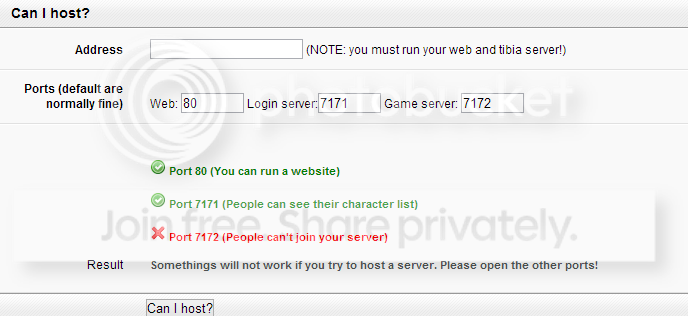
Thanks Limos, I did it and this is what I get:
canihost_zps85c9cb01.png


Something is happening with 7172 port
 
Are you sure you also opened port 7172?
If something is blocking it, it should also block the other ports, unless you only added 80 and 7171 as exception.
 
Thanks Limos, I did it and this is what I get:
canihost_zps85c9cb01.png


Something is happening with 7172 port

Start your computer in bug free mode, nothing will start up automaticly, start only xampp / uniform and tfs and check if 7172 is taken. If not, then you can use a command in CMD to check what program is using the port.
Otherwise you did not open the port correctly.
 
Back
Top