• There is NO official Otland's Discord server and NO official Otland's server list. The Otland's Staff does not manage any Discord server or server list. Moderators or administrator of any Discord server or server lists have NO connection to the Otland's Staff. Do not get scammed!
  • 2026 staff recruitment is open! Check it out and consider applying!

Solved How: player first login on "a" coord without losing his town.

1268995

Member
Joined
Sep 9, 2010
Messages
422
Reaction score
13
Hello guys.

I use gesior and i want that player, on first login, log in on coordenate i want (x, y, z).

BUT i dont want to change the coordenate of my city to this one i said above, because if players die, i dont want
him do spawn on the first coordenate, i want him to spawn on his town temple.

U guys undesrtand what i need?
How can i do thhat?
 
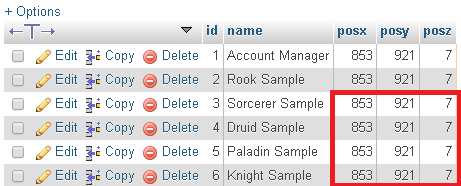
Try to change the start positions in your database:
IMF75UF.png


If that doesn't work you can try and add this to your login script where it checks if it's the players first login:
Code:
if (getPlayerLastLoginSaved(cid) == 0) then
    doTeleportThing(cid, {x=100,y=100,z=7})
end
 
Try to change the start positions in your database:
IMF75UF.png


If that doesn't work you can try and add this to your login script where it checks if it's the players first login:
Code:
if (getPlayerLastLoginSaved(cid) == 0) then
    doTeleportThing(cid, {x=100,y=100,z=7})
end

I really appreciate ur help, but none worked! He still login in for first time in temple..

EDIT: that's weird because new players wear all itens of samples, but the coordenate of samples are not saved by new players...
 
Last edited:
I really appreciate ur help, but none worked! He still login in for first time in temple..

EDIT: that's weird because new players wear all itens of samples, but the coordenate of samples are not saved by new players...

You can add this to your login script then:
Code:
if getPlayerStorageValue(cid, 30002) ~= 1 then
    doTeleportThing(cid, POSITION)
    setPlayerStorageValue(cid, 30002, 1)
end
 
You can add this to your login script then:
Code:
if getPlayerStorageValue(cid, 30002) ~= 1 then
    doTeleportThing(cid, POSITION)
    setPlayerStorageValue(cid, 30002, 1)
end

1) Storage 30002 is the storage of new players?
2) doTeleportThing(cid, POSITION) <- how can i put my postion? like this:
doTeleportThing(cid, {x=100,y=100,z=7}) ?
 
1) Storage 30002 is the storage of new players?
2) doTeleportThing(cid, POSITION) <- how can i put my postion? like this:
doTeleportThing(cid, {x=100,y=100,z=7}) ?

30002 --> Just a random storage value, use any empty storage value that is not being used in another script/quest
POSITION --> replace with your coordinates: {x=1000, y=1000,z=7}
 
Instead of using a new storage you could use the lastlogin function, which is already on the login file :p

@EDIT: Nvm...
 
Last edited:
Back
Top