• There is NO official Otland's Discord server and NO official Otland's server list. The Otland's Staff does not manage any Discord server or server list. Moderators or administrator of any Discord server or server lists have NO connection to the Otland's Staff. Do not get scammed!
  • 2026 staff recruitment is open! Check it out and consider applying!

TFS 1.1 crashes as soon as I start it

mike800

New Member
Joined
Mar 9, 2015
Messages
30
Reaction score
1
I downloaded TFS 1.1 from https://github.com/otland/forgottenserver/releases/tag/v1.1 however when I try to start the .exe it shows me the cmd and then instanly disappears. I can't see any errors because it's gone so quick.
I'm pretty terrible when it comes to this so any help would be greatly appreciated!
I use windows

Edit: SOLVED
If you also have this issue, try opening your forgottenserver.exe through cmd, that's what worked for me.
 
Last edited:
Do you have a Uniserver? There could be a lot of reasons, without the error window, it's not easy to tell. Maybe try screenshotting it, or taking a video
 
You can make a batch file so you can force to create a log file instead of showing the text on the console window.
 
Sorry, I went to sleep last night, just got back from work.
@XxDeathAvenger Yeah I use uniserver, tried with xampp too but the same thing happens. I could even not have either of them active and it still happens. Tried screenshotting, but it's impossible to catch it, I think the same will happen with video
@silveralol I use 32 bits
@Colors How do I go about doing that?
 
In most cases you can keep retrying until you get a screenshot of the very last output; it takes patience and skill.
Alternately, you can just tell us the last thing in the console you see before it crashes.

Yes, it's not the most technical way to diagnose it, but it's a start; it's a dependable start.
Red
 
NCkrt9S.jpg

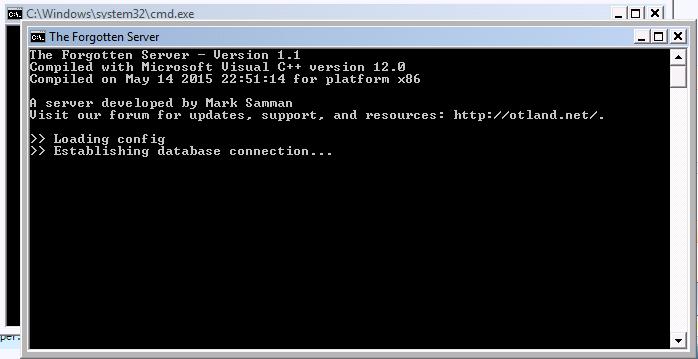
this is the best i can capture, even if I see the black box inside and capture the image, it doesn't show up, tried several times. I can't figure out what it says, most of the time its just this.
 
Done, but it doesn't do anything, or I'm not doing it right. I started tfs.exe but it does the same
thing
edit: woops im stupid, hold on
edit 2:
qtPl5Lb.jpg

this is where it closes, I suppose I should start uniserver now?
 
You on 1.1? Cause I had the same problem and can't exactly remember what I did, but I know it wasn't nothing too hard lol. I swear it's something to do with importing db / PHP, but I will check and see if I can find out.
 
I managed to not make the cmd instanly close by opening tfs.exe through cmd. update soon
update:
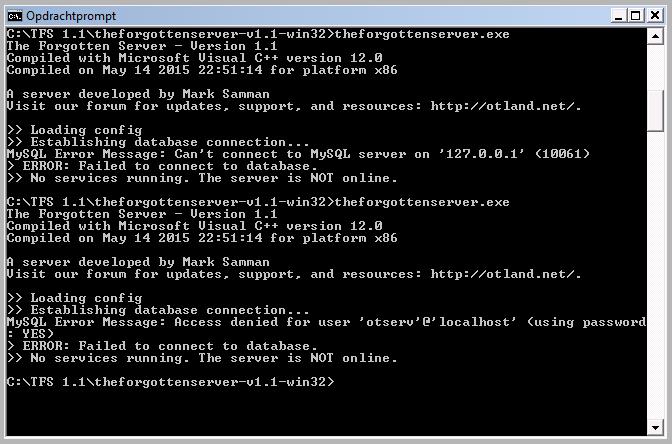
XUSVmIY.jpg

so why does it deny access?
edit again: apparently i used the wrong password, i can get it to start now
 
Last edited:
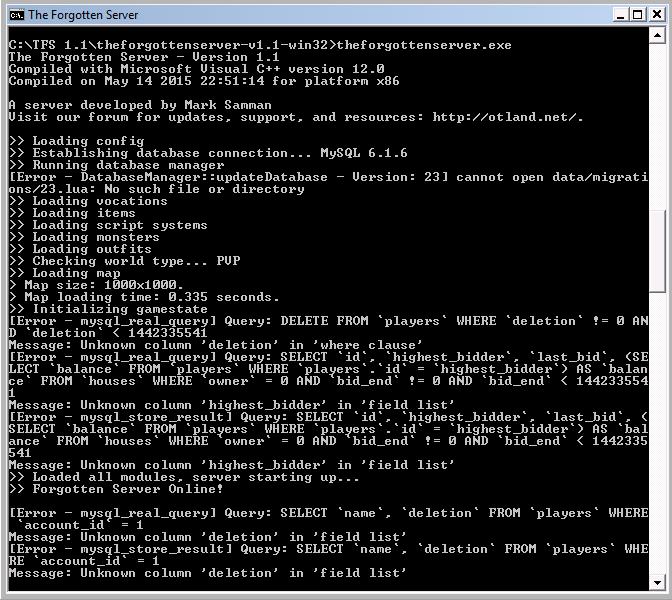
Alright, so this is what I'm getting now. Atleast the server is online though.
eZTQ3r8.jpg

I suppose I'll watch znote's video again, because I feel I should setup the database again, I'm using the one I used for tfs 0.36
 
Back
Top