• There is NO official Otland's Discord server and NO official Otland's server list. The Otland's Staff does not manage any Discord server or server list. Moderators or administrator of any Discord server or server lists have NO connection to the Otland's Staff. Do not get scammed!
  • 2026 staff recruitment is open! Check it out and consider applying!

Hair/Beard - Outfit

Helliot1

Owner of Empire Online
Joined
Jul 26, 2017
Messages
315
Solutions
1
Reaction score
60
Hello!!

To start, I don't know so much programming, and I need an urgent help, in my server besides having the normal Outfit, you have Hair and Beard that can add as an optional, but you can change the color of them. And as I use Otclient, you can make these changes, I just don't have so much knowledge on it, I tried to modify but I couldn't.

It's like that:
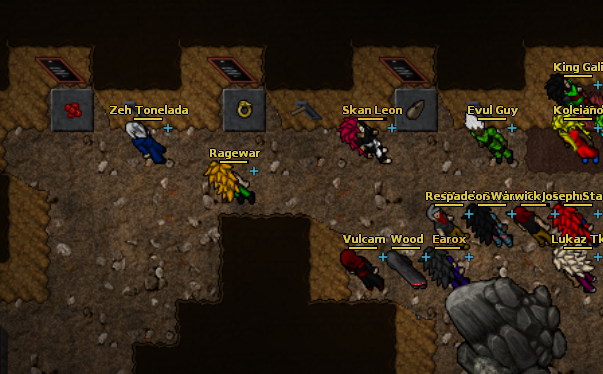
0c6c2ab2960b665aac11d24796ddcca9.png


Can anyone help me with this? I'll be very grateful!!
 
I can help you, but I need you to explain exactly what's your problem. I mean, you want to allow the players to modify the beard/hair, or what?
 
I can help you, but I need you to explain exactly what's your problem. I mean, you want to allow the players to modify the beard/hair, or what?

As in the picture above, you have your normal clothes, which is a looktype, and you have hair, which is a looktype2, and the beard which is a looktype3,

The I need to create a New looktype, like a looktype2, looktype3..

To count with the normal looktype, And change the OtClient
 
If you want to add beard and hair to your outfits, you don't need to add any kind of new looktypes but using the addons.

You can add addons to your outfits using ObjectBuilder. To do this, you will need the beard/hair sprites. Also, you should enable it in outfits.xml, assuming you're using tfs 0.3.x or 0.4.
 
If you want to add beard and hair to your outfits, you don't need to add any kind of new looktypes but using the addons.

You can add addons to your outfits using ObjectBuilder. To do this, you will need the beard/hair sprites. Also, you should enable it in outfits.xml, assuming you're using tfs 0.3.x or 0.4.

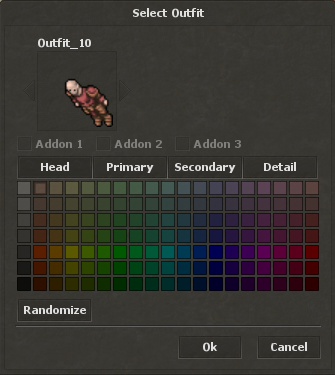
Yea, But I need change the hair/beard color, and when you choice the addons, you don't have the option for chance colors :(

and I already have the hair/beard sprites, almost 20 sprites, and in client have only 2 addons..
 
Last edited:
what he wants is to even be Addon 1 and 2 for the hair but he also wants colour change for those addons as an additional 2 bars to head primary secondary and details so that they are Not connected to nor but instead have unique choice for themselves.
 
Well, that would need client edits, maybe in sources. Can't help you with these changes, but I can suggest you a different way to do this.

You can use Head, Primary, Secondary and Detail to define the color only for the addons, so it'd seem that they are not connected with the color the player is using without addons. Addons usually use colors too, so you have to delete only the color for the outfit parts.

The image of the first post shows lots of outfits and not even one of them has more than 4 colors, so I guess they're using a system very similar to what I've said.
 
or copy Head and Primary (so essentialy you can call them A1 Colour A2 Colour for addon 1 addon 2)after Detail assign them to another numbers after these ( if they have any) then look at how they are linked to colours inside of the client (head is yellow? primary be red then green blue so you will need to create unique colour (any OFFSET of colour you like just dont use FFFFFF or 00000 because white and black are usually used in for hair or outline of character but lets say some kind of light blue and assign that to the hair and then lets say light red to beard and connect them the same way they are in client to head and primary to the head and body) its really just a lot of doing inside of the client rather than anything of the engine just expand the outfit system inside of OTC

// if you find it too hard to do or cant pay somebody to do it simple thing is to create a command and each of those hairs and beard with those colours ( which imo needs a lot of painting but then you can allow them to change addon assigned to outfit (which is different type of hair /beard to addon1 /addon 2 which gives you even more possibilities then ( Or look at how tibia 6.4 outfit system works that shit would be cool!)
 
or copy Head and Primary (so essentialy you can call them A1 Colour A2 Colour for addon 1 addon 2)after Detail assign them to another numbers after these ( if they have any) then look at how they are linked to colours inside of the client (head is yellow? primary be red then green blue so you will need to create unique colour (any OFFSET of colour you like just dont use FFFFFF or 00000 because white and black are usually used in for hair or outline of character but lets say some kind of light blue and assign that to the hair and then lets say light red to beard and connect them the same way they are in client to head and primary to the head and body) its really just a lot of doing inside of the client rather than anything of the engine just expand the outfit system inside of OTC

// if you find it too hard to do or cant pay somebody to do it simple thing is to create a command and each of those hairs and beard with those colours ( which imo needs a lot of painting but then you can allow them to change addon assigned to outfit (which is different type of hair /beard to addon1 /addon 2 which gives you even more possibilities then ( Or look at how tibia 6.4 outfit system works that shit would be cool!)

Thanks Wirless!! I don't have so knowledge on it, But I'll try, and comeback here to say the result

or copy Head and Primary (so essentialy you can call them A1 Colour A2 Colour for addon 1 addon 2)after Detail assign them to another numbers after these ( if they have any) then look at how they are linked to colours inside of the client (head is yellow? primary be red then green blue so you will need to create unique colour (any OFFSET of colour you like just dont use FFFFFF or 00000 because white and black are usually used in for hair or outline of character but lets say some kind of light blue and assign that to the hair and then lets say light red to beard and connect them the same way they are in client to head and primary to the head and body) its really just a lot of doing inside of the client rather than anything of the engine just expand the outfit system inside of OTC

// if you find it too hard to do or cant pay somebody to do it simple thing is to create a command and each of those hairs and beard with those colours ( which imo needs a lot of painting but then you can allow them to change addon assigned to outfit (which is different type of hair /beard to addon1 /addon 2 which gives you even more possibilities then ( Or look at how tibia 6.4 outfit system works that shit would be cool!)

After a time working on my project, I decided to back this part and complete them.
I changed somethings in my client source. But I don't know if I'm in the right way. If you could help me, I'l be so grateful bro.

In creature.cpp I changed this:
C++:
            if(getLayers() > 1) {
                Color oldColor = g_painter->getColor();
                Painter::CompositionMode oldComposition = g_painter->getCompositionMode();
                g_painter->setCompositionMode(Painter::CompositionMode_Multiply);
                g_painter->setColor(m_outfit.getHairColor());
                datType->draw(dest, scaleFactor, SpriteMaskCyan, xPattern, yPattern, zPattern, animationPhase);
                g_painter->setColor(m_outfit.getBeardColor());
                datType->draw(dest, scaleFactor, SpriteMaskPurple, xPattern, yPattern, zPattern, animationPhase);
                g_painter->setColor(m_outfit.getHeadColor());
                datType->draw(dest, scaleFactor, SpriteMaskYellow, xPattern, yPattern, zPattern, animationPhase);
                g_painter->setColor(m_outfit.getBodyColor());
                datType->draw(dest, scaleFactor, SpriteMaskRed, xPattern, yPattern, zPattern, animationPhase);
                g_painter->setColor(m_outfit.getLegsColor());
                datType->draw(dest, scaleFactor, SpriteMaskGreen, xPattern, yPattern, zPattern, animationPhase);
                g_painter->setColor(m_outfit.getFeetColor());
                datType->draw(dest, scaleFactor, SpriteMaskBlue, xPattern, yPattern, zPattern, animationPhase);
                g_painter->setColor(oldColor);
                g_painter->setCompositionMode(oldComposition);
            }

Outfit.h
C++:
class Outfit
{
    enum {
        HSI_SI_VALUES = 7,
        HSI_H_STEPS = 19
    };

public:
    Outfit();

    static Color getColor(int color);

    void setId(int id) { m_id = id; }
    void setAuxId(int id) { m_auxId = id; }
    void setHair(int hair) { m_hair = hair; m_hairColor = getColor(hair); }
    void setBeard(int beard) { m_beard = beard; m_beardColor = getColor(beard); }
    void setHead(int head) { m_head = head; m_headColor = getColor(head); }
    void setBody(int body) { m_body = body; m_bodyColor = getColor(body); }
    void setLegs(int legs) { m_legs = legs; m_legsColor = getColor(legs); }
    void setFeet(int feet) { m_feet = feet; m_feetColor = getColor(feet); }
    void setAddons(int addons) { m_addons = addons; }
    void setMount(int mount) { m_mount = mount; }
    void setCategory(ThingCategory category) { m_category = category; }

    void resetClothes();

    int getId() const { return m_id; }
    int getAuxId() const { return m_auxId; }
    int getHair() const { return m_hair; }
    int getBeard() const { return m_beard; }
    int getHead() const { return m_head; }
    int getBody() const { return m_body; }
    int getLegs() const { return m_legs; }
    int getFeet() const { return m_feet; }
    int getAddons() const { return m_addons; }
    int getMount() const { return m_mount; }
    ThingCategory getCategory() const { return m_category; }

    Color getHairColor() const { return m_hairColor; }
    Color getBeardColor() const { return m_beardColor; }
    Color getHeadColor() const { return m_headColor; }
    Color getBodyColor() const { return m_bodyColor; }
    Color getLegsColor() const { return m_legsColor; }
    Color getFeetColor() const { return m_feetColor; }

private:
    ThingCategory m_category;
    int m_id, m_auxId, m_hair, m_beard, m_head, m_body, m_legs, m_feet, m_addons, m_mount;
    Color m_hairColor, m_beardColor, m_headColor, m_bodyColor, m_legsColor, m_feetColor;
};

#endif

Thingtype.h
C++:
enum SpriteMask {
    SpriteMaskRed = 1,
    SpriteMaskGreen,
    SpriteMaskBlue,
    SpriteMaskYellow,
    SpriteMaskCyan,
    SpriteMaskPurple
};

I'm in the right way ? Because, I'm a little confused.
I create a "layer" for Hair and Beard, give colors, cyan and purple.
 
Last edited by a moderator:
seems like you are editing the right way now either way you can either put beards etc on proper offset where player should have them or create centered sprites and add grid so that they are moved onto player face ( first way i said will probably be easier and you already have it done that way.)
 
Back
Top