CyberShaman21
New Member
- Joined
- Dec 9, 2017
- Messages
- 52
- Reaction score
- 4
Hi
I want remove this :
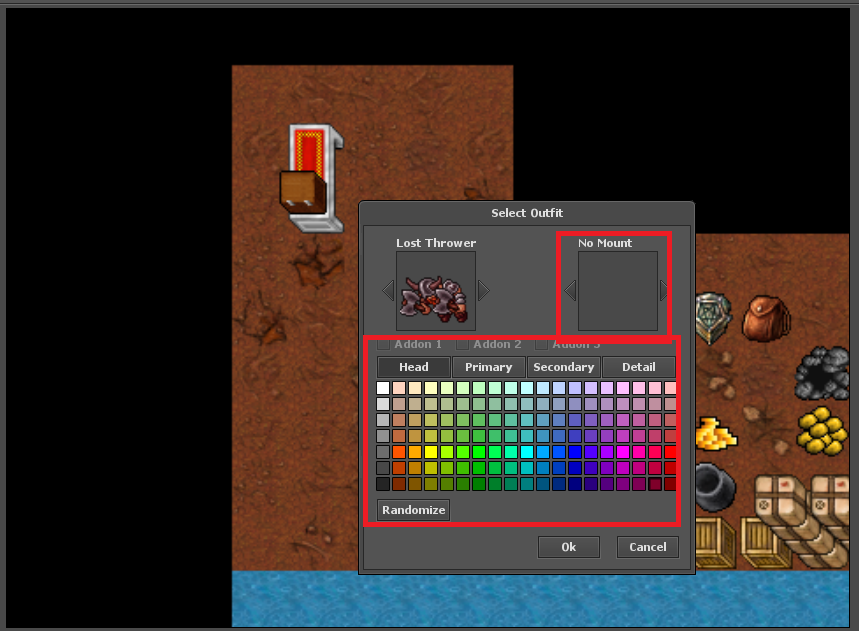
wher it is in otclient?
I want remove this :
wher it is in otclient?



NextOutfitButton < NextButton
PrevOutfitButton < PreviousButton

MainWindow
  !text: tr('Select Outfit')
  size: 338 375

  @onEnter: modules.game_outfit.accept()
  @onEscape: modules.game_outfit.destroy()

  // Creature Boxes
  Creature
    id: outfitCreatureBox
    anchors.top: parent.top
    anchors.left: parent.left
    margin-top: 15
    margin-left: 22
    padding: 4 4 4 4
    fixed-creature-size: true

  Label
    id: outfitName
    !text: tr('No Outfit')
    width: 115
    anchors.bottom: prev.top
    anchors.left: prev.left
    margin-bottom: 2

  NextOutfitButton
    id: outfitNextButton
    anchors.left: outfitCreatureBox.right
    anchors.verticalCenter: outfitCreatureBox.verticalCenter
    margin-left: 3
    enabled: true
    @onClick: modules.game_outfit.nextOutfitType()

  PrevOutfitButton
    id: outfitPrevButton
    anchors.right: outfitCreatureBox.left
    anchors.verticalCenter: outfitCreatureBox.verticalCenter
    margin-right: 3
    enabled: true
    @onClick: modules.game_outfit.previousOutfitType()

  Button
    id: outfitOkButton
    !text: tr('Ok')
    width: 64
    anchors.right: next.left
    anchors.bottom: parent.bottom
    margin-right: 16
    @onClick: modules.game_outfit.accept()

  Button
    id: outfitCancelButton
    !text: tr('Cancel')
    width: 64
    anchors.right: parent.right
    anchors.bottom: parent.bottom
    @onClick: modules.game_outfit.destroy()
my code looks like:
Code:NextOutfitButton < NextButton PrevOutfitButton < PreviousButton MainWindow !text: tr('Select Outfit') size: 338 375 @onEnter: modules.game_outfit.accept() @onEscape: modules.game_outfit.destroy() // Creature Boxes Creature id: outfitCreatureBox anchors.top: parent.top anchors.left: parent.left margin-top: 15 margin-left: 22 padding: 4 4 4 4 fixed-creature-size: true Label id: outfitName !text: tr('No Outfit') width: 115 anchors.bottom: prev.top anchors.left: prev.left margin-bottom: 2 NextOutfitButton id: outfitNextButton anchors.left: outfitCreatureBox.right anchors.verticalCenter: outfitCreatureBox.verticalCenter margin-left: 3 enabled: true @onClick: modules.game_outfit.nextOutfitType() PrevOutfitButton id: outfitPrevButton anchors.right: outfitCreatureBox.left anchors.verticalCenter: outfitCreatureBox.verticalCenter margin-right: 3 enabled: true @onClick: modules.game_outfit.previousOutfitType() Button id: outfitOkButton !text: tr('Ok') width: 64 anchors.right: next.left anchors.bottom: parent.bottom margin-right: 16 @onClick: modules.game_outfit.accept() Button id: outfitCancelButton !text: tr('Cancel') width: 64 anchors.right: parent.right anchors.bottom: parent.bottom @onClick: modules.game_outfit.destroy()
i dont touch lua. i think otmod is enought but i have problem ./ small bug
when i log in to game and want change outfit, outfits dont change. i must close window with outfits and open again and its working
how to fix this,
You need to touch lua, the code tries to parse the colors and can't, you got no terminal errors?
Np. I suggest you mark one of the answers that helped you as Best Answer so that others who are searching for a solution to a similar problem may know that this was solved.i fix problem. i just remove line with addons. thx for help