• There is NO official Otland's Discord server and NO official Otland's server list. The Otland's Staff does not manage any Discord server or server list. Moderators or administrator of any Discord server or server lists have NO connection to the Otland's Staff. Do not get scammed!
  • 2026 staff recruitment is open! Check it out and consider applying!

Lua action item ground

Sigoles

Discord: @sigoles
Joined
Nov 20, 2015
Messages
1,209
Solutions
2
Reaction score
154
LUA:
local data = {}

function onUse(cid, item, fromPosition, target, toPosition, isHotkey)

    local player = Player(cid)
   
  
    local bucket = player:getItemById(2005, true, 0)
    if bucket == nil then
        return fromPosition:sendMagicEffect(3)       
    end

    if not data[player:getId()] then
        data[player:getId()] = 0
    end

    data[player:getId()] = data[player:getId()] + 1
    if data[player:getId()] > 10 then
        bucket:transform(22388)
        data[player:getId()] = 0
    end

    player:sendTextMessage(MESSAGE_EVENT_ADVANCE, "You fill some of the fine chalk into a bucket.")
    item:transform(22470)
    item:decay()
    return true
end
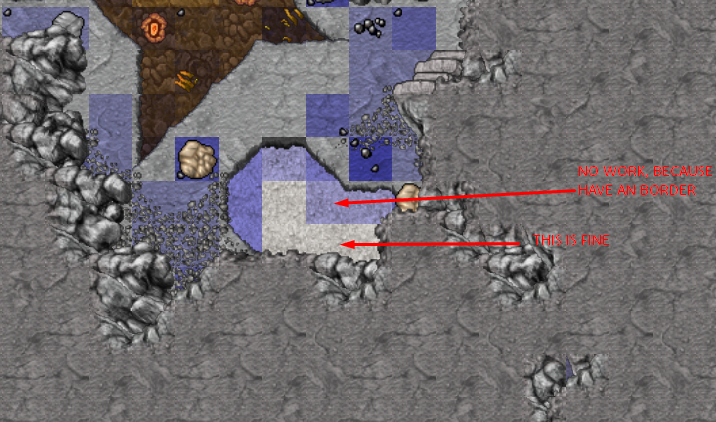
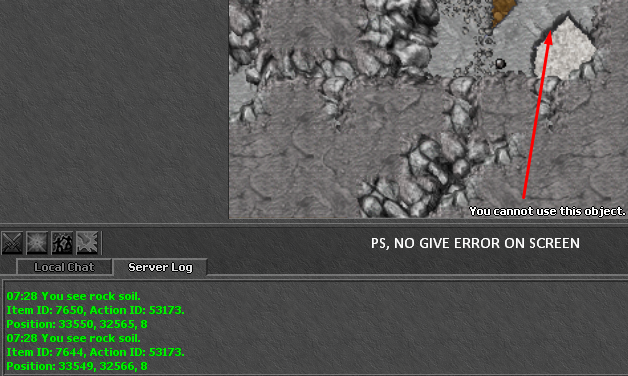
this script is for when player use the ground, transform one item on his backpack, the problem is:
KNTZqYF.png


how to fix it? allow it to work even if it has a border above

tfs 1.2
 
Solution
This may be happening because:
1 - The script return false, which indicates that the use can't be completed
or
2 - The item is not marked as useable in the items.otb(Using a ItemEditor). This is to prevent of calling all the script side of event use for a item that should really never be used or that don't make sense on calling the event. As is the case.

Make sure that the script is being executed by putting a print on it. If not, then you will need to mark item as useable on the items.otb to be able to call a script event on it.
Seems that you are using onUse in the ground item. It's best to use based on bucket, and when using bucket on the ground. So you just need to check if the Tile in that position contains the ground item that you want.

LUA:
local data = {}

function onUse(cid, item, fromPosition, target, toPosition, isHotkey)
    local tile = Tile(toPosition)
    if tile then
        local chalk = tile:getItemById(GroundItemID)
        if chalk then
            data[player:getId()] = (data[player:getId] or 0) + 1
            if data[player:getId()] > 10 then
                item:transform(22388)
                data[player:getId()] = nil
            end

            player:sendTextMessage(MESSAGE_EVENT_ADVANCE, "You fill some of the fine chalk into a bucket.")
            chalk:transform(22470)
            chalk:decay()
            return true
        end
    end

    fromPosition:sendMagicEffect(CONST_ME_POFF)
    return false
end
 
Seems that you are using onUse in the ground item. It's best to use based on bucket, and when using bucket on the ground. So you just need to check if the Tile in that position contains the ground item that you want.

LUA:
local data = {}

function onUse(cid, item, fromPosition, target, toPosition, isHotkey)
    local tile = Tile(toPosition)
    if tile then
        local chalk = tile:getItemById(GroundItemID)
        if chalk then
            data[player:getId()] = (data[player:getId] or 0) + 1
            if data[player:getId()] > 10 then
                item:transform(22388)
                data[player:getId()] = nil
            end

            player:sendTextMessage(MESSAGE_EVENT_ADVANCE, "You fill some of the fine chalk into a bucket.")
            chalk:transform(22470)
            chalk:decay()
            return true
        end
    end

    fromPosition:sendMagicEffect(CONST_ME_POFF)
    return false
end

thanks.
when we click on border dont work the action because the ground item is 22459 o/

action.xml
LUA:
<action itemid="22459" script="roshamuul/chalk.lua" />
 
Yes. Because of this I say to use based on the bucket. So the script is for the bucket, and not for the ground. This way you can easily get the item that you should interact on the tile and manipulate it. This script that I posted is the already done script for the bucket. Try it
 
Yes. Because of this I say to use based on the bucket. So the script is for the bucket, and not for the ground. This way you can easily get the item that you should interact on the tile and manipulate it. This script that I posted is the already done script for the bucket. Try it

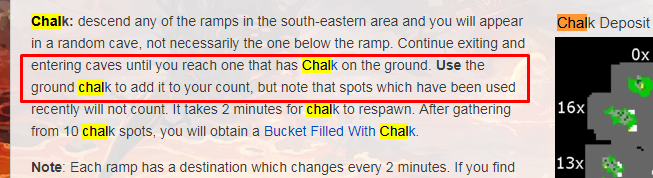
thats the problem, correctly is use the ground like tibia global :S
tt7D79p.png
 
Well. So the best should be to use an ActionId instead. And put it on borders, and in the chalk tiles. When player use the items with the action id it will be just like using the chalks. See the logic:
Player Click item with ActionID
Check if exists the chalk in the tile of the item position
If yes proceed as it should
Make the chalk decay

This way will the actionId will be only a shortcut to check and use a chalk on the position it is located. And after transform to another id will not have another chalk there until it decay to the right id. Undestand?
 
Well. So the best should be to use an ActionId instead. And put it on borders, and in the chalk tiles. When player use the items with the action id it will be just like using the chalks. See the logic:
Player Click item with ActionID
Check if exists the chalk in the tile of the item position
If yes proceed as it should
Make the chalk decay

This way will the actionId will be only a shortcut to check and use a chalk on the position it is located. And after transform to another id will not have another chalk there until it decay to the right id. Undestand?


yes, like this then?:
LUA:
local tile = Tile(toPosition)
    if tile then
    local chalk = tile:getItemById(22459)
        if chalk then
            if getPlayerItemCount(cid, 2005) >= 1 then       
                bucket:transform(22388)
                chalk:transform(22470)
                chalk:decay()
                player:sendTextMessage(MESSAGE_EVENT_ADVANCE, "You fill some of the fine chalk into a bucket.")               
                else return fromPosition:sendMagicEffect(3)       
            end
        end
    end
 
Yes. Than you link the action id with the script. I made your first script as example:

LUA:
local data = {}
function onUse(cid, item, fromPosition, target, toPosition, isHotkey)
    local player = Player(cid)

    local bucket = player:getItemById(2005, true, 0)
    if bucket == nil then
        return fromPosition:sendMagicEffect(3)     
    end
    local chalk = Tile(fromPosition):getItemById(22459)
    if chalk == nil then
        return fromPosition:sendMagicEffect(3)  
    end

    if not data[player:getId()] then
        data[player:getId()] = 0
    end
    data[player:getId()] = data[player:getId()] + 1
    if data[player:getId()] > 10 then
        bucket:transform(22388)
        data[player:getId()] = 0
    end
    player:sendTextMessage(MESSAGE_EVENT_ADVANCE, "You fill some of the fine chalk into a bucket.")
    chalk:transform(22470)
    chalk:decay()
    return true
end
 
Yes. Than you link the action id with the script. I made your first script as example:

LUA:
local data = {}
function onUse(cid, item, fromPosition, target, toPosition, isHotkey)
    local player = Player(cid)

    local bucket = player:getItemById(2005, true, 0)
    if bucket == nil then
        return fromPosition:sendMagicEffect(3)    
    end
    local chalk = Tile(fromPosition):getItemById(22459)
    if chalk == nil then
        return fromPosition:sendMagicEffect(3) 
    end

    if not data[player:getId()] then
        data[player:getId()] = 0
    end
    data[player:getId()] = data[player:getId()] + 1
    if data[player:getId()] > 10 then
        bucket:transform(22388)
        data[player:getId()] = 0
    end
    player:sendTextMessage(MESSAGE_EVENT_ADVANCE, "You fill some of the fine chalk into a bucket.")
    chalk:transform(22470)
    chalk:decay()
    return true
end
yBJg4pQ.png
 
This may be happening because:
1 - The script return false, which indicates that the use can't be completed
or
2 - The item is not marked as useable in the items.otb(Using a ItemEditor). This is to prevent of calling all the script side of event use for a item that should really never be used or that don't make sense on calling the event. As is the case.

Make sure that the script is being executed by putting a print on it. If not, then you will need to mark item as useable on the items.otb to be able to call a script event on it.
 
Last edited:
Solution
Back
Top