• There is NO official Otland's Discord server and NO official Otland's server list. The Otland's Staff does not manage any Discord server or server list. Moderators or administrator of any Discord server or server lists have NO connection to the Otland's Staff. Do not get scammed!
  • 2026 staff recruitment is open! Check it out and consider applying!

PHP/MyACC Is not loading picture

Lopaskurwa

Well-Known Member
Joined
Oct 6, 2017
Messages
936
Solutions
2
Reaction score
57
Hello
i'm having problem to show image when server is offline it just not showing. I tried to find some information in google, but it was one big failure all possible code ways gave me the same problem
PHP:
        if($status['online']){
        echo 'Players On-Line:<br>
        <a href="' . getLink('online') . '" title="Players Online"><b>'.$status['players'] . '/' . $status['playersMax'].'</b></a>
        <br>Uptime:<br>
        <b>'.$status['uptimeReadable'].'</b><br>';
        }else{
        echo "<img src="."images/others/offline.png". $row['image'] . " />";
        }
Result:
Untitled.png


Btw, yes i navigate picture correctly
 
Assuming the "offline" image path is correct, you could try this. Open the console of your browser and check for any resources that are failing to load.

PHP:
if($status['online']){
    echo "
        Players On-Line:<br>
        <a href=\"{getLink('online')}\" title=\"Players Online\">
            <b>{$status['players']}/{$status['playersMax']}</b>
        </a>
        <br/>Uptime:<br/>
        <b>{$status['uptimeReadable']}</b>
    ";
} else {
    echo "<img src=\"images/others/offline.png\" />";
}
 
Assuming the "offline" image path is correct, you could try this. Open the console of your browser and check for any resources that are failing to load.

PHP:
if($status['online']){
    echo "
        Players On-Line:<br>
        <a href=\"{getLink('online')}\" title=\"Players Online\">
            <b>{$status['players']}/{$status['playersMax']}</b>
        </a>
        <br/>Uptime:<br/>
        <b>{$status['uptimeReadable']}</b>
    ";
} else {
    echo "<img src=\"images/others/offline.png\" />";
}
Failed to load resource: the server responded with a status of 404 (Not Found)
offline.png:1 Failed to load resource: the server responded with a status of 404 (Not Found)
layout.css:1 Failed to load resource: the server responded with a status of 404 (Not Found)
bg01.jpg:1 Failed to load resource: the server responded with a status of 404 (Not Found)
bg08.jpg:1 Failed to load resource: the server responded with a status of 404 (Not Found)
bg07.jpg:1 Failed to load resource: the server responded with a status of 404 (Not Found)
bg06.jpg:1 Failed to load resource: the server responded with a status of 404 (Not Found)
bg05.jpg:1 Failed to load resource: the server responded with a status of 404 (Not Found)
bg04.jpg:1 Failed to load resource: the server responded with a status of 404 (Not Found)
/templates/loleslav/images/others/favicon.ico:1 Failed to load resource: the server responded with a status of 404 (Not Found)
layout.css:1 Failed to load resource: the server responded with a status of 404 (Not Found)
 
You might want to prefix the images folder with a slash, so it'll read from the root directory.
If it's not there, you should figure out where it actually is since I don't know the structure of your project.
 
You might want to prefix the images folder with a slash, so it'll read from the root directory.
If it's not there, you should figure out where it actually is since I don't know the structure of your project.
What do you mean?
You can see the website structure here slawkens/myaac-loleslav-template
by going templates/loleslav/
 
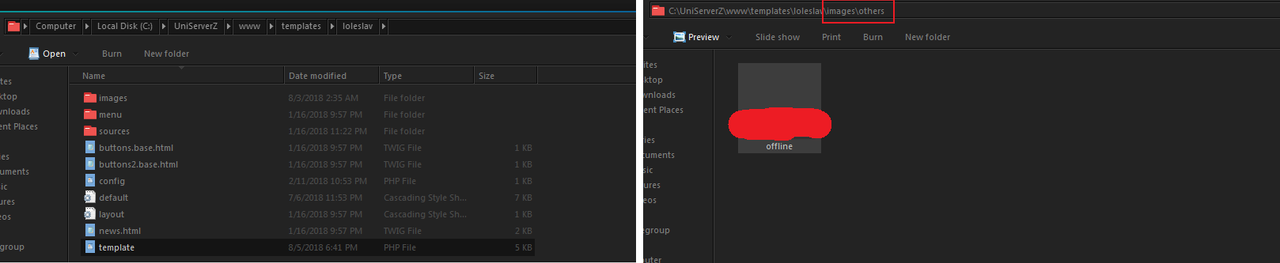
Yea i know that there is no offline,png because its not a default picture but in my template i added, so basically i just showed the structure of the website.
 
Yea i know that there is no offline,png because its not a default picture but in my template i added, so basically i just showed the structure of the website.
If you did everything I said, the image would be shown. You're doing something wrong. Check the path of the image (from the root directory) and correct it.
 
Back
Top