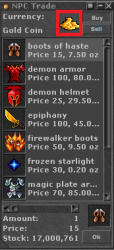
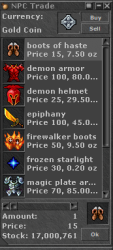
Someone could help me with some solution to this problem of mine, I found an npc here on the forum that I can buy the items through other items without using the 'gold coin', but in the image is showing the gold coin, I would have to change it to the new currency appear?
View attachment 49636View attachment 49637
Hello! Is it possible to make a NPC sell items for other items instead of gold? Change gold value i guess you can call it... For example: I want to sell golden boots for 15 christmas tokens and get the trade window as in a normal NPC seller. rep++ for help

otland.net
@darkmu inside your data/lib/core you will find player.lua here you will find
LUA:
local type_crystal = ItemType(ITEM_CRYSTAL_COIN)
    local crystalCoins = math.floor(amount / 10000)
    if crystalCoins > 0 then
        amount = amount - (crystalCoins * 10000)
        while crystalCoins > 0 do
            local count = math.min(100, crystalCoins)
            totalWeight = totalWeight + type_crystal:getWeight(count)
            crystalCoins = crystalCoins - count
            inventorySlots = inventorySlots + 1
        end
    end
Here you must create your own function exactly the same as its written here, but change crystal for your own currency name.
Also you should create the global I
TEM_CRYSTAL_COIN inside data/actions/scripts/other/changegold.lua so you tell on which place it must be changed, so lets say it should be the highest currency available you will do it like this:
LUA:
local config = {
    [ITEM_GOLD_COIN] = {changeTo = ITEM_PLATINUM_COIN},
    [ITEM_PLATINUM_COIN] = {changeBack = ITEM_GOLD_COIN, changeTo = ITEM_CRYSTAL_COIN},
    [ITEM_CRYSTAL_COIN] = {changeBack = ITEM_PLATINUM_COIN, changeTo = ITEM_NEWCURRENCY_COIN}
    [ITEM_NEWCURRENCY_COIN] = {changeBack = ITEM_CRYSTAL_COIN}
}
But there is many more

in your bank.lua inside your npc scripts you must also add an extra elseif statement for removing and adding the coin.
Beside this you will also need to specify in your source code ITEM_NEWCURRENCY_COIN to the itemid of the new currency. Which you can find in const.h, make edits to game.cpp inside the
void Game::addMoney(Cylinder* cylinder, uint64_t money, uint32_t flags /*= 0*/) function, item.cpp in the
uint32_t Item::getWorth() const function, inside luascript you must add a new enum
registerEnum(ITEM_NEWCURRENCY_COIN), then finally you must update player.cpp inside the
bool Player::updateSaleShopList(const Item* item) function.
I hope you gained enough information to obtain your goal. This is the proper way of doing it.
The not proper way would be replacing ITEM_NEWCURRENCY_COIN for the itemid, but that will not work properly.
Sincerely,
Ralumbi