Shoorkill
Active Member
- Joined
- Dec 17, 2018
- Messages
- 154
- Reaction score
- 25
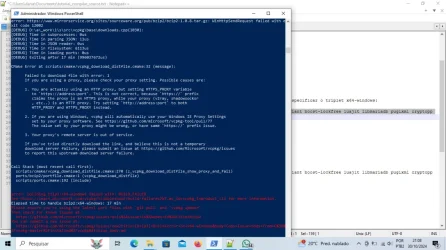
What engine do you try to compile?GOOD, I HAD TO FORMAT MY COMPUTER, I ALWAYS COMPILED MY TFS WITHOUT ERRORS, I INSTALLED THE SAME OPERATING SYSTEM (WINDOWS 10) HOWEVER EVERY VCPKG I TRY TO INSTALL I AM RECEIVING THE SAME ERROR, CAN ANYONE HELP ME WITH THIS? THANK
vcpkg pretty fast lose possibility to build it's C++ libraries (few months, up to 2 years, then download links die). If you are trying to compile some old engine, you must keep old vcpkg directory copy.I'm just trying to compile my tfs 1.5, do you have a working vcpkg link to send me?What engine do you try to compile?
vcpkgpretty fast lose possibility to build it's C++ libraries (few months, up to 2 years, then download links die). If you are trying to compile some old engine, you must keep oldvcpkgdirectory copy.
There is no 'working vcpkg link'. You need to use exact version of vcpkg for your engine.I'm just trying to compile my tfs 1.5
vcpkg.json files with required version for given TFS commit:215a2535590f1f63788ac9bd2ed58ad15e6afdff
Tfs 1.5 should work with the forgottenserver github vcpkg. Do a fresh install Compiling on Windows (vcpkg) (https://github.com/otland/forgottenserver/wiki/Compiling-on-Windows-%28vcpkg%29)
My PC is actually very weak and slow, things around here aren't very good ($$$) I'm barking in the yard to save the dog hahahaThere is no 'working vcpkg link'. You need to use exact version of vcpkg for your engine.
Right now there are 23596 vcpkg versions and you must know which one is required by your engine to compile.
On new engines there arevcpkg.jsonfiles with required version for given TFS commit:
ex.![]()
forgottenserver/vcpkg.json at master · otland/forgottenserver
A free and open-source MMORPG server emulator written in C++ - otland/forgottenservergithub.com
215a2535590f1f63788ac9bd2ed58ad15e6afdff
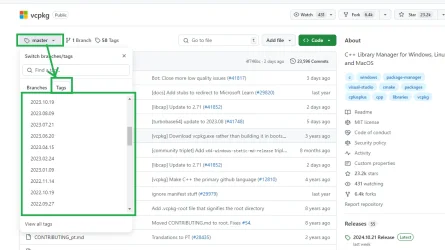
If you don't know vcpkg commit for your engine, all you can do is to download some vcpkg version by date with date similar to your engine release (dates are in "Tags" on vcpkg github site) and try to compile using it. If it fails, get another version and try again.
View attachment 88051
If you don't have fast PC and few hours/days to find vcpkg version that works with your engine, you can just move to Linux. TFS compiles on Linux with system libraries - you don't need vcpkg. Ubuntu 22.04 should be compatible with TFS 1.5.

If you followed newest TFS vcpkg compliation instruction there is no Crypto++ library, as it was replaced in TFS 1.6 with OpenSSL library few months ago. For TFS 1.5 you probably need older version of instruction ex. (it's 1 version before "Changed build settings from crypto++ to openssl" - History for Compiling on Windows (vcpkg) · otland/forgottenserver Wiki (https://github.com/otland/forgottenserver/wiki/Compiling-on-Windows-(vcpkg)/_history) ):Cannot open file include: 'cryptopp/rsa.h'
.\vcpkg install --triplet x64-windows boost-iostreams boost-asio boost-system boost-variant boost-lockfree boost-locale luajit libmariadb pugixml cryptopp fmt
cryptopp..\vcpkg install --triplet x64-windows cryptopp