• There is NO official Otland's Discord server and NO official Otland's server list. The Otland's Staff does not manage any Discord server or server list. Moderators or administrator of any Discord server or server lists have NO connection to the Otland's Staff. Do not get scammed!
  • 2026 staff recruitment is open! Check it out and consider applying!

[Tutorial][BlackTek] From nothing to fully installed Server with AAC on Windows.

Awesome thanks for the info.

I have an issue atm, I followed the instructions for installing vcpkg, premake, and blacktek however when I am compiling the BlackTekServer, I am running into this error:

Severity Code Description Project File Line Suppression State Details
Error LNK2001 unresolved external symbol __std_mismatch_4 Black-Tek-Server C:\Users\USER\Downloads\BlackTek-Server-master\BlackTek-Server-master\cryptopp.lib(dll.cpp.obj) 1

Edit: I have located the cryptopp.lib and placed it in the file location but still get the same error. after looking up the error code it tells me i need to create a reference function

How do you fixed it, im having the same problem :(
 
How do you fixed it, im having the same problem :(
Follow the instructions instead of trying to download a project file, open it and compile... in other words, don't try to take a short cut.

The project files that are uploaded with the "pre-releases" were generated for their own environment, everyone's environment can vary... The CRT I run on my windows, probably won't be the same you have on yours, and won't be the same that the github runner is using to create those packages you guys are using to try to shortcut the compiling process...

There is a reason I didn't just include a solution file with the project....
 
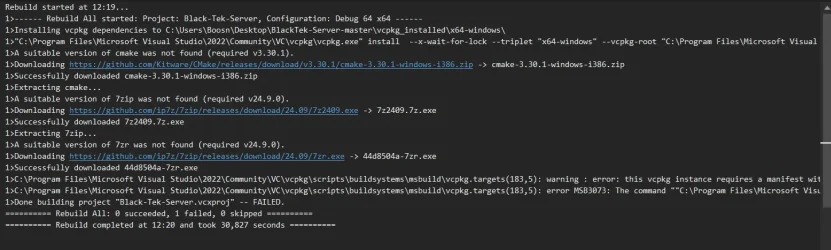
@Codinablack - I followed this tutorial and encountered an issue when trying to rebuild the solution.View attachment 93976
Very interesting... this is actually the first time I have seen that warning (the error is common when vcpkg fails).

It would seem you have multiple triplets (aka ports) on your system and so it wishes to be told which port to use... why it would require a baseline though is quite peculiar!

At any rate, I would absolutely do as the warning (not the error, because the warning explains why you got the error) says to do, and add a baseline to the vcpkg.json, I would personally recommend using the absolute latest commit from the vcpkg repo, but really any relatively newer one should suffice... You can see how to add such a thing to the vcpkg by looking at examples out there like these:


In fact, you could likely copy the line from forgottenservers vcpkg.json exactly and it should work perfectly (provided you don't make a syntactical error during the copy+paste)
 
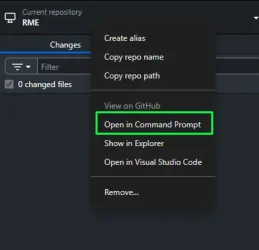
I usually fix it like this open command prompt
1753752928200.webp

LUA:
F:\vcpkg\vcpkg.exe x-update-baseline

(your vcpkg.exe directory, in my case it is F:\vcpkg\vcpkg.exe)
output:
Code:
updated registry 'https://github.com/microsoft/vcpkg': baseline 'b322364f06308bdd24823f9d8f03fe0cc86fd46f' -> '4b6c50d962cc20aaa3ef457f8ba683b586263cfb'
 
Back
Top