Ive tried with waifu2x and even others upscaling tools and still same colouring issue, Ive even tried others .bmp -> .png converters and had no luck, have you manage to fix this bug?No its because of the upscaling model fucked up the coloring layer, thats the only issue im currently facing i think wafi2ux doesn't make this mistake didn't try it yet

-
2026 staff recruitment is open! Check it out and consider applying!
You are using an out of date browser. It may not display this or other websites correctly.
You should upgrade or use an alternative browser.
You should upgrade or use an alternative browser.
How to use upscaled sprites (64x64 or bigger) in OTCv8
- Thread starter Erikas Kontenis
- Start date

El Bringy
Banned User
- Joined
- Jan 5, 2013
- Messages
- 333
- Solutions
- 6
- Reaction score
- 286
maybe try upscayl i use it it provide multiple models with multiple optionsIve tried with waifu2x and even others upscaling tools and still same colouring issue, Ive even tried others .bmp -> .png converters and had no luck, have you manage to fix this bug?
jeisonribas
New Member
- Joined
- Jul 25, 2023
- Messages
- 8
- Reaction score
- 1
A mesma coisa aconteceu comigo, você conseguiu consertar?@Erikas Kontenis Parece que algo está errado comigo aqui. Acabei de testar e, depois de executar npm run unpack-spr ./binary/Tibia.spr ./sprites/tibia, o resultado foi uma pasta cheia de bmps vazios. Talvez haja algo a ver com a opção estendida/transparência habilitada. Você já viu isso acontecer antes? Sabe como consertar?
I had this bug, and there is no simple solution for this. What I did is to write quite complex post processing with using opencv libIve tried with waifu2x and even others upscaling tools and still same colouring issue, Ive even tried others .bmp -> .png converters and had no luck, have you manage to fix this bug?
El Bringy
Banned User
- Joined
- Jan 5, 2013
- Messages
- 333
- Solutions
- 6
- Reaction score
- 286
If you don't mind for sure, is it something like that?I had this bug, and there is no simple solution for this. What I did is to write quite complex post processing with using opencv lib
in this example i used opencv as well to upscale and sharpen maybe just proccess I/O with CV pre multiple before processing, and postdivide alpha before output? where wafi2ux can come in the middle after splitting the img colors
Python:
img = cv2.imread('input.png', cv2.IMREAD_UNCHANGED)
b, g, r, a = cv2.split(img)

alpha = a / 255.0
b = (b * alpha).astype(np.uint8)
g = (g * alpha).astype(np.uint8)
r = (r * alpha).astype(np.uint8)

premultiplied = cv2.merge((b, g, r, a))

kernel = np.array([[0, -1, 0],
                   [-1, 5,-1],
                   [0, -1, 0]])

sharpened_rgb = cv2.filter2D(premultiplied[:, :, :3], -1, kernel)
result = cv2.merge((sharpened_rgb, a))

alpha = a.astype(np.float32) / 255.0
alpha[alpha == 0] = 1  # Prevent divide-by-zero

b = (sharpened_rgb[:, :, 0].astype(np.float32) / alpha).clip(0, 255).astype(np.uint8)
g = (sharpened_rgb[:, :, 1].astype(np.float32) / alpha).clip(0, 255).astype(np.uint8)
r = (sharpened_rgb[:, :, 2].astype(np.float32) / alpha).clip(0, 255).astype(np.uint8)

final = cv2.merge((b, g, r, a))
cv2.imwrite('output.png', final)El Bringy
Banned User
- Joined
- Jan 5, 2013
- Messages
- 333
- Solutions
- 6
- Reaction score
- 286
Maybe I did not understand Your problem correctly- i dont have problem with edges of the outfits, but with edges on the outfit masks
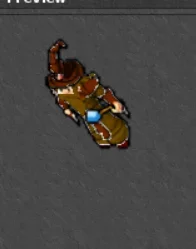 thats what i've been trying to solve since april haha
ok, but how "raw sprites" looks like ? .png files I mean - is the problem in the masks or the base outfit, I believe masks onlyView attachment 94858 thats what i've been trying to solve since april haha
El Bringy
Banned User
- Joined
- Jan 5, 2013
- Messages
- 333
- Solutions
- 6
- Reaction score
- 286
true it is only the masks of coloring the outfit it seems slightly smaller for some reasonok, but how "raw sprites" looks like ? .png files I mean - is the problem in the masks or the base outfit, I believe masks only
Ive actually managed to make it better by generating to png32 and then upscaling both base outfits and masks with waifu2x, its not perfect but I guess I can fix the details manually on paint:true it is only the masks of coloring the outfit it seems slightly smaller for some reason
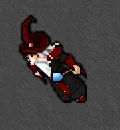
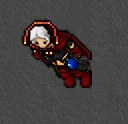
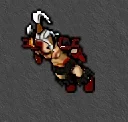


samco
4x4 Developer.
Same thing happening here. Using 10.98 Spr@Erikas Kontenis something seems to be going wrong for me here. I just tried it, and after running npm run unpack-spr ./binary/Tibia.spr ./sprites/tibia, the result was a folder full of empty bmps. Maybe there's something to do with extended/transparency being enabled. Have you seen this happen before/do you know how to fix?
OP
OP

Erikas Kontenis
Excellent OT User
Same thing happening here. Using 10.98 Spr
I updated the tutorial to use other tools that can do sprite exporting.
Similar threads
- Replies
- 1
- Views
- 2K


