
-
2026 staff recruitment is open! Check it out and consider applying!
You are using an out of date browser. It may not display this or other websites correctly.
You should upgrade or use an alternative browser.
You should upgrade or use an alternative browser.
[8.60] [TFS 1.2] -[Real Map full] with mount & market system
- Thread starter Shiris undrin
- Start date
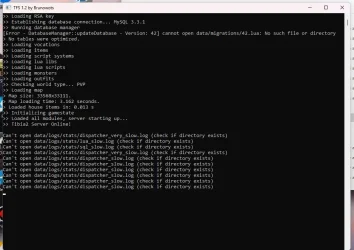

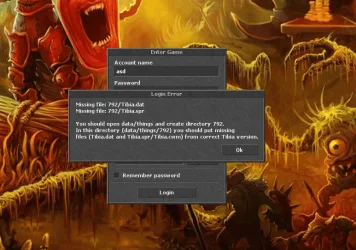
okay thanks bro
and how to solve this problem regarding the version
How can I replace these files and where?
View attachment 94348
I have a small problem. I can log in to the game, but I can't create a regular player to play with. Can someone help me create one in the database or what am I doing wrong?
How to add a speed attack? Can someone help?
I will add that I have set it in vocation xml but unfortunately it does not work
it's the same with spells, they don't work either, don't you have to edit it in mysql?
Last edited:

mysticbunny
Member
- Joined
- Jul 30, 2025
- Messages
- 17
- Reaction score
- 13
Hello, thank you for the files! They look very promising, I’m really excited to test them!!!
One important detail: I can open the server without any issues, and I was able to configure the client successfully. However, I cannot create a website using MyAAC, nor can I access any type of account manager.
To be precise, the MyAAC installation goes smoothly until the admin account creation step. After I enter my login and password and click Next, I get the following error:
Fatal error: Uncaught PDOException: SQLSTATE[42S02]: Base table or view not found: 1146 Table 'otserv.player_skills' doesn't exist in C:\xampp\htdocs\myaac\system\libs\pot\OTS_Base_DB.php:86 Stack trace: #0 C:\xampp\htdocs\myaac\system\libs\pot\OTS_Base_DB.php(86): PDO->query('INSERT INTO pl...', NULL) #1 C:\xampp\htdocs\myaac\system\libs\pot\OTS_DB_PDOQuery.php(11): OTS_Base_DB->doQuery('INSERT INTO pl...', NULL) #2 C:\xampp\htdocs\myaac\system\libs\pot\OTS_Player.php(465): OTS_Base_DB->query('INSERT INTO pl...') #3 C:\xampp\htdocs\myaac\install\steps\7-finish.php(108): OTS_Player->save() #4 C:\xampp\htdocs\myaac\install\index.php(208): require('C:\\xampp\\htdocs...') #5 {main} thrown in C:\xampp\htdocs\myaac\system\libs\pot\OTS_Base_DB.php on line 86
Despite this, the website is created (although missing some information). I can access it, I can even create accounts, and the account shows up in the database — but character creation does not work.
Another strange issue is that when I try to log in through the client — whether using the account created via MyAAC or directly on the website — I always get the error:
“Login error: account name or password is not correct.”
Also, in the top-right corner of the site, the server appears as online, so the connection itself seems fine.
How do you usually create accounts? Is it possible to set up a website for this? Do you recommend any specific AAC (account website) for us to use?
Inside the directory client\data\things you will find a zip file called 860.rar.
Extract it, then put all the files into a folder with the same name 860.
It will work. After that, I just don’t know how to handle the website, accounts, and character creation :/
One important detail: I can open the server without any issues, and I was able to configure the client successfully. However, I cannot create a website using MyAAC, nor can I access any type of account manager.
To be precise, the MyAAC installation goes smoothly until the admin account creation step. After I enter my login and password and click Next, I get the following error:
Fatal error: Uncaught PDOException: SQLSTATE[42S02]: Base table or view not found: 1146 Table 'otserv.player_skills' doesn't exist in C:\xampp\htdocs\myaac\system\libs\pot\OTS_Base_DB.php:86 Stack trace: #0 C:\xampp\htdocs\myaac\system\libs\pot\OTS_Base_DB.php(86): PDO->query('INSERT INTO pl...', NULL) #1 C:\xampp\htdocs\myaac\system\libs\pot\OTS_DB_PDOQuery.php(11): OTS_Base_DB->doQuery('INSERT INTO pl...', NULL) #2 C:\xampp\htdocs\myaac\system\libs\pot\OTS_Player.php(465): OTS_Base_DB->query('INSERT INTO pl...') #3 C:\xampp\htdocs\myaac\install\steps\7-finish.php(108): OTS_Player->save() #4 C:\xampp\htdocs\myaac\install\index.php(208): require('C:\\xampp\\htdocs...') #5 {main} thrown in C:\xampp\htdocs\myaac\system\libs\pot\OTS_Base_DB.php on line 86
Despite this, the website is created (although missing some information). I can access it, I can even create accounts, and the account shows up in the database — but character creation does not work.
Another strange issue is that when I try to log in through the client — whether using the account created via MyAAC or directly on the website — I always get the error:
“Login error: account name or password is not correct.”
Also, in the top-right corner of the site, the server appears as online, so the connection itself seems fine.
How do you usually create accounts? Is it possible to set up a website for this? Do you recommend any specific AAC (account website) for us to use?
Post automatically merged:
You can download the client he provided.I need help. What game client and passwords are needed to log in to this engine? The server loads, but I don't know how to access it. There's no client and I can't use another one. Please help.
Inside the directory client\data\things you will find a zip file called 860.rar.
Extract it, then put all the files into a folder with the same name 860.
It will work. After that, I just don’t know how to handle the website, accounts, and character creation :/
Last edited:

perignondon7
New Member
- Joined
- Sep 1, 2025
- Messages
- 1
- Reaction score
- 1
I just want to say fantastic job on this. I think the concept is brilliant. The best of both worlds right here in one server. I played with it for a full day. I managed to get znote working with it after a few minor tweaks, able to login and create accounts etc. I personally love the attack speed. That's probably unpopular opinion. I really really like this server its just hard to find tools to use to edit things in quicker like being able to use the map editor (I go full custom). Of course running into many spr issues... If I had the time and the money to spend for you to help, I'd turn this into something. Gonna save it for now, and maybe it'll be my second server project. Nice work everyone involved.
mysticbunny
Member
- Joined
- Jul 30, 2025
- Messages
- 17
- Reaction score
- 13
I successfully configured ZnoteAAC, downloaded from the official repository on this site. The installation ran without issues, and account creation also worked fine.
Problem (when creating a character):
"Fatal error: Uncaught mysqli_sql_exception: Table 'otserv.player_skills' doesn't exist in C:\xampp\htdocs\engine\database\connect.php:89 Stack trace: #0 C:\xampp\htdocs\engine\database\connect.php(89): mysqli_query(Object(mysqli), 'INSERT INTO pl...') #1 C:\xampp\htdocs\engine\database\connect.php(79): voidQuery('INSERT INTO pl...') #2 C:\xampp\htdocs\engine\function\users.php(1435): mysql_insert('INSERT INTO pl...') #3 C:\xampp\htdocs\createcharacter.php(101): user_create_character(Array) #4 {main} thrown in C:\xampp\htdocs\engine\database\connect.php on line 89"
What I did to fix it (SQL run in phpMyAdmin):
Result:
This created the player_skills table and resolved the error. I was able to create a character and log into the server.
Note:
I’m not sure if this is the “official” approach or whether it could cause problems later, but it worked for me right now.
I’ve already added the new code to the global3.sql file and it’s working here. Please let me know if I did something wrong or if there’s a better way to fix this error.
I managed to make more progress with the MyAAC installation, but some errors are still happening:
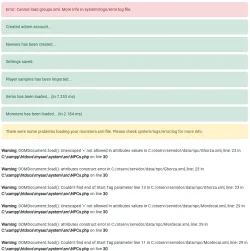
The installation completes, I can access the website, create accounts, and create characters (which was not possible before due to the missing player_skills table). I can access accounts through the website, including both the admin account created during the MyAAC installation and the player account I created directly on the site. The accounts appear in the phpMyAdmin database, and the created characters show up as well. You can even see the character list on the side of the screen and the indication that the server is online, which means the site and server are connected.
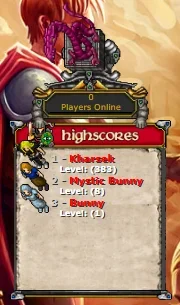
However, when I try to log in through the client with either the player account or the admin account created by MyAAC, I get a login error:
“Login error: account name or password is not correct.” Unlike the player account, the god/god account works fine.
An important detail: through the Znote site, I can create a player account and log in through the client normally, without any password error. Does anyone know why this happens? I believe MyAAC is saving the password using some encryption that the server cannot read. This is just my guess, I still need to investigate.
The “Error: Cannot load groups.xml” in MyAAC was caused by invalid XML comments in data/XML/groups.xml.
The file had lines like:
Fix: Replace them with valid comments, for example:
Problem (when creating a character):
"Fatal error: Uncaught mysqli_sql_exception: Table 'otserv.player_skills' doesn't exist in C:\xampp\htdocs\engine\database\connect.php:89 Stack trace: #0 C:\xampp\htdocs\engine\database\connect.php(89): mysqli_query(Object(mysqli), 'INSERT INTO pl...') #1 C:\xampp\htdocs\engine\database\connect.php(79): voidQuery('INSERT INTO pl...') #2 C:\xampp\htdocs\engine\function\users.php(1435): mysql_insert('INSERT INTO pl...') #3 C:\xampp\htdocs\createcharacter.php(101): user_create_character(Array) #4 {main} thrown in C:\xampp\htdocs\engine\database\connect.php on line 89"
What I did to fix it (SQL run in phpMyAdmin):
LUA:
-- Ajuste o nome do banco se necessário: selecione a base certa no phpMyAdmin antes de rodar.

START TRANSACTION;

-- 1) Cria a tabela player_skills (compatível com TFS 1.2/8.6)
CREATE TABLE IF NOT EXISTS `player_skills` (
  `player_id` INT NOT NULL,
  `skillid` TINYINT UNSIGNED NOT NULL,
  `value` INT UNSIGNED NOT NULL DEFAULT 10,
  `count` INT UNSIGNED NOT NULL DEFAULT 0,
  PRIMARY KEY (`player_id`, `skillid`),
  CONSTRAINT `fk_player_skills_player`
    FOREIGN KEY (`player_id`) REFERENCES `players`(`id`)
    ON DELETE CASCADE
    ON UPDATE CASCADE
) ENGINE=InnoDB DEFAULT CHARSET=latin1;

-- 2) “Seed” das 7 skills para TODOS os jogadores existentes (sem duplicar)
-- skillid mapping: 0=fist, 1=club, 2=sword, 3=axe, 4=distance, 5=shield, 6=fishing
INSERT IGNORE INTO `player_skills` (`player_id`, `skillid`, `value`, `count`)
SELECT p.id, s.skillid, 10, 0
FROM `players` p
JOIN (
  SELECT 0 AS skillid UNION ALL SELECT 1 UNION ALL SELECT 2
  UNION ALL SELECT 3 UNION ALL SELECT 4 UNION ALL SELECT 5
  UNION ALL SELECT 6
) AS s
LEFT JOIN `player_skills` ps
  ON ps.player_id = p.id AND ps.skillid = s.skillid
WHERE ps.player_id IS NULL;

COMMIT;
Result:
This created the player_skills table and resolved the error. I was able to create a character and log into the server.
Note:
I’m not sure if this is the “official” approach or whether it could cause problems later, but it worked for me right now.
I’ve already added the new code to the global3.sql file and it’s working here. Please let me know if I did something wrong or if there’s a better way to fix this error.
Post automatically merged:
I managed to make more progress with the MyAAC installation, but some errors are still happening:
The installation completes, I can access the website, create accounts, and create characters (which was not possible before due to the missing player_skills table). I can access accounts through the website, including both the admin account created during the MyAAC installation and the player account I created directly on the site. The accounts appear in the phpMyAdmin database, and the created characters show up as well. You can even see the character list on the side of the screen and the indication that the server is online, which means the site and server are connected.
However, when I try to log in through the client with either the player account or the admin account created by MyAAC, I get a login error:
“Login error: account name or password is not correct.” Unlike the player account, the god/god account works fine.
An important detail: through the Znote site, I can create a player account and log in through the client normally, without any password error. Does anyone know why this happens? I believe MyAAC is saving the password using some encryption that the server cannot read. This is just my guess, I still need to investigate.
Post automatically merged:
The “Error: Cannot load groups.xml” in MyAAC was caused by invalid XML comments in data/XML/groups.xml.
The file had lines like:
XML does not allow -- inside comments, so the parser failed.<!------------------- GAMEMASTER FLAGS USED -------------->
Fix: Replace them with valid comments, for example:
After correcting the comments, groups.xml loaded fine and the error was gone.<!-- ========== GAMEMASTER FLAGS USED ========== -->
Attachments
-
groups.xml2.5 KB · Views: 10 · VirusTotal
-
global3(player_skills).sql770.1 KB · Views: 9 · VirusTotal
Last edited:
mysticbunny
Member
- Joined
- Jul 30, 2025
- Messages
- 17
- Reaction score
- 13
I managed to fix the client error “Login error: account name or password is not correct.” — this error happens when using MyAAC.
The server is configured to read passwords encrypted with "sha1" (you can find this in the MySQL settings inside config.lua). However, in the global3.sql file that we use to import into phpMyAdmin, it creates a field called "salt" inside the accounts table. When MyAAC creates an account and detects this "salt" field, instead of encrypting the password with plain sha1, it does it as sha1+salt.
What I did to fix it was to modify the global3.sql file again. Now, when importing the file into phpMyAdmin, instead of creating a field called "salt" inside accounts, it creates a field called "salt_disabled". This way, MyAAC doesn’t see the need to use salt and encrypts the password only with sha1.
Another detail: the structure is still there, so if you ever want to use sha1+salt, you can just rename the field in accounts back to "salt" in phpMyAdmin and it will be active again.
Note: I noticed that the god/god account, since it already comes pre-imported with the server, didn’t have a salt defined. Because of that, I was able to log in with it on the client without any problems. So it’s likely that this server was already meant to work without salt, since the pre-created account came without it. Just a detail.
The server is configured to read passwords encrypted with "sha1" (you can find this in the MySQL settings inside config.lua). However, in the global3.sql file that we use to import into phpMyAdmin, it creates a field called "salt" inside the accounts table. When MyAAC creates an account and detects this "salt" field, instead of encrypting the password with plain sha1, it does it as sha1+salt.
What I did to fix it was to modify the global3.sql file again. Now, when importing the file into phpMyAdmin, instead of creating a field called "salt" inside accounts, it creates a field called "salt_disabled". This way, MyAAC doesn’t see the need to use salt and encrypts the password only with sha1.
Another detail: the structure is still there, so if you ever want to use sha1+salt, you can just rename the field in accounts back to "salt" in phpMyAdmin and it will be active again.
Note: I noticed that the god/god account, since it already comes pre-imported with the server, didn’t have a salt defined. Because of that, I was able to log in with it on the client without any problems. So it’s likely that this server was already meant to work without salt, since the pre-created account came without it. Just a detail.
Attachments
-
global3(player_skills+salt_disabled).sql770.1 KB · Views: 14 · VirusTotal
was u able to fix the rings ? im stuck with it !I managed to fix the client error “Login error: account name or password is not correct.” — this error happens when using MyAAC.
The server is configured to read passwords encrypted with "sha1" (you can find this in the MySQL settings inside config.lua). However, in the global3.sql file that we use to import into phpMyAdmin, it creates a field called "salt" inside the accounts table. When MyAAC creates an account and detects this "salt" field, instead of encrypting the password with plain sha1, it does it as sha1+salt.
What I did to fix it was to modify the global3.sql file again. Now, when importing the file into phpMyAdmin, instead of creating a field called "salt" inside accounts, it creates a field called "salt_disabled". This way, MyAAC doesn’t see the need to use salt and encrypts the password only with sha1.
Another detail: the structure is still there, so if you ever want to use sha1+salt, you can just rename the field in accounts back to "salt" in phpMyAdmin and it will be active again.
Note: I noticed that the god/god account, since it already comes pre-imported with the server, didn’t have a salt defined. Because of that, I was able to log in with it on the client without any problems. So it’s likely that this server was already meant to work without salt, since the pre-created account came without it. Just a detail.
mysticbunny
Member
- Joined
- Jul 30, 2025
- Messages
- 17
- Reaction score
- 13
Hiii, I didn't get to that part, I ended up migrating to a 10.98 client, I thought it would better adapt to my needswas u able to fix the rings ? im stuck with it !
Pad7233668
New Member
- Joined
- Feb 18, 2010
- Messages
- 4
- Reaction score
- 2
you are a HERO!I successfully configured ZnoteAAC, downloaded from the official repository on this site. The installation ran without issues, and account creation also worked fine.
Problem (when creating a character):
"Fatal error: Uncaught mysqli_sql_exception: Table 'otserv.player_skills' doesn't exist in C:\xampp\htdocs\engine\database\connect.php:89 Stack trace: #0 C:\xampp\htdocs\engine\database\connect.php(89): mysqli_query(Object(mysqli), 'INSERT INTO pl...') #1 C:\xampp\htdocs\engine\database\connect.php(79): voidQuery('INSERT INTO pl...') #2 C:\xampp\htdocs\engine\function\users.php(1435): mysql_insert('INSERT INTO pl...') #3 C:\xampp\htdocs\createcharacter.php(101): user_create_character(Array) #4 {main} thrown in C:\xampp\htdocs\engine\database\connect.php on line 89"
What I did to fix it (SQL run in phpMyAdmin):
LUA:-- Ajuste o nome do banco se necessário: selecione a base certa no phpMyAdmin antes de rodar. START TRANSACTION; -- 1) Cria a tabela player_skills (compatível com TFS 1.2/8.6) CREATE TABLE IF NOT EXISTS `player_skills` ( `player_id` INT NOT NULL, `skillid` TINYINT UNSIGNED NOT NULL, `value` INT UNSIGNED NOT NULL DEFAULT 10, `count` INT UNSIGNED NOT NULL DEFAULT 0, PRIMARY KEY (`player_id`, `skillid`), CONSTRAINT `fk_player_skills_player` FOREIGN KEY (`player_id`) REFERENCES `players`(`id`) ON DELETE CASCADE ON UPDATE CASCADE ) ENGINE=InnoDB DEFAULT CHARSET=latin1; -- 2) “Seed” das 7 skills para TODOS os jogadores existentes (sem duplicar) -- skillid mapping: 0=fist, 1=club, 2=sword, 3=axe, 4=distance, 5=shield, 6=fishing INSERT IGNORE INTO `player_skills` (`player_id`, `skillid`, `value`, `count`) SELECT p.id, s.skillid, 10, 0 FROM `players` p JOIN ( SELECT 0 AS skillid UNION ALL SELECT 1 UNION ALL SELECT 2 UNION ALL SELECT 3 UNION ALL SELECT 4 UNION ALL SELECT 5 UNION ALL SELECT 6 ) AS s LEFT JOIN `player_skills` ps ON ps.player_id = p.id AND ps.skillid = s.skillid WHERE ps.player_id IS NULL; COMMIT;
Result:
This created the player_skills table and resolved the error. I was able to create a character and log into the server.
Note:
I’m not sure if this is the “official” approach or whether it could cause problems later, but it worked for me right now.
I’ve already added the new code to the global3.sql file and it’s working here. Please let me know if I did something wrong or if there’s a better way to fix this error.
Post automatically merged:
I managed to make more progress with the MyAAC installation, but some errors are still happening:
View attachment 94586
The installation completes, I can access the website, create accounts, and create characters (which was not possible before due to the missing player_skills table). I can access accounts through the website, including both the admin account created during the MyAAC installation and the player account I created directly on the site. The accounts appear in the phpMyAdmin database, and the created characters show up as well. You can even see the character list on the side of the screen and the indication that the server is online, which means the site and server are connected.
View attachment 94587
However, when I try to log in through the client with either the player account or the admin account created by MyAAC, I get a login error:
“Login error: account name or password is not correct.” Unlike the player account, the god/god account works fine.
An important detail: through the Znote site, I can create a player account and log in through the client normally, without any password error. Does anyone know why this happens? I believe MyAAC is saving the password using some encryption that the server cannot read. This is just my guess, I still need to investigate.
Post automatically merged:
The “Error: Cannot load groups.xml” in MyAAC was caused by invalid XML comments in data/XML/groups.xml.
The file had lines like:
XML does not allow -- inside comments, so the parser failed.
Fix: Replace them with valid comments, for example:
After correcting the comments, groups.xml loaded fine and the error was gone.
Running the query got me into the server error free.
i did have a "critical windows update" that left it crippled but im going to try your sql later today.
alright thanks u !Hiii, I didn't get to that part, I ended up migrating to a 10.98 client, I thought it would better adapt to my needs
Pad7233668
New Member
- Joined
- Feb 18, 2010
- Messages
- 4
- Reaction score
- 2
global3(player_skills+salt_disabled).sql is the perfect answer to the server AAC issue.
the has anyone figured out the decay time? its very clearly being overridden from the item.xml and im not sure from where......
the has anyone figured out the decay time? its very clearly being overridden from the item.xml and im not sure from where......
Pad7233668
New Member
- Joined
- Feb 18, 2010
- Messages
- 4
- Reaction score
- 2
little update:
i found out i copied the updated files with the original and thats why the decay thing was still an issue, got that figured out.
im not very smart on these things and im trying to run the server (4x) for the family. some major issues i cant seem to figure out has come from this that i was hoping someone could point me in the right direct of solving these issues.
first all spells that require the use of " " (example being find friend, summon, chameleon, levitate) wont work. as in you can type the spell/action but the game reads it as just text and not a spell or command.
secondly my son got a life ring off a ghoul but it has no effect on the character at all. my concern is that this is true for all rings, necklaces, and armor (potentially anything with "ticks" or "duration".
Any and i do mean ANY help would be greatly appreciated. and i do apologize for my previous post, the error was me.
i found out i copied the updated files with the original and thats why the decay thing was still an issue, got that figured out.
im not very smart on these things and im trying to run the server (4x) for the family. some major issues i cant seem to figure out has come from this that i was hoping someone could point me in the right direct of solving these issues.
first all spells that require the use of " " (example being find friend, summon, chameleon, levitate) wont work. as in you can type the spell/action but the game reads it as just text and not a spell or command.
secondly my son got a life ring off a ghoul but it has no effect on the character at all. my concern is that this is true for all rings, necklaces, and armor (potentially anything with "ticks" or "duration".
Any and i do mean ANY help would be greatly appreciated. and i do apologize for my previous post, the error was me.
TibiaQuest
New Member
- Joined
- Sep 21, 2025
- Messages
- 1
- Reaction score
- 0
I set this up and was able to login to the God character.
I want to setup a server to play alone and with a close friend of mine. What else would be required to get a nice game play going?
Also, config says it has account manager. Does it come with an account manager that can create acc/chars or do I need to add one myself. Which one would be the easiest to setup for very little use as it's just me and my friend.
Would like to play a fun 8.X server that's like real tibia, but for us to boost ourselves to explore the world.
I want to setup a server to play alone and with a close friend of mine. What else would be required to get a nice game play going?
Also, config says it has account manager. Does it come with an account manager that can create acc/chars or do I need to add one myself. Which one would be the easiest to setup for very little use as it's just me and my friend.
Would like to play a fun 8.X server that's like real tibia, but for us to boost ourselves to explore the world.

This data is being worked on, I will share some improvements for this engine so far the sources have been updated to compile on Ubuntu 20.04, it was compiled on Oracle VPS.
The city of Yalahar is being added and the correct spawns and their systems are being added. This version is being worked on by some kind-hearted people.
Sorairei
millhiorebt
And if server
Github REAL GLOBAL
The city of Yalahar is being added and the correct spawns and their systems are being added. This version is being worked on by some kind-hearted people.
Sorairei
millhiorebt
And if server
Github REAL GLOBAL
Last edited:
OP
OP

Shiris undrin
Advanced OT User
- Joined
- Jun 10, 2010
- Messages
- 161
- Solutions
- 1
- Reaction score
- 171
Thanks, I haven't had time to update this project and I was also discouraged to see people selling it.This data is being worked on, I will share some improvements for this engine so far the sources have been updated to compile on Ubuntu 20.04, it was compiled on Oracle VPS.
The city of Yalahar is being added and the correct spawns and their systems are being added. This version is being worked on by some kind-hearted people.
Sorairei
millhiorebt
And if server
Github REAL GLOBAL
Similar threads

- Replies
- 45
- Views
- 6K


- Replies
- 67
- Views
- 10K


- Replies
- 86
- Views
- 11K

- Replies
- 147
- Views
- 21K