• There is NO official Otland's Discord server and NO official Otland's server list. The Otland's Staff does not manage any Discord server or server list. Moderators or administrator of any Discord server or server lists have NO connection to the Otland's Staff. Do not get scammed!
  • 2026 staff recruitment is open! Check it out and consider applying!

Removing .otb – Only Using .dat

Tofame

Advanced OT User
Joined
Aug 17, 2021
Messages
191
Solutions
5
Reaction score
168
Location
Poland
Hello everyone,

Im glad to share information about a revolutionary change, fully authored by me, which completely removes the need for .otb in OT projects. After analyzing .otb and .dat, I developed a method to rely only on .dat, ordered by server IDs, simplifying item handling dramatically - .otb, using Item Editor app, converting sid<->sid <--- all of it is redundant.

Why .otb is unnecessary


The .otb format was originally introduced as a bridge between client IDs and server IDs. Allegedly, this came from old quirks with item removal/items being moved to different ids, every time new .dat was released, to confuse tfs developers so OTS wouldnt have working items, many years ago. My research and testing show:

  • .otb does not implement anything new; everything it contains is derivable from .dat.
  • Most “custom” attributes in .otb are either calculated from .dat (like stack order) or deprecated (from 7.x times when items.xml didnt exist).
  • Only minor attributes like allowDistRead were .otb-specific, and even those are mostly covered by items.xml.
  • The original client-server ID mapping is no longer necessary because the new .dat can be reordered by server ID, making cid == sid.

In short: .otb is fully obsolete, and projects can safely move to .dat only.

My approach vs Canary server


Canary server had a similar idea, but they did not reorder .dat by server ID, as it would require a tool. This idea wasn't also easy to come up with, to begin with. Keep in mind that, we both use 'client ID', but my clientIDs are actually not equal to theirs. Also, in their method they had to patch thousands of lines in other systems to accommodate client-server ID differences. Imo my solution is better, but it's not like Canary's is worse. The amount of time I had to put into making the tool and even coming up with this idea balances things out. What matters that both me and Canary dont use .otb anymore!!

My solution:

  • I built a custom tool to reorder .dat by server IDs, making client IDs match server IDs directly.
  • This eliminates the need for .otb and for any extensive downstream code changes.
  • After conversion, .otb becomes fully obsolete, and everything works with a single ID per item.​

Technical Notes on how to make such a tool


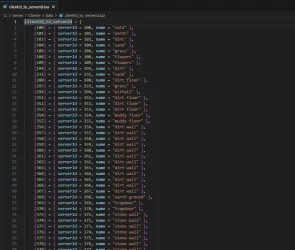
  • Read both old .otb and .dat initially, then while looping through otb items you will be getting each dat Item by server id and outputting it. The final result will be a .dat that is ordered by serverids! :)
  • [NOTE] After reordering, cid == sid across all items.
  • [NOTE] Remember that .otb had uint32_t flags, while .dat has its attributes saved byte after byte.
Q&A:

[Q] Are IDs still shuffled inside the .dat, in the middle of it, to confuse everyone?
@zbizu answered me on discord:
Code:
they no longer do
it was up until 8.x times
they no longer do it since 9 something

[Q] A worry that I've received on discord:
otb never was removed due to the strict rules in place for the entire opentibia community, dont do stuff that can break compatibility with thousand versions

My approach to server DOES NOT require changes in: scripts, .xml files, c++ files of TFS (other than .dat load method), which means everything is still backwards compatible, as no IDs are required to be changed across the codebase.
My approach to RME: I actually kept support for .otb loading, which means with my commits both .otb and/or_only .dat can be loaded!
Regarding client, as mentioned above, only SOME of the custom modules might be affected.

It's the fastest, flawless and most simple .otb deletion!

[Q] Why would I even support .otb in RME, why didn't I just remove that code from RME like I did for the server?
So people can load maps with .dat/.otb that didnt go through a reorder of ids, meaning any RME with my commits can still open any map, no matter what files of items (ordered or not) a user has.
Basically, I wanted anyone who has either older .otb + .dat or new .dat to be able to load any kind of maps, without actually having to use different RMEs with different code.
Another benefit, that even I didn't predict, is that while I had some issues with my .dat loading in RME, users could load .otb and report to me in a more accurate way - whether it was due to my changes that something stopped working in RME, or it happens with .otb as well (meaning its not related to me) – so that was just as a fun fact, lol.

[Q] Is the process quick or is it difficult, or did it make it ‘harder’ to use engine that went full .dat compared to engines that still use .otb?
Yes, this process is extremely quickly and simple. Reordering on .dat is to be done just once, and afterwards, everything JUST keeps working. Simple. It’s black magic, until it’s not. Hopefully my explanations on the approach and how I’ve done it, after read maybe a few times, finally show that there are no flaws 😉

[Q] Client is using Tibia.dat, but Server is using assets.dat. What?
I want to call the modified file assets.dat. The perfect solution would be to just modify OTC to look forassets.dat in the folder, but since that modification is not done (despite probably being like 3 lines in c++), the user is expected to take assets.dat, rename it to Tibia.dat and put in the client.
Why even rename? Reasons:
1. Avoids confusion when a person has Tibia.dat vs newName.dat, its easier to know if its actually reordered or not, which makes a big difference whether someone will have non-glitched client or w/e.
2. Redundant association to call a file 'Tibia' when it can store any type of items, outfits, effects.
3. Even Tibia doesnt call their file like that nowadays, they have sheets + appearances.dat

[Q] RME, what do I do, how do I map now?
If RME detects items.otb in its folder, it uses it. If it can’t find items.otb – either deleted or renamed, it simply load .dat. The path is already known since we give it when loading .spr… so no need to put any file in RME anymore 😊

[Q] Can I use .otb?
The whole point of this, is to remove the need for .otb and item editor, at which I succeeded. The use cases that I predict should validate the need for .otb is only to load e.g. some datapacks and copy parts of the map, so...
Three variants:
  • old items.otb and old .dat
  • new .dat AND new items.otb
  • just .dat (like I encourage anyone to do)
Yeah, in the map editor - either original .dat and original .otb OR if with the new .dat, you gotta generate ‘New’ .otb in Item Editor. Then ‘Create missing items’ and reload all afterwards. You will have .otb that is working flawlessly with the reordered dat, also all the cid==sid will be matching.

[Q] Supported versions?
10.11-10.98. I don't have time to currently add 8.x+, but I wish to do so, plan is to add it in the next 6 months. It's simple, just not a priority for me. Maybe somebody else would do that in the meantime :D

[Q] I have custom items in my .dat, what now?
There is absolutely no difference, what anyone has done to their dat, whether it has 20k items or 100k items or any other number.
All that is needed is to just reorder the .dat by the tool to get the new dat.
Afterwards everything works - "Save' in OB builder will make items accessible in the server, map editor, client, all without even thinking of using item editor or anything else!
 
Last edited by a moderator:
I can absolutely verify everything Tofame says here is absolutely factual and correct!

This solution was quite ingenious!

As far as bugs go, there is zero concerns... like he stated, since he simply reordered based on server id, everything just works! There is no problems and no reason to expect any either.... at most, the only thing that was of any concern was the mapeditor, and it does indeed appear as though any small "kinks" for the mapeditor were already discovered and fixed... in short...

This is a flawless solution!

Great Job @Tofame and thank you for sharing both with BlackTek and the rest of the OT community 🫡
 
As a Blacktek user (where this solution was first experimented with), I’d like to make a very obvious point:

OTC modules need to adapt the ID they use.

In OTC, you typically worked with an internal table to interconvert between CID and SID (the server would send the SID, the client would convert it to a CID, and then display properties such as the UIItem).


But now the server will directly send the CID. So, if your modules still rely on the SID, they’ll display the wrong image — because they’re still performing that internal conversion.


The fix is very simple: just replace the IDs in UIItem with the CIDs.


At the time, I had issues where OTC showed pillars or corpses instead of the correct sprites, and it was because the client was still using SID values (internally converting them to CID using Lua and a lookup table). But with what Tofame added, that’s no longer necessary — it’s much simpler now.

Example from an old table:
1760925127480.webp

It’s a great improvement that reduces redundancy and communication errors between Open Tibia programs.
 
It is very cool that you are contributing and I am always happy to see such threads. But on the other side, you're moving from binary file to binary file reading. IMHO, as long as it is binary and not text-based it is not user friendly, not newcomer friendly. I find CipSoft approach the most user-friendly and the most logical for this problem. See for reference items.srv: SabrehavenServer/data/items780/items.srv at master · ErikasKontenis/SabrehavenServer (https://github.com/ErikasKontenis/SabrehavenServer/blob/master/data/items780/items.srv#L4572)

Legacy TFS solution (items.otb + items.xml):
  • Two files to edit same item
  • Two files to edit same item in two different formats (binary + xml)
  • Extremely hard to edit binary file need extra software (10+ different programs, different revisions due of breaking changes in variety of protocols)

Your solution (items.dat + items.toml):
  • Two files to edit same item
  • Two files to edit same item in two different formats (binary + xml)
  • Extremely hard to edit binary file need extra software (10+ different programs, different revisions due of breaking changes in variety of protocols, what about protobuff(??), what about next format that Tibia might come up with or Ravendawn has its own format too)

CipSoft solution (items.srv):
  • Single file to edit same item
  • Single file to edit same item in a single format
  • No need of external software, beginner friendly, no breaking changes in case of protocols. No .dat or .protobuff or new one that can make breaking changes due of client.
  • The only flaw, if it is a flaw since we don't care about legacy is that with legacy clients/software you need to keep .dat or .protobuff in sync with items.srv (.probuff, .toml, w\e). However, OTC and RME and others could simply read from items.srv it is nothing wrong to expose this file as client facing public file.

All in all, if items.otb attributes would go right to the items.xml (or items.toml w\e this doesn't change anything) this would remove all the problems that items.otb have ever had. The only major difficulty with this legacy is that having two different places to edit for the same item and plus in the different format which is not human readable is hard.
 
It is very cool that you are contributing and I am always happy to see such threads. But on the other side, you're moving from binary file to binary file reading. IMHO, as long as it is binary and not text-based it is not user friendly, not newcomer friendly. I find CipSoft approach the most user-friendly and the most logical for this problem. See for reference items.srv: SabrehavenServer/data/items780/items.srv at master · ErikasKontenis/SabrehavenServer (https://github.com/ErikasKontenis/SabrehavenServer/blob/master/data/items780/items.srv#L4572)

Legacy TFS solution (items.otb + items.xml):
  • Two files to edit same item
  • Two files to edit same item in two different formats (binary + xml)
  • Extremely hard to edit binary file need extra software (10+ different programs, different revisions due of breaking changes in variety of protocols)

Your solution (items.dat + items.toml):
  • Two files to edit same item
  • Two files to edit same item in two different formats (binary + xml)
  • Extremely hard to edit binary file need extra software (10+ different programs, different revisions due of breaking changes in variety of protocols, what about protobuff(??), what about next format that Tibia might come up with or Ravendawn has its own format too)

CipSoft solution (items.srv):
  • Single file to edit same item
  • Single file to edit same item in a single format
  • No need of external software, beginner friendly, no breaking changes in case of protocols. No .dat or .protobuff or new one that can make breaking changes due of client.
  • The only flaw, if it is a flaw since we don't care about legacy is that with legacy clients/software you need to keep .dat or .protobuff in sync with items.srv (.probuff, .toml, w\e). However, OTC and RME and others could simply read from items.srv it is nothing wrong to expose this file as client facing public file.

All in all, if items.otb attributes would go right to the items.xml (or items.toml w\e this doesn't change anything) this would remove all the problems that items.otb have ever had. The only major difficulty with this legacy is that having two different places to edit for the same item and plus in the different format which is not human readable is hard.
TFS Before my changes is:
  • 2 tools: Object Builder, Item Editor
  • 3 different formats: .otb, .xml, .dat
  • No way to use 1 file in different apps: RME, Server have to duplicate .otb file.

This is not about XML, toml or whatever, though I know what you mean - still its not something up to me.
Ive already resolved the massive problem that you can see in what I listed in this comment

Another point you made:
There are people who just dumped all to items.xml/toml w/e file already.

1. Yeah, this is also allegedly a solution, but I dont see how its fixing the sid-cid bridge? Are people gonna store cid/sid attribute in that items file?😁 reorder is needed no matter what imo
2. I dont wanna give full items to the client, only properties :) This is a choice that one must consider.
3. I dont care about Tibia 12.x, whether they have dat, otb, protobuff or other magical stuff, for me it is a dead area that I dont wanna go into. I see the problem of otb has been here for over a decade, so I gave the solution.

All in all, this idea of mine, doesnt make anything harder, I remove whole 1 tool dependency and whole 1 format, hugely optimizing the workflow
 
Last edited:
In OTC, you typically worked with an internal table to interconvert between CID and SID (the server would send the SID, the client would convert it to a CID, and then display properties such as the UIItem).
You should never see server ID in OTC module. Server already knows all SID-CID pairs and server side should use CID in communication with OTC.

Only module I've seen with server ID in OTC script is "market for old Tibia protocols".
Tibia.dat up to 9.4 had no information about market items (name, category, if it's marketable etc.), so it wasn't in items.otb up to 9.4.
7.x and 8.x server owners have to generate own list of 'marketable items' for market module, so they often put same list of clientID-serverID-name in client and server Lua code to make it simpler. They could make 2 lists, one with just CID-name for client, but it would be a waste of time.
Yeah, as said in the beginning, I want to call the modified file items.dat. The perfect solution would be to just modify OTC to look for items.dat
Why would you call it items.dat in client? For client that file contains: items, outfits, missiles and effects.
Most of that information is not used on server (ex. sprite IDs of items). You should use Tibia.dat name on server, as you are using client file format and keep all client information in it.
Canary did not rename client file they use: canary/data/items/appearances.dat at main · opentibiabr/canary (https://github.com/opentibiabr/canary/blob/main/data/items/appearances.dat)

Update README.md ( BlackTek-Server/README.md at 97c32eccb743613f9ccd6751fa0c17ccf7046b53 · Black-Tek/BlackTek-Server (https://github.com/Black-Tek/BlackTek-Server/blob/97c32eccb743613f9ccd6751fa0c17ccf7046b53/README.md#where-to-find-a-compatible-client) ) with information that normal Tibia Client/OTC 10.98 won't connect to BTS without replacing Tibia.dat.
 
Why would you call it items.dat in client? For client that file contains: items, outfits, missiles and effects.
Most of that information is not used on server (ex. sprite IDs of items). You should use Tibia.dat name on server, as you are using client file format and keep all client information in it.
Post updated. Soon I will rename items.dat to assets.dat and use this naming convention.
The reasons as to I dont want to call it Tibia.dat are explained in Q&A (updated).
 
Last edited:
Shit tons of hardcoded values.
I doubt cipsoft generated/edited objects.srv manually.
The most likely situation is they had a software containing each item, attributes and sprites in it, and just generated objects.srv, .spr and .dat all from one source. I'm pretty sure the .dat format we have is not even the raw format they worked with, they probably just dropped whole image of a demon and it framed it in 32x32 automatically, same for rotable items sprites, etc.
If there is something that is completely non-sense for nowadays is the disguise attribute they implemented, although it saved some bytes for them back in the day.
 
The separation between CID and SID was actually a deliberate design choice/

It allows servers to reuse the same client item (CID) in multiple ways. For example, a single sword sprite could represent totally different server items, each with unique stats, names, or behaviors.

If you force the server to rely purely on CID (like in a one-to-one mapping setup), sure, it's simpler but you lose flexibility. Reusing assets without being locked into their original meaning is a big part of what made custom servers versatile / attractive in the first place.

That said, it’s always cool to see fresh approaches being explored - love seeing the community push boundaries (and simplify where it makes sense!)
 
The separation between CID and SID was actually a deliberate design choice/

It allows servers to reuse the same client item (CID) in multiple ways. For example, a single sword sprite could represent totally different server items, each with unique stats, names, or behaviors.

If you force the server to rely purely on CID (like in a one-to-one mapping setup), sure, it's simpler but you lose flexibility. Reusing assets without being locked into their original meaning is a big part of what made custom servers versatile / attractive in the first place.

That said, it’s always cool to see fresh approaches being explored - love seeing the community push boundaries (and simplify where it makes sense!)
You don't need an otb or server id to do that.. It's completely possible to use the exact same sprite for multiple items without any need in a "server id" to do it.

Also as to your point, that it allowed custom things to be created easily... that's exactly what this change does! Without this change, if you want to add new "object" types or new "sprites", you would indeed have to edit 4 files, items.xml, items.otb, tibia.dat and tibia.spr... now, with this change, you can achieve the exact same thing without editing the otb at all, completely eliminating the need in an ADDITIONAL piece of software to make these changes, a piece of software which is known all too well with having various problems depending on the client/otb version you are targetting.

So just to be clear, it's even easier to make custom content, not more difficult or less intuitive... and is still very possible to reuse the same object and or sprite for multiple "items", and you can do this without even editting any of those files, you can do it with the lua api already provided by TFS/BlackTek, and others... I assume even canary still has this possibility.


It is very cool that you are contributing and I am always happy to see such threads. But on the other side, you're moving from binary file to binary file reading. IMHO, as long as it is binary and not text-based it is not user friendly, not newcomer friendly. I find CipSoft approach the most user-friendly and the most logical for this problem. See for reference items.srv: SabrehavenServer/data/items780/items.srv at master · ErikasKontenis/SabrehavenServer (https://github.com/ErikasKontenis/SabrehavenServer/blob/master/data/items780/items.srv#L4572)

Legacy TFS solution (items.otb + items.xml):
  • Two files to edit same item
  • Two files to edit same item in two different formats (binary + xml)
  • Extremely hard to edit binary file need extra software (10+ different programs, different revisions due of breaking changes in variety of protocols)

Your solution (items.dat + items.toml):
  • Two files to edit same item
  • Two files to edit same item in two different formats (binary + xml)
  • Extremely hard to edit binary file need extra software (10+ different programs, different revisions due of breaking changes in variety of protocols, what about protobuff(??), what about next format that Tibia might come up with or Ravendawn has its own format too)

CipSoft solution (items.srv):
  • Single file to edit same item
  • Single file to edit same item in a single format
  • No need of external software, beginner friendly, no breaking changes in case of protocols. No .dat or .protobuff or new one that can make breaking changes due of client.
  • The only flaw, if it is a flaw since we don't care about legacy is that with legacy clients/software you need to keep .dat or .protobuff in sync with items.srv (.probuff, .toml, w\e). However, OTC and RME and others could simply read from items.srv it is nothing wrong to expose this file as client facing public file.

All in all, if items.otb attributes would go right to the items.xml (or items.toml w\e this doesn't change anything) this would remove all the problems that items.otb have ever had. The only major difficulty with this legacy is that having two different places to edit for the same item and plus in the different format which is not human readable is hard.

I'd like to comment on a few of these points:

First being that all that was going on here was replacing a binary file with a binary file... and sure, you can short sum it up as that, but it's not really true is it? The fact is, the .dat is already a necessity in all the software EXCEPT the server.. so in the most strictest sense, the server is indeed having one binary replaced for another, but in the grand scheme of things, the main point, and what really happened, is that an entirely unnecessary binary file was eliminated.

The second thing is that it should all be output into a single, human readable format... On this, I mostly agree... but to get to that point, I feel like we can take steps towards that direction, and that's exactly what this solution offers, a big step towards the direction of a unified format which is easily manageable by players.... Right now, with all the attributes, flags, properties, ect, that go with just a single item, is likely to be completely overwhelming for a user and in readable format would cause the management to not be any easier due to the sheer volume of things needing to be configured... the trick will be to standardize some defaults for things that are not defined, so that a user doesn't need to define everything... but we are talking about a huge ask for this sort of thing... for starters, this won't be supported by anything or anyone, anywhere... it would be solely up to the person who creates this format to write the implementation everywhere it would be needed, in the client, in the mapeditor, in the server, and for any software to be able to interface with the user via GUI or w/e to create new ones... this is a massive job... and again... I agree with this direction, but I think that we don't have to get there all at once, we can get there incrementally..
 
@Codinablack thanks again for sharing, but no you are not correct on this point my good man. (again; try to understand this is the exact reason SID was created)

The server passes around raw SIDs everywhere and uses them to lookup into into base item-types (called AllItems). OTItem does not even contain any item properties, like eg Damage or armor that's all stored in the OTAllItems which is again 100% only differentiable via SID.

If you want to reuse items in Tibia your ONLY options are 1. modifying the client or 2. assigning multiple SIDs to a single CIDs. (reusing the existing items)

Your claim that "It's completely possible to use the exact same sprite for multiple items without any need in a "server id" to do it." is false.

As for needing multiple programs (you mention client side files like tibia.dat and tibia.spr) It sounds like your confused here; we're talking about updating the game on the server side and the limits of what that can do (atleast for my server that means only 1 file needs changing)

If we are distributing our own client then yeah we don't need to follow any rules and can just do whatever; but SID was invented so you do not need to change the client just to have multiple different items.

Hope that makes sense, If you still think I am wrong and that there is a way, please respond with code, I'll be happy to test it and report back. Thanks again for sharing!
 
Last edited:
@Codinablack no you are not correct my good man. (again; try to understand this is the entire reason we originally created SIDs)

The server passes around raw SIDs everywhere and uses them to lookup into into base item-types (called AllItems). OTItem does not even contain any item properties, like eg Damage or armor that's all stored in the OTAllItems which is again 100% only differentiable via SID.

If you want to reuse items in Tibia your ONLY options are 1. modifying the client or 2. assigning multiple SIDs to a single CIDs. (reusing the existing items)

Your claim that "It's completely possible to use the exact same sprite for multiple items without any need in a "server id" to do it." is false.

As for needing multiple programs (you mention client side files like tibia.dat and tibia.spr) It sounds like your confused here; we're talking about updating the game on the server side and the limits of what that can do (atleast for my server that means only 1 file needs changing)

If you are distributing your own client then you don't need to follow any rules and can just do whatever; but SID was invented so you do not need to do that.

Hope that makes sense, thanks again for sharing!
Wrong! I am not false! I have created an entire system on this possible functionality, it's called "Custom Equipment" look it up! I first learned this was possible from a script that Amy Azzkaban wrote! It's 100 percent possible to reuse the same sprite to create veritable new items! Now if you just don't know how to do it, then that's fine, private message me and I'll teach you.. but don't tell me I'm wrong, when I have built entire scripting systems off this possibility... it's you who are wrong, idk why you are making assumptions or what it is you think you know with your whole 2 posts on otland, but I promise you, it's absolutely possible, and people who know how to do it have already been doing it for years now.

And as for "entire reason we made server id's" you are again assuming a whole lot... this was not the purpose, the purpose was because cipsoft kept shuffling id's around and they also kept making changes to the .dat and attributes they used, so to make sure these changes didn't cause the developers to have to redo all the item id's everytime cipsoft shuffled them, they created the server id... because they couldn't trust the client to give proper information, as when they did, people were editing the .dat to make walls moveable and stuff like that... so yeah there was a lot behind it, but it's purpose was not, "so people can make custom variations of items"... ot devs, tfs devs, they NEVER cared about people being able to do cool custom things because that wasn't the goal, the goal was to replicate tibia.

Learn your facts and stop making assumptions and then presenting them as facts and telling others they are wrong... It is definitely you who are wrong, so please, just stop assuming....
 
Last edited:
@Codinablack all good my excellent man; we all make mistakes it's normal, if it IS possible Feel free to explain how to do it.

Lets discuss in public and leave the egos out of it lol. How EXACTLY do you duplicate an item while modifying only the server?
Try to keep in mind the context of the conversation: We don't want solutions that require distributing modified new client files.

BUT FYI: if it involves sending the same CID for both item types them we're gonna have to consider it to be a failed explanation.

If you have any links or code I'll happily investigate and do the tests, but the logic is very simple and clear, you are wrong friend.
 
@Codinablack all good my excellent man; we all make mistakes it's normal, if it IS possible Feel free to explain how to do it.

Lets discuss in public and leave the egos out of it lol. How EXACTLY do you duplicate an item while modifying only the server?
Try to keep in mind the context of the conversation: We don't want solutions that require distributing modified new client files.

BUT FYI: if it involves sending the same CID for both item types them we're gonna have to consider it to be a failed explanation.

If you have any links or code I'll happily investigate and do the tests, but the logic is very simple and clear, you are wrong friend.
How about no. This thread is not made for your discussion, if you want to know how to do it, I already told you, message me privately and I'll teach you... otherwise, lets both stop posting off topic as per otland rules.
 
Edit: Note to readers, please read whole post, there are a few twists and turns ;D !

@Codinablack yeah okay: you have been caught lying red handed.

The Topic is whether SID can be replaced, questioning the logic of your alternative is very relevant lol.

There is no good alternative (you just made up a vague lie that there is because otherwise your original point seems invalid)

I'm afraid your currently on my dishonest list, regain your honor by apologizing to everyone and being honest about what is actually possible.

Thanks again my good man! Enjoy!
Post automatically merged:

Update: @Codinablack And I had a chat, and it turns out he is not Lying - He just isn't really talking about what were discussing here.

In his system he doesn't magically manage to avoid sending identical CID's, but instead he does manage to bypasses SIDs by giving everything a UID (I'm not sure that's such a great idea, and doesn't map onto what we've been discussing here, but it does mean the specific claims he made were not technically wrong)

Out of coincidence I happened to make a Post this morning about Uniquid (tho that is actually ANOTHER DIFFRENT variable also called UID lol)

Overall our claim that servers need to decorrelate SID from CID for item reuse is true. @Codinablack is basically making the adjacent claim that if you simply use UniqueID then you don't even need SID (which is true but doesn't really relate to the SID vs CID discussion here since UID is a bypass put in place to make the server not even use the SID; CBs suggested system would invalidate the whole CIS/SID synchronization debate)

Hope that's clear enough, these things are very subtle :D

Codinablack wasn't lying but he hasn't proven there is a good alternative yet. but Codinablack you are back in my good books! thanks again for sharing! and continuing the discussion!

@codingblack so with UniqueIDs each instance of an item has it's own ID value, with only 16 bits of precision that doesn't scale to up to support multiple players over long gameplays (if everything has a unique ID then the 65k limit of a 16bit item ID limit would be reached fairly quickly); have you managed to solve that problem? (cause otherwise it's kind of not a solution) thanks in advance!

(btw if you suggest breaking the contract and just giving multiple instances the same UID then your legit kind of blowing my mind! it's a cool ideas but I suspect you would be losing a lot as the UID = instance is kind of the whole useful/important point UIDs in the first place, which was unique item stuff like upgrades etc)

All the best
 
Last edited:
The separation between CID and SID was actually a deliberate design choice/

It allows servers to reuse the same client item (CID) in multiple ways. For example, a single sword sprite could represent totally different server items, each with unique stats, names, or behaviors.

If you force the server to rely purely on CID (like in a one-to-one mapping setup), sure, it's simpler but you lose flexibility. Reusing assets without being locked into their original meaning is a big part of what made custom servers versatile / attractive in the first place.

That said, it’s always cool to see fresh approaches being explored - love seeing the community push boundaries (and simplify where it makes sense!)
I might be convinced that part of it was to reuse properties of created 'item properties', however it is still true that they shuffled those IDs - our Object Builder locks the management - removal/adition of a new item to be only possible at the end, maybe they didn't.

The sprites can be reused, no matter if system is designed to only use CID or use both CID and SID, so in the end this badly designed system only:
1. Part of the reason for requirement of 1 more binary file
2. Part of the reason for requirement of 1 more tool
3. It didn't help with sprite reduction, only with different 'itemtype's of the same properties, which...
3.1 ...as said is not sprites - it's just saving a few bytes that would otherwise be clearly seen in .dat, while instead adding confusion.
3.2 ...i have never heard anyone in this community benefitting from this design (being aware they can use 1 cid for multiple sids), idk if our tools are even easily allowing to remember/manage it.

btw, yes, I kneww one cid was assigned to multiple sids, while writing my tool, I saw it happening. Also, its easily seen anyway, with that total count of server items is always higher than total count of client items.
Post automatically merged:

@Codinablack all good my excellent man; we all make mistakes it's normal, if it IS possible Feel free to explain how to do it.

Lets discuss in public and leave the egos out of it lol. How EXACTLY do you duplicate an item while modifying only the server?
Try to keep in mind the context of the conversation: We don't want solutions that require distributing modified new client files.
Imo if you created several swords, one 'Godly' and one 'Mighty' Sword, you always wanna just duplicate this as 'client item'.
Otherwise, this design is making 'Sword' with static properties and dynamic attack values etc.

What if, I wanted my Godly sword to have yellow light around it, so I change property. If I do so, suddenly, all of my swords I created out of that client ID are having this light.

Confusion, redundancy, and all of that just for like what, 40 bytes? Not accurate, but it's a meaningless number just like that. Multiple it by maximum usages that .dat could've benefitted from it and it still amounts to nothing if we assume e.g. 300 times.
 
Last edited:
an entirely unnecessary binary file was eliminated.
Yes, I completely understand that and it is a good thing
I agree with this direction, but I think that we don't have to get there all at once, we can get there incrementally..
I am happy that you understand my thoughts and goodluck in further optimizations.
All in all, this idea of mine, doesnt make anything harder, I remove whole 1 tool dependency and whole 1 format, hugely optimizing the workflow
Just to flex a little bit :D, I am in OTS old enough to say that I completely understand the idea and philosophy of yours and it is very good contribution and I really mean it. I completely agree that for legacy protocol users (.dat not protobuff and not custom) you are reducing 1 tool and this is great initiative If what I said make sense just don't stop the development and make it even better than what I have suggested :)
 
sense just don't stop the development and make it even better than what I have suggested :)
Unfortunately, I've already given and prepared all the code, for free at that, spending many hours on that. I don't have time to suddenly take another approach - there was time for that, I've mentioned this topic 2 times in the past 2 years, the only reaction getting that my idea was impossible, and generally that OTB is not gonna be deleted. (btw, otland should have its own discord, maybe more people would've reacted back then...)

If you guys are eager to do that, you can go ahead, as it seems maybe you are the 3rd person suggesting putting all into .xml.
I've said reasons why I haven't done it, though I might agree it's a better method overall, for some users, not all though.
So far, what, 15 years (?) with OTB have passed, and yet, it took me, to do something about it. I encourage all to contribute, as we have discussed enough to end the 'design stage' and proceed to 'implementation stage' of w/e is the best method.

Whoever wants to use mine, go ahead. It's tested, has no downsides (0 compared to what is currently) and only benefits.
 
Back
Top