• There is NO official Otland's Discord server and NO official Otland's server list. The Otland's Staff does not manage any Discord server or server list. Moderators or administrator of any Discord server or server lists have NO connection to the Otland's Staff. Do not get scammed!
  • 2026 staff recruitment is open! Check it out and consider applying!

15.x assest downgraded to 8.60 dat&spr with all 8.60 sprites (outfits, items, effects)

Even with option, through item editor 0.5, "create missing items", client can stop working.
And in rme, you will see this new items, but not in the game.
If you click, on the map, where is new item, you will see only description of the item, and not the sprite.

Between old protocol, 8.6 and new protocol sprites from tibia 15, is something wrong.
Maybe then need to be synchronized, or parsed.
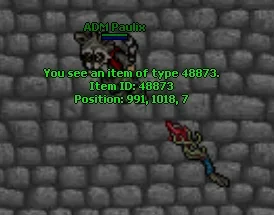
it is all working correctly, but the item descriptions are missing cause the id's are not set on items.xml, i can see the items in game normally, but they just dont have descriptions nor attributes

1769735904542.webp
 
Even with option, through item editor 0.5, "create missing items", client can stop working.
And in rme, you will see this new items, but not in the game.
If you click, on the map, where is new item, you will see only description of the item, and not the sprite.

Between old protocol, 8.6 and new protocol sprites from tibia 15, is something wrong.
Maybe then need to be synchronized, or parsed.

He's talking about items.xml
Everything else works fine

it is all working correctly, but the item descriptions are missing cause the id's are not set on items.xml, i can see the items in game normally, but they just dont have descriptions nor attributes

View attachment 97848

I don't think there's any items.xml that has all items registed
Your best option would be to create a json file to convert the items.xml of canary or crystal to tfs
 
Hmm, interesting, which tfs you are using ?

Otclient, cipsoft client ?
TFS 1.5 downgraded to 8.6 by nekiro
OTCv8

as marko said, is just about items.xml, I'm just creating custom items by hand anyways
 
First of all, I would like to thank @Marko999x for this thread. It is literally pure gold. Recently, I started playing around again with my old servers (8.4 and 8.6), and they don’t have anything custom — it’s the original CipSoft client. I played some 8.6 baiak servers and noticed that they have a lot of updated content, with monsters and items from version 10.x or higher, including walls, floors, and other assets from RME, which sparked my interest in this area.

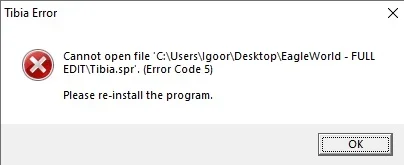
I experimented a bit and managed to add some sprites from version 10.x (Sanguine/Soulwar) into my 8.6 server. However, when I moved on to RME, I ran into the following issue: even doing everything correctly in OBJECT BUILDER, after compiling, when I open the client and log in, it goes into an infinite debug loop with the error message attached. Does anyone know how I can fix this?

 

Attachments

First of all, I would like to thank @Marko999x for this thread. It is literally pure gold. Recently, I started playing around again with my old servers (8.4 and 8.6), and they don’t have anything custom — it’s the original CipSoft client. I played some 8.6 baiak servers and noticed that they have a lot of updated content, with monsters and items from version 10.x or higher, including walls, floors, and other assets from RME, which sparked my interest in this area.

I experimented a bit and managed to add some sprites from version 10.x (Sanguine/Soulwar) into my 8.6 server. However, when I moved on to RME, I ran into the following issue: even doing everything correctly in OBJECT BUILDER, after compiling, when I open the client and log in, it goes into an infinite debug loop with the error message attached. Does anyone know how I can fix this?

When u export items from 10.98 as obd format and import it into 8.60 it won't work because you are adding flags from 10.x that does not exists in 8.60 :D
Easiest solution for that problem would be: Compile files as 8.50 as example then compile it back to 8.60
It will remove the flags
 
First of all, I would like to thank @Marko999x for this thread. It is literally pure gold. Recently, I started playing around again with my old servers (8.4 and 8.6), and they don’t have anything custom — it’s the original CipSoft client. I played some 8.6 baiak servers and noticed that they have a lot of updated content, with monsters and items from version 10.x or higher, including walls, floors, and other assets from RME, which sparked my interest in this area.

I experimented a bit and managed to add some sprites from version 10.x (Sanguine/Soulwar) into my 8.6 server. However, when I moved on to RME, I ran into the following issue: even doing everything correctly in OBJECT BUILDER, after compiling, when I open the client and log in, it goes into an infinite debug loop with the error message attached. Does anyone know how I can fix this?
Also, with compiled thing as marko said, use installed version of tibia client.
 
When u export items from 10.98 as obd format and import it into 8.60 it won't work because you are adding flags from 10.x that does not exists in 8.60 :D
Easiest solution for that problem would be: Compile files as 8.50 as example then compile it back to 8.60
It will remove the flags
So, please correct me if I’m wrong, because I’m inexperienced and dumb, and unfortunately I’m using a translator to talk to you all…

What I will have to do is this?

1st: I will have to use the original 8.6 client from CipSoft.
2nd: Open Object Builder and select the 12.x client version.
3rd: File > Compile As

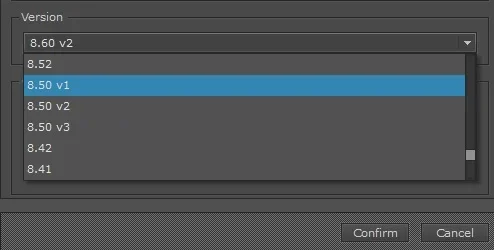
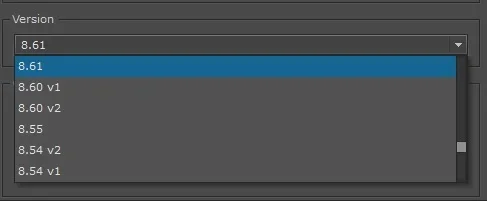
In “Version”, which option should I choose?
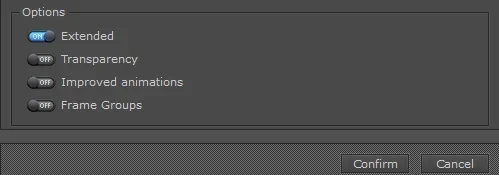
In “Options”, should I select anything besides Extended?

After doing that, do I open the original client I downloaded from CipSoft and click IMPORT, select the sprites, and compile in 8.6?!

I attached the images to show the options that appear.
 

Attachments

So, please correct me if I’m wrong, because I’m inexperienced and dumb, and unfortunately I’m using a translator to talk to you all…

What I will have to do is this?

1st: I will have to use the original 8.6 client from CipSoft.
2nd: Open Object Builder and select the 12.x client version.
3rd: File > Compile As

In “Version”, which option should I choose?
In “Options”, should I select anything besides Extended?

After doing that, do I open the original client I downloaded from CipSoft and click IMPORT, select the sprites, and compile in 8.6?!

I attached the images to show the options that appear.
Inexperienced yes, but not dumb.

Try compiling with 8.50v2, next compiling with 8.60v2, and with this options:
Extended: Yes
Improv. Anim: Yes
Frame Groups: Yes

Check this first, and let us know.
 
Inexperienced yes, but not dumb.

Try compiling with 8.50v2, next compiling with 8.60v2, and with this options:
Extended: Yes
Improv. Anim: Yes
Frame Groups: Yes

Check this first, and let us know.

Hello again!
Even after following the step-by-step instructions, I’m still getting an error in tibia.dat. I’m not sure if I did something wrong. I uploaded a video to Streamable showing exactly what I did, so you can check if I made any mistakes.


Watch bandicam 2026-03-01 11-12-15-298 | Streamable (https://streamable.com/rjfa7y)
 
Hey again!
Do you installed tibia 8.60 ?
I don't see there uninstaller.
You can click reload there, is just faster.
As you can see, I did exactly what you asked and it’s still giving the same error (original Tibia 8.6 folder).

So you can understand what I’m doing:

  • The “860” folder at the beginning is the one with the updated sprites;
  • The “Tibia” folder is the original one from CipSoft (as indicated).
I honestly can’t figure out what’s going on =/


As you can see, I did exactly what you asked and it’s still giving the same error (original Tibia 8.6 folder).

So you can understand what I’m doing:

  • The “860” folder at the beginning is the one with the updated sprites;
  • The “Tibia” folder is the original one from CipSoft (as indicated).
I honestly can’t figure out what’s going on =/


Compile without frame group and improved Animation. Tibia 8.60 does not support it by default.
 
As you can see, I did exactly what you asked and it’s still giving the same error (original Tibia 8.6 folder).

So you can understand what I’m doing:

  • The “860” folder at the beginning is the one with the updated sprites;
  • The “Tibia” folder is the original one from CipSoft (as indicated).
I honestly can’t figure out what’s going on =/


Installed like you installing games through setup.exe, not tibia from zip package.


And try method like marko said.
Post automatically merged:

Installed like you installing games through setup.exe, not tibia from zip package.


And try method like marko said.
Before installing new tibia 8.60, make a copy of your sprites files.
 
Last edited:
You can't just use the default 8.60 client and think it will work...
There's a reason why I included the tibia exe :D
 
Last edited:
Você não pode simplesmente usar o cliente padrão 8.60 e achar que vai funcionar...
Existe um motivo para eu ter incluído o executável do Tibia.:D
Alright, let’s recap.


I really don’t have any experience in this area, sorry about that. However, I’m genuinely making an effort to learn. Since you already gave me a good idea of what to do, where can I find this Tibia executable? I downloaded it exactly from the link you sent and asked me to download (the executable, not the zip file).


Other than that, if I really can’t manage to make it work, I’ll try to figure something out or find someone who can do it and pay them for the work.
Post automatically merged:

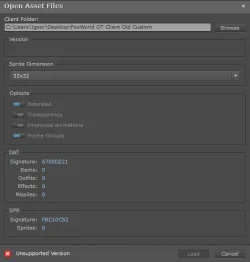
Update: After searching all over the internet, I found a server that is almost identical to the project I want. Would it be possible to use its sprites/client and just update the background image with the name I want, which would be FoxPrime?


However, when I try to use the client in Object Builder, I get the image error. Why does this happen? Could it be some kind of encryption, or is my Object Builder version simply not the correct one?


I’ve attached the image and the file in ZIP format so you can take a look.
 

Attachments

  • 1772479496238.webp
    1772479496238.webp
    18.2 KB · Views: 14 · VirusTotal
Last edited:
Hello, I have a problem. I have my current project. But I would like to import many things from this OTB into my project. Animations and many more. How can I do this? I have an 8.6 project with many new features from TFS 1.5.
 
Back
Top