• There is NO official Otland's Discord server and NO official Otland's server list. The Otland's Staff does not manage any Discord server or server list. Moderators or administrator of any Discord server or server lists have NO connection to the Otland's Staff. Do not get scammed!
  • 2026 staff recruitment is open! Check it out and consider applying!

Issue building TFS 1.4.2 on Windows – looking for guidance

xchaffer0

New Member
Joined
Apr 28, 2025
Messages
17
Reaction score
4
GitHub
xchaffer007
Hello everyone,

I hope you're doing well.

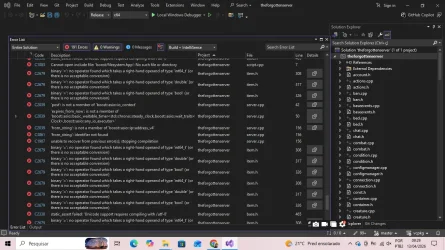
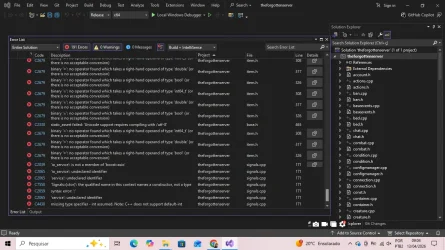
I'm currently trying to compile TFS 1.4.2 on Windows, but I’ve been running into some issues and haven’t been able to get it working so far.

As far as I can tell, my vcpkg installation is up to date, so I don’t think that’s the root of the problem. I’ve followed a few guides, but I’m still encountering errors during the build process and haven’t been able to pinpoint exactly what’s going wrong.

Has anyone experienced something similar or could point me in the right direction? I’d really appreciate any suggestions or things I might be overlooking.

Thanks in advance for your time and help!
 
Hello everyone,

I hope you're doing well.

I'm currently trying to compile TFS 1.4.2 on Windows, but I’ve been running into some issues and haven’t been able to get it working so far.

As far as I can tell, my vcpkg installation is up to date, so I don’t think that’s the root of the problem. I’ve followed a few guides, but I’m still encountering errors during the build process and haven’t been able to pinpoint exactly what’s going wrong.

Has anyone experienced something similar or could point me in the right direction? I’d really appreciate any suggestions or things I might be overlooking.

Thanks in advance for your time and help!


VCPKG might be an issue in this case. Download the one provided with git, and try.
 
Hello everyone,

I hope you're doing well.

I'm currently trying to compile TFS 1.4.2 on Windows, but I’ve been running into some issues and haven’t been able to get it working so far.

As far as I can tell, my vcpkg installation is up to date, so I don’t think that’s the root of the problem. I’ve followed a few guides, but I’m still encountering errors during the build process and haven’t been able to pinpoint exactly what’s going wrong.

Has anyone experienced something similar or could point me in the right direction? I’d really appreciate any suggestions or things I might be overlooking.

Thanks in advance for your time and help!
It's fmt errors correct?


If so just go to bottom of tools.cpp and add this (change to your own namepsace)


C++:
namespace BlackTek {

#if defined(__cpp_lib_to_underlying) && (__cpp_lib_to_underlying >= 202102L)

    inline constexpr auto to_underlying(auto e) noexcept { return std::to_underlying(e); }

#else

    inline constexpr auto to_underlying(auto e) noexcept { return static_cast<std::underlying_type_t<decltype(e)>>(e); }

#endif

} // namespace BlackTek

That should get rid of all the errors.. or at least enough to get a list of each usage of fmt that needs adjustment, if that happens and you are at a loss for what to do next, you can come back here and seek help, or, you can click on each error in the "output" tab (start at top one, it may fix the others, so always work top down) and it will take you to the line there is an error with the description of the problem, and you should be able to work out next what to do, or if you need further help, you can come back here again.
 
having up to date vcpkg its one of the problems, take a look when 1.4.2 been released, donwgrade the VCPKG, also try with older visual satudio

mine sweet spot for almost all tfs'es and otclient's
Code:
vcpkg package management program version 2024-06-10-02590c430e4ed9215d27870138c2e579cc338772

after fixing some issues with installation packages its one of the best options. also u can use manifest vcpkg (lazy fix, but reaching the goal)
 
Back
Top