
You are using an out of date browser. It may not display this or other websites correctly.
You should upgrade or use an alternative browser.
You should upgrade or use an alternative browser.
[12.x] OTServBR-Global
- Thread starter EduardoDantas
- Start date



alejandro762
Well-Known Member
- Joined
- Sep 6, 2021
- Messages
- 266
- Reaction score
- 78
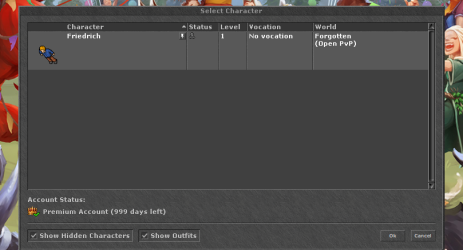
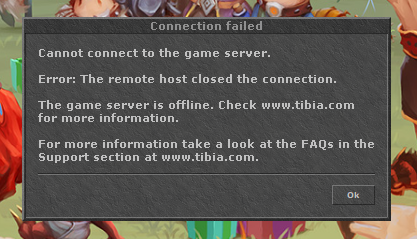
Servername mismatch , this error was because you use 2 different serve name in config.php and config.lua, i see now you can log in.View attachment 74878
View attachment 74879
View attachment 74880
Post automatically merged:
View attachment 74881
View attachment 74882
Post automatically merged:
View attachment 74883
it runs thx for all
can you say me only what my friends need now to come on my server
Well, on your computer open ports, but this is another thing, create a support thread about this with all informations, your router etc, if you didn't know how to open ports, also you need add it on your firewall, then change all 127.0.0.1 ( except mysql ) for your Public ip.

mysticbunny
Member
- Joined
- Jul 30, 2025
- Messages
- 17
- Reaction score
- 13
Hello, I really liked the project, I’ve already managed to run everything: website, client, and the server… but I have a question. Is it possible to implement the old Rookgaard on the server? The classic Rookgaard? I would really like the characters to start in the old city. I know I could do this with an 8.6 server without any problems, but I really want to use the modern systems of 12x, the modern graphics, but with the classic Rookgaard.

3alola1
I don't have time
If there is rookgaard in the map then just set the first town as rookguardHello, I really liked the project, I’ve already managed to run everything: website, client, and the server… but I have a question. Is it possible to implement the old Rookgaard on the server? The classic Rookgaard? I would really like the characters to start in the old city. I know I could do this with an 8.6 server without any problems, but I really want to use the modern systems of 12x, the modern graphics, but with the classic Rookgaard.
The player as a rocker and only add The oracle (i assume it is already added)
mysticbunny
Member
- Joined
- Jul 30, 2025
- Messages
- 17
- Reaction score
- 13
that's exactly what I'm looking for now, I'm compiling and configuring the map editor to look for rookguard 
I managed to find Rookguard in the map editor!!! Now I know I’ll have everything I need, and I’ve started working with these files.
I’m facing a problem with the latest version of OTServBR-Global and I’d like to know if anyone has gone through this or found a solution.
I’m using the latest server release available here:
 OTServBR-Global v1.5.0
And I’m trying to use the 12.91 client that comes in the project’s release:
Client 12.91.12329
The problem is that, when I try to log in with this client, I get the following error:

As an alternative, I tried using a compiled OTClient 3.5 from this repository:
OTClient 3.5 (mehah)
With this client, I was able to access the server without any issues on version 1.3.0 (protocol 12.86). Everything worked fine (login, movement, etc.).
However, when I try to use this same OTClient 3.5 but with the 12.91 assets, to access the latest server (v1.5.0), the login works but a strange bug happens:
Is there any specific configuration to use the official 12.91 client with server v1.5.0?
Or a proper way to use OTClient 3.5 with 12.91 assets without having the movement bug, missing sprite, and authentication issue?
Thanks a lot for any help or guidance!
Post automatically merged:
I managed to find Rookguard in the map editor!!!
Now I know I’ll have everything I need, and I’ve started working with these files.I’m facing a problem with the latest version of OTServBR-Global and I’d like to know if anyone has gone through this or found a solution.
I’m using the latest server release available here:
OTServBR-Global v1.5.0And I’m trying to use the 12.91 client that comes in the project’s release:
Client 12.91.12329The problem is that, when I try to log in with this client, I get the following error:
I’ve researched and noticed that this client expects an /api/v1/login endpoint, but I couldn’t find anything ready in the installation to handle this route.Error transferring http://127.0.0.1/api/v1/login - server replied: Not Found
As an alternative, I tried using a compiled OTClient 3.5 from this repository:
OTClient 3.5 (mehah)With this client, I was able to access the server without any issues on version 1.3.0 (protocol 12.86). Everything worked fine (login, movement, etc.).
However, when I try to use this same OTClient 3.5 but with the 12.91 assets, to access the latest server (v1.5.0), the login works but a strange bug happens:
- I can enter the game,
- But when I try to walk, the character takes a step and immediately goes back to the initial position (rubberband).
- NPCs move normally, but my character stays stuck.
- Also, on the login screen, the character sprite doesn’t appear: it’s just a blank space where the sprite should be.
- Another detail: when I click to log into the character, the message “Please wait: connecting to the authentication server” shows up. After a while, another message appears: “Authentication error: your connection was lost. Either your network or the server went down. (ERROR 10060).” and I’m sent back to the login screen.
- However, if while the message “Please wait: connecting to the authentication server” is still showing I cancel/abort the process before the final error 10060 appears, I’m taken back to the character selection screen. From there, if I click again to log into the same character, I can enter the game — but with the movement issue (walking forward and bouncing back).
- With the official 12.91 client, I get the login error: Error transferring http://127.0.0.1/api/v1/login - server replied: Not Found.
- With the OTClient 3.5 + 12.91 assets, I can log in, but the character can’t move (walks and gets pulled back), the sprite doesn’t appear on the login screen, and there’s also this strange behavior during authentication (Error 10060).
Is there any specific configuration to use the official 12.91 client with server v1.5.0?
Or a proper way to use OTClient 3.5 with 12.91 assets without having the movement bug, missing sprite, and authentication issue?
Thanks a lot for any help or guidance!
Last edited:
3alola1
I don't have time
This is login.php im not expert with the new clients protocols but I assum you need to edit this file if it exist somewhere in your account maker or your server.that's exactly what I'm looking for now, I'm compiling and configuring the map editor to look for rookguard
Post automatically merged:
I managed to find Rookguard in the map editor!!!
I’m facing a problem with the latest version of OTServBR-Global and I’d like to know if anyone has gone through this or found a solution.
I’m using the latest server release available here:
And I’m trying to use the 12.91 client that comes in the project’s release:
The problem is that, when I try to log in with this client, I get the following error:
View attachment 94605
I’ve researched and noticed that this client expects an /api/v1/login endpoint, but I couldn’t find anything ready in the installation to handle this route.
As an alternative, I tried using a compiled OTClient 3.5 from this repository:
With this client, I was able to access the server without any issues on version 1.3.0 (protocol 12.86). Everything worked fine (login, movement, etc.).
However, when I try to use this same OTClient 3.5 but with the 12.91 assets, to access the latest server (v1.5.0), the login works but a strange bug happens:
So I’m stuck between two problems:
- I can enter the game,
- But when I try to walk, the character takes a step and immediately goes back to the initial position (rubberband).
- NPCs move normally, but my character stays stuck.
- Also, on the login screen, the character sprite doesn’t appear: it’s just a blank space where the sprite should be.
- Another detail: when I click to log into the character, the message “Please wait: connecting to the authentication server” shows up. After a while, another message appears: “Authentication error: your connection was lost. Either your network or the server went down. (ERROR 10060).” and I’m sent back to the login screen.
- However, if while the message “Please wait: connecting to the authentication server” is still showing I cancel/abort the process before the final error 10060 appears, I’m taken back to the character selection screen. From there, if I click again to log into the same character, I can enter the game — but with the movement issue (walking forward and bouncing back).
Has anyone gone through this?
- With the official 12.91 client, I get the login error: Error transferring http://127.0.0.1/api/v1/login - server replied: Not Found.
- With the OTClient 3.5 + 12.91 assets, I can log in, but the character can’t move (walks and gets pulled back), the sprite doesn’t appear on the login screen, and there’s also this strange behavior during authentication (Error 10060).
Is there any specific configuration to use the official 12.91 client with server v1.5.0?
Or a proper way to use OTClient 3.5 with 12.91 assets without having the movement bug, missing sprite, and authentication issue?
Thanks a lot for any help or guidance!
But if you are new I would advice using the tfs as a way to go learning stuff first and it simple and easy to use and you will find tons of help and sourceses with features.
mysticbunny
Member
- Joined
- Jul 30, 2025
- Messages
- 17
- Reaction score
- 13
Thank you for the reply!
But in the specific case of the 12.91 client from OTServBR-Global, it’s not as simple as editing the login.php.
This client does not use the classic model (which connects to the login.php from MyAAC or Znote). It was designed to communicate with OTServBR-Global’s own website (CanaryAAC), which implements a REST API with endpoints such as:
- /api/v1/login
- /api/v1/checkcharactername
- /api/v1/events
That’s why, when I try to log in with the official 12.91 client, I get:
In other words, it’s not that the login.php is wrong or misconfigured — the 12.91 client simply doesn’t even try to access login.php. It looks for a REST endpoint that MyAAC/Znote do not provide.
On the other hand, when I use my client compiled directly from the official mehah/otclient repository (stable version 3.5), I can connect to the Canary server.
- When I connect to Canary 1.3.0 (12.86): I can log in and walk around normally without any issues.
- When I connect to Canary 1.5.0 (12.91): I can log in, but when I try to move my character, it takes one step and immediately snaps back, as if something were blocking me from moving.
- Curiously, in both 1.3.0 and 1.5.0, the character image does not appear on the login screen.
I’ve already compiled and tested several pure TFS versions without major problems, but now I specifically want to find a more complete server, because after finishing the basics of TFS there’s still a long road ahead. The Canary project, however, is already much more advanced — practically more than halfway there — and that’s why I’d rather stick with it instead of going back to basic TFS.
But in the specific case of the 12.91 client from OTServBR-Global, it’s not as simple as editing the login.php.
This client does not use the classic model (which connects to the login.php from MyAAC or Znote). It was designed to communicate with OTServBR-Global’s own website (CanaryAAC), which implements a REST API with endpoints such as:
- /api/v1/login
- /api/v1/checkcharactername
- /api/v1/events
That’s why, when I try to log in with the official 12.91 client, I get:
Error transferring http://127.0.0.1/api/v1/login - server replied: Not Found
In other words, it’s not that the login.php is wrong or misconfigured — the 12.91 client simply doesn’t even try to access login.php. It looks for a REST endpoint that MyAAC/Znote do not provide.
On the other hand, when I use my client compiled directly from the official mehah/otclient repository (stable version 3.5), I can connect to the Canary server.
- When I connect to Canary 1.3.0 (12.86): I can log in and walk around normally without any issues.
- When I connect to Canary 1.5.0 (12.91): I can log in, but when I try to move my character, it takes one step and immediately snaps back, as if something were blocking me from moving.
- Curiously, in both 1.3.0 and 1.5.0, the character image does not appear on the login screen.
I’ve already compiled and tested several pure TFS versions without major problems, but now I specifically want to find a more complete server, because after finishing the basics of TFS there’s still a long road ahead. The Canary project, however, is already much more advanced — practically more than halfway there — and that’s why I’d rather stick with it instead of going back to basic TFS.
khaled3343
New Member
- Joined
- Sep 18, 2025
- Messages
- 5
- Reaction score
- 1

Paco
Member
After a long time here is it:Alright no reply, I'll create the real tibia spell teachers editing your npcs and post them here :v Hope you use them.
feat: add configurable retro spell learning system by Paco161315 · Pull Request #3971 · opentibiabr/canary
Enable retro spell learning system as a config boolean. 1.- All spells have been updated to handle the new config. 2.- All NPCs have been updated to handle the learning spells system acording to ti...
 github.com
I'm debuging this server for everyone and creating the real tibia mechanics, please join us and help

where's the client? or the Bin folder?Hello everybody!
Today we introduce you a different project that we called Canary.
Canary aims to be the definitive and end engine for running a server, and along with that we are also sharing our otservbr-global datapack that runs on top of Canary.
Why canary?
The goal of this engine is to rewrite many systems from TFS in order to provide flexibility and bring organization and otimization to some areas.
This comes in the form of various refactors, cleaner and more efficient code, updated tech stacks that are relavant to the server.
The initial object was to be come a generic MMORPG 2D plataform that could go beyond the world of Tibia and its many derivated servers.
To achieve this object, we are simplifying key architectural areas in both Server and Client and introducing innovation whenever we see possible.
During many years we have tried to push such advancements to the main repository without success so we decided to start fresh and go in a completely different direction.
Canary holds some ideas for the future that are not yet implemented but are still relevant for future:
Server - We have the huge legacy that SaiyansKing left for us in his optimized tfs repository, where he gave us a glimpse of how badly the architecture was designed and how much further it can be improved.
Client: Despite running in latest tibia client, OTC Mehah is our official objective. At some point the client will have the tibia modules and will be optimized and easy to be used and adopted for every player.
Canary-Lib: Many things within the hundreds of bases and tools in the universe of open tibia share the same conceps and functions but they are not unified.
We have inumerous remakes in several places, with just a few tweaks and as you can imagine this is not different in client/server.
The idea of having a common lib to unify all that's common (configs, features, enums, definitions, most of protocol, etc) would simplify and reduce duplicity and maintenance.
In long run, we can have this lib being used as a base for development of other tools using its structure, such as RME, Item Editor, Integrated server list, Integrated Launcher (possibly in a steam format), etc.
The future looks bright, but we will need all the support we can!
Tutorials
GOD Account:
Contact:
Discord Group for Support
Report bugs (global datapack)
Report bugs (source)
Supported by: OTServBR Forum
GitHub Info
Latest release
Remere's Map Editor
Website (Myaac recommended)
Assets Editor
Others tools
Special Thanks:
Mark Samman
Saiyans King
Canary Contributors
Global Contributors[/B]
Similar threads

- Replies
- 6
- Views
- 2K

- Replies
- 0
- Views
- 459


