• There is NO official Otland's Discord server and NO official Otland's server list. The Otland's Staff does not manage any Discord server or server list. Moderators or administrator of any Discord server or server lists have NO connection to the Otland's Staff. Do not get scammed!
  • 2026 staff recruitment is open! Check it out and consider applying!

Alpha Proxy Guide (kondrah/otclient multi-path proxy)

The system initially worked well, and I will improve it.

I have one problem: I have a feature that, when the player's IP address is 0, the creatures ignore them (this is good because in case of power or internet outages, the player is protected).

However, with Alpha Proxy (hasproxy), when exiting the character, it takes 30 seconds to lose the IP address. Does anyone know how to adjust this setting?


Demonstration video: Watch WhatsApp Video 2025-12-16 at 19.20.16 | Streamable (https://streamable.com/vgz4o7)
 
However, with Alpha Proxy (hasproxy), when exiting the character, it takes 30 seconds to lose the IP address. Does anyone know how to adjust this setting?
When client without proxy 'exits', it closes TCP connection to OTS, so OTS is noticed that connection goes offline and delete Connection/ProtocolGame in C++, so server shows IP 0.0.0.0 for that player ( forgottenserver/src/player.cpp at 1.4 · otland/forgottenserver (https://github.com/otland/forgottenserver/blob/1.4/src/player.cpp#L1975) ).

When client with proxy 'exits', it closes TCP connections to alpha proxy server, but alpha proxy server does not close connection to OTS.

You can detect 'exit' in alpha proxy by replacing these lines ( alpha-proxy/server.cpp at main · thatmichaelguy/alpha-proxy (https://github.com/thatmichaelguy/alpha-proxy/blob/main/server.cpp#L202-L221) ) with:
C++:
void Session::removeProxy(const ProxyPtr &proxy)
{
#ifdef DEBUG
    std::clog << "[Session " << m_id << "] removeProxy" << std::endl;
#endif
    for (auto it = m_proxies.begin(); it != m_proxies.end();)
    {
        if (auto p = it->lock())
        {
            if (p == proxy)
            {
                it = m_proxies.erase(it);
                continue;
            }
            ++it;
            continue;
        }
        it = m_proxies.erase(it);
    }
    if (m_proxies.empty()) {
        terminate();
    }
}
It will close connection to OTS, when number of active sessions with client (client tries to keep 2 active) go to 0. I think that no one noticed that problem before, because no one used IP 0.0.0.0 as detection of connection lose. It only detects 'exit', not real problems with internet.

With and without proxy, if player really lose internet (ex. turn off WiFi on PC, block network on firewall by mistake), not 'exit' in client, server won't be 'noticed' that TCP connection does not work and it will take 30 seconds before OTS engine notice that connection is not active, drop it and show IP 0.0.0.0.

If you really want to detect people losing connection, you should modify server to send 'tibia ping' every second and 'protect' players that did not send any packet to server for X seconds (they should send at least 1 packet per second - response to ping). I worked for OTS that decided to send ping 10 times per second, to detect lags over 500 ms.

 
When client without proxy 'exits', it closes TCP connection to OTS, so OTS is noticed that connection goes offline and delete Connection/ProtocolGame in C++, so server shows IP 0.0.0.0 for that player ( forgottenserver/src/player.cpp at 1.4 · otland/forgottenserver (https://github.com/otland/forgottenserver/blob/1.4/src/player.cpp#L1975) ).

When client with proxy 'exits', it closes TCP connections to alpha proxy server, but alpha proxy server does not close connection to OTS.

You can detect 'exit' in alpha proxy by replacing these lines ( alpha-proxy/server.cpp at main · thatmichaelguy/alpha-proxy (https://github.com/thatmichaelguy/alpha-proxy/blob/main/server.cpp#L202-L221) ) with:
C++:
void Session::removeProxy(const ProxyPtr &proxy)
{
#ifdef DEBUG
    std::clog << "[Session " << m_id << "] removeProxy" << std::endl;
#endif
    for (auto it = m_proxies.begin(); it != m_proxies.end();)
    {
        if (auto p = it->lock())
        {
            if (p == proxy)
            {
                it = m_proxies.erase(it);
                continue;
            }
            ++it;
            continue;
        }
        it = m_proxies.erase(it);
    }
    if (m_proxies.empty()) {
        terminate();
    }
}
It will close connection to OTS, when number of active sessions with client (client tries to keep 2 active) go to 0. I think that no one noticed that problem before, because no one used IP 0.0.0.0 as detection of connection lose. It only detects 'exit', not real problems with internet.

With and without proxy, if player really lose internet (ex. turn off WiFi on PC, block network on firewall by mistake), not 'exit' in client, server won't be 'noticed' that TCP connection does not work and it will take 30 seconds before OTS engine notice that connection is not active, drop it and show IP 0.0.0.0.

If you really want to detect people losing connection, you should modify server to send 'tibia ping' every second and 'protect' players that did not send any packet to server for X seconds (they should send at least 1 packet per second - response to ping). I worked for OTS that decided to send ping 10 times per second, to detect lags over 500 ms.
Thanks works fine.
 
Can alpha proxy work with newer tfs when connection uses login.php?
Yes. login.php must return OTS IP 127.0.0.1 and it will make OTC use proxy system defined in init.lua (list of proxy IPs and ports) of OTC to connect to OTS.
I know that there are some changes in 14.00+ protocol in RL tibia client, that broke 'OTC proxy for RL Tibia Client'. IDK, if these changes are implemented in canary/OTC and if they break OTC proxy system too.
('OTCv8 proxy for RL Tibia Client' - as .exe - worked for 7.x - 13.40 RL tibia client without problems)

This client has proxy system:
More about that proxy config:
 
Last edited:
I am trying to implement the system for TFS1.6 and otclient redemption and I just cant find the problem.
My whole setup is local using windows machine with client and two Ubuntu VMs as forward proxy and backend server.
I can connect to the server without the proxy when allowOtcProxy and allowHaProxy are set to false and ip is set to VM's ip.

1. I am running TFS1.6 with Gesior's updates. so connection is through http.
I don't know if alpha proxy is considered HAproxy or OTCv8 proxy so I have tested with either and both flags set to true.

My config.lua:
LUA:
ip = "127.0.0.1"
bindOnlyGlobalAddress = true
httpPort = 8080
gameProtocolPort = 7172
statusProtocolPort = 7171

statusIp = "192.168.1.15" --closest forward proxy ip. Tested with 127.0.0.1 as well.
allowOtcProxy = false -- Tested with each being true separately and both true at the same time
allowHaProxy = true

2. client is otclient redemption with proxy handling added and proxy added in init.lua.
LUA:
init.lua: g_proxy.addProxy('192.168.1.15', 7200, 0)

3. Forward proxy is configured exactly as in post but i experimented with forwarding directly to and from port 8080

4. same with reverse proxy, only forward changed from port 7171 to 8080
LUA:
# login connections
listen l1
        bind 0.0.0.0:7100 accept-proxy
        mode tcp
        server srv1 127.0.0.1:8080 send-proxy-v2

5. alpha proxy with debug configuration shows in logs new connection when i turn on the client.
LUA:
Jan 31 20:07:43 ubuntuserver2204 alpha-proxy[22646]: [Server] new connection
Jan 31 20:07:43 ubuntuserver2204 alpha-proxy[22646]: [Proxy 0] onProxyHeader: Connections per IP: 0, m_ip = 192.168.1.37, m_proxy_ip = 15.1.168.192
Jan 31 20:07:43 ubuntuserver2204 alpha-proxy[22646]: [Proxy 0] onProxyHeader: Continuing with connection, connections from IP now: 1, m_ip = 192.168.1.37, m_proxy_ip = 15.1.168.192
I don't understand why m_proxy_ip is printed as "15.1.168.192" instead of "192.168.1.15"

6. no table in db and no dynamic proxy from server, might try to add it later on my own if hardcoded proxy works first.

How i try to login:
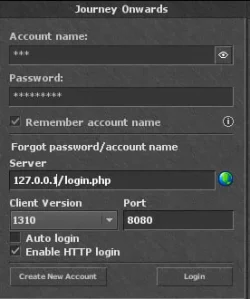
1769891639502.webp
The response after timeout is:
LUA:
-- REQUEST --
POST
/login.php
{"email":"ccc","password":"admin1234","stayloggedin":true,"type":"login"}
User-Agent      Mozilla/5.0
Content-Type    application/json
Accept-Encoding
Connection      close
Content-Length  73
Accept  */*
Host    127.0.0.1:8080
-- RESPONSE --
HTTP/1.1
404
Not Found
<!DOCTYPE html>
<html><head><title>Not Found</title></head>
<body>
<h2>Access Error: 404 -- Not Found</h2>
<pre>Cannot open document for: /login.php</pre>
</body>
</html>


Cache-Control   no-cache
Connection      close
Server  Embedthis-http
Date    Sat, 31 Jan 2026 20:38:45 GMT
Content-Length  178
=========
HTTP error: Success (no error)


Also I don't understand when login.php is important, i can log in directly with http://tibia_ip/login.php port 8080 even without login.php file on server.
data in response is coming from login.cpp code anyway, from function: tfs::http::handle_login.

and even if login.php is important, from what i understand from the code, login.php returns ip from config.lua which is set to 127.0.0.1
 
Also I don't understand when login.php is important, i can log in directly with http://tibia_ip/login.php port 8080 even without login.php file on server.
data in response is coming from login.cpp code anyway, from function: tfs::http::handle_login.
I missed in previous post that you are using TFS login.php on 8080 port, not MyAAC login.php to login.
You do not have login.php on server. TFS handles requests to login.php on port 8080 in C++, which I modified in my PR to return 127.0.0.1: OTCv8 proxy + HAProxy by gesior · Pull Request #4860 · otland/forgottenserver (https://github.com/otland/forgottenserver/pull/4860/changes#diff-6f4d3bc3da3c81c1d9a71a6276d5503adeec7643c1909d68f3cf2cb21517a09a)

TFS 1.6+ does not work with MyAAC, as TFS authors made own token generator for client that is not compatible with MyAAC.

Connection to www (login.php) does not go thru proxy system (you should use Cloudflare for protection and to hide OTS real IP - on production), so you should use same IP to login in OTC as without proxy. List of characters generated by "login.php" in TFS should return IP of server 127.0.0..1, to make client connect thru proxy, when player select character to login in client.

You can press CTRL+ALT+D to view OTCv8 proxy debug info in client.

I don't know if alpha proxy is considered HAproxy or OTCv8 proxy so I have tested with either and both flags set to true.
allowOtcProxy must be true to allow client to connect to TFS using OTCv8 proxy.
allowHaProxy is used only by 'status protocol', it allows you to add VPS with statusIp as OTS to otservlist etc. - to hide real IP of OTS.

I don't know if alpha proxy is considered HAproxy or OTCv8 proxy so I have tested with either and both flags set to true.
Alpha proxy by default requires haproxy in front of it, so packets from client go: OTC -> haproxy -> alpha proxy -> OTS
You can also edit:
to OFF and recompile, to make alpha proxy work without haproxy in front of it.

You should be able to run OTS, OTCv8 proxy and haproxy on same machine using IP 127.0.0.1 for all of them - they can run on different ports. VM/docker will break routing to 127.0.0.1.

Anyway, NOBODY tested TFS 1.6 with build in login.php and OTCv8 proxy.
I don't think it's a good idea to try to make it work without knowledge how it should work and how to debug every step, when it does not work. Especially on Windows with virtual machines - it may add some extra network problems, not related to OTCv8 proxy configuration problems. Part of OTCv8 code (alpha proxy) on server passes packets using IP 127.0.0.1, which won't work, if OTCv8 proxy (alpha proxy) runs in VM and OTS runs in separate VM.

I'm on holidays now, I will be at home after 6th February. Then I can try to make it work on Linux or on Windows with Docker Compose.
 
The problem is that proxy in client doesn't seem to use proxy ip when sending http login request if "127.0.0.1" is used as server address during login. I managed to make it work with sending login request directly at proxy and forwarding connection to reverse-proxy->TFS. TFS answers with 127.0.0.1 as externaladdressprotected in character list and alpha-proxy kicks in from this point.

Forward proxy:
LUA:
listen l1
        bind 192.168.1.15:8080
        mode tcp
        server srv1 192.168.1.14:8080

Reverse-proxy:
LUA:
listen l1
        bind 192.168.1.14:8080
        mode tcp
        server srv1 127.0.0.1:8080

TFS binds to 127.0.0.1:8080 for login.

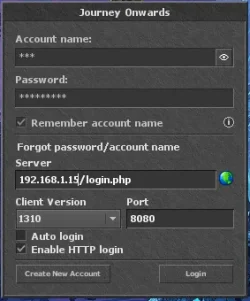
I login by passing forward-proxy address directly:
1770035946009.webp

If someone knows which part of proxy code in OTC redemption should be modified for client to use proxy address for http login i'd be thankful. I will post how i modified the client code if i get it to work.

Alpha proxy, reverse proxy and TFS are on the same machine.

Additionally my setup is with TFS in container but network mode is set to "host" so no additional network configuration is required.
 
The problem is that proxy in client doesn't seem to use proxy ip when sending http login request if "127.0.0.1" is used as server address during login. I managed to make it work with sending login request directly at proxy and forwarding connection to reverse-proxy->TFS. TFS answers with 127.0.0.1 as externaladdressprotected in character list and alpha-proxy kicks in from this point.

Forward proxy:
LUA:
listen l1
        bind 192.168.1.15:8080
        mode tcp
        server srv1 192.168.1.14:8080

Reverse-proxy:
LUA:
listen l1
        bind 192.168.1.14:8080
        mode tcp
        server srv1 127.0.0.1:8080

TFS binds to 127.0.0.1:8080 for login.

I login by passing forward-proxy address directly:
View attachment 97925

If someone knows which part of proxy code in OTC redemption should be modified for client to use proxy address for http login i'd be thankful. I will post how i modified the client code if i get it to work.

Alpha proxy, reverse proxy and TFS are on the same machine.

Additionally my setup is with TFS in container but network mode is set to "host" so no additional network configuration is required.
I made it work by modifying void LoginHttp::httpLogin in httplogin.cpp to iterate over proxies

C++:
    g_asyncDispatcher.detach_task([this, host, path, port, email, password, request_id, httpLogin] {
        std::string loginIP = host;
        httplib::Result result;
        if ((loginIP == "proxy" || loginIP == "0.0.0.0" || loginIP == "127.0.0.1") && g_proxy.isActive()) {
            std::map<std::string, uint32_t> proxies = g_proxy.getProxies();
            for (const auto& [addr, ping] : proxies) {
                auto pos = addr.find(':');
                loginIP = addr.substr(0, pos);
                std::cout << "trying to login over proxy, trying address: " << loginIP << ", " << std::to_string(port) << std::endl;
                result = this->loginHttpsJson(loginIP, path, port, email, password);
                if(result && result->status == Success) break;
                if(httpLogin){
                    result = loginHttpJson(loginIP, path, port, email, password);
                }
                if(result && result->status == Success) break;
            }
        }
        else{
            result = this->loginHttpsJson(loginIP, path, port, email, password);
            if (httpLogin && (!result || result->status != Success)) {
                result = loginHttpJson(loginIP, path, port, email, password);
            }
 
Back
Top