• There is NO official Otland's Discord server and NO official Otland's server list. The Otland's Staff does not manage any Discord server or server list. Moderators or administrator of any Discord server or server lists have NO connection to the Otland's Staff. Do not get scammed!
  • 2026 staff recruitment is open! Check it out and consider applying!

Assets Editor 2.0

SpiderOT

™ツʂριԃҽɾσƚ➽ ٩(•‿•)۶★彡
Joined
Sep 29, 2008
Messages
1,068
Solutions
10
Reaction score
321
Location
Egypt/cairo
Hello everyone,

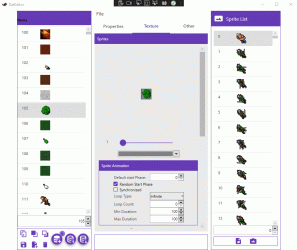
Assets Editor is an open-source tool designed for modifying and managing client assets for both Tibia 12+ and Tibia 1098.
Requirements:
  • Net Framework 6.0
Features:
  • Support for Tibia 12+
  • Support for Tibia 10.98.
  • Object Modification
  • Create/Copy/Delete Objects
  • Import and Export
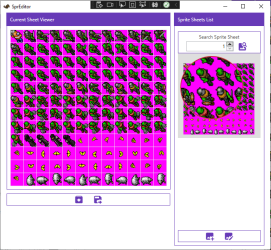
  • Sprite Sheet Modifications
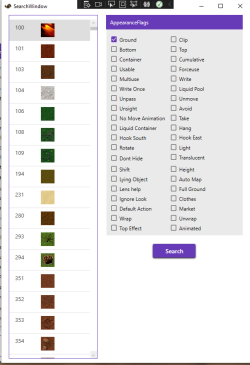
  • New Search Window
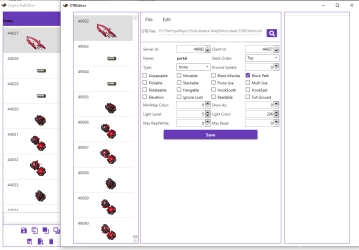
  • OTB Editor for Tibia 10.98
  • Import Manager for Tibia 10.98

You can download the latest version of the Assets Editor from Releases · Arch-Mina/Assets-Editor (https://github.com/Arch-Mina/Assets-Editor/releases)
2.PNG3.PNG4.PNG
5.gif
 

Attachments

Immaculate timing. How can we support you?
Post automatically merged:

FYI: When opening items.otb of TFS 1.4.2 (10.98 protocol) it crashes. Opening Tibia.dat and Tibia.spr of 10.98 works fine.
 
Last edited:

Any idea how to config it using the assets editor? @SpiderOT
 
Thank's a lot for the updates! Such an amazing tool
Just wondering if there's any guide on how to compile latest version
since last release was Assets Editor V2.0.0.Latest Nov8, 2023

Cheers!
 
A guide on compiling would definitely be appreciated! It would also be appreciated if we could get more information about how to use each "sub-module" for lack of a better term, specifically im interested in the sprite sheet viewer/editor, as I was never able to figure out how to get that part of the program running.
 
@SpiderOT any chance you make this compatible with 64x64 sprites? I wasn't able to compile/do it myself, that's why I'm asking.
Also, having a "Import Sprites in Batch" that gets every sprite inside the selected folder would be great.
 
IS THERE A TOOL TO CONVERT SPRITE DAT TO ASSETS? TO WE COULD REPLACE IMAGES FOR EXAMPLE FROM 8.6 TO TIBIA 13?
 
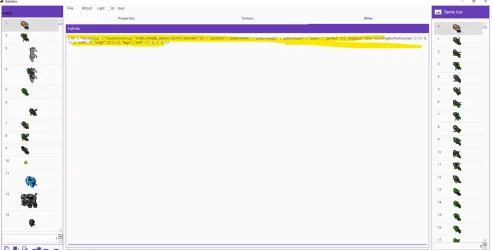
@SpiderOT is it possible to edit a sprite using the text?
For example, instead of drag and drop tons of sprites to make a big animations, i could just edit it using the spriteId line, add manually the Ids there.
assets-text.webp
 
A guide on compiling would definitely be appreciated! It would also be appreciated if we could get more information about how to use each "sub-module" for lack of a better term, specifically im interested in the sprite sheet viewer/editor, as I was never able to figure out how to get that part of the program running.
Compiling is pretty straightforward, you just use the C# SDK as per usual (open terminal in source folder, "dotnet build AssetsEditor.csproj --runtime [desired runtime here] --configuration Release"). If the forum allows me, I'm attaching a Windows x64 build with recent changes, requiring .NET 8.0. They added things such as light/dark mode, and in my experience, it loads assets much faster.

If you don't have Tibia installed in a default location, you might want to change the Settings.json file to stop getting warnings whenever you open the editor.

In order to use the Sprite Editor, you need the /assets/ folder of a Tibia 13+ version, which will make the current DatEditor open when you press "Load Assets". I tested this on the latest 15.11.dde523 version, and still works the same.
(If you open an older version than 13+, or if you have 13+ assets converted to the old format, it will load the LegacyDatEditor instead, if not just crash. The LegacyDatEditor doesn't have the Sprite Editor.)

You can tell which DatEditor you got by looking at the name of the window tab up top. If it just says "DatEditor", you're fine.
Under the Sprite List on the right, you'll have a button to "Open Sprite Manager". In this newer build it's opening in the background, so you'll have to maximize the Sprite Editor window after.

In "Search Sprite Sheet", you put the number of the sprite you want in the sheet, then press the "Create New Sheet" button right beside it.
The created sheet will appear below it. Click it to highlight it, then at the bottom press on "Edit Sheet".
Now you can do whatever you want with it.

If this is too vague, ask and I'll make a GIF demonstrating.

and for linux when?
I compiled it for Linux, but will only be able to test it tomorrow on my Debian machine. If I have any success, I'll post here too.
 

Attachments

Last edited:
Back
Top