
• There is NO official Otland's Discord server and NO official Otland's server list. The Otland's Staff does not manage any Discord server or server list. Moderators or administrator of any Discord server or server lists have NO connection to the Otland's Staff. Do not get scammed!
  • 2026 staff recruitment is open! Check it out and consider applying!

Autoloot script error screen

Sigoles

Discord: @sigoles
Joined
Nov 20, 2015
Messages
1,209
Solutions
2
Reaction score
154
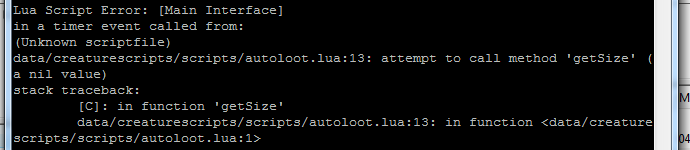
This work normal but sometimes got an error on screen:
AA8OE4K.png


Script:
Code:
local function scanContainer(cid, position)
    local player = Player(cid)
    if not player then
        return
    end

    local corpse = Tile(position):getTopDownItem()
    if not corpse then
        return
    end

    if corpse:getType():isCorpse() and corpse:getAttribute(ITEM_ATTRIBUTE_CORPSEOWNER) == cid then
        for a = corpse:getSize() - 1, 0, -1 do
            local containerItem = corpse:getItem(a)
            if containerItem then
                for b = AUTOLOOT_STORAGE_START, AUTOLOOT_STORAGE_END do
                    if player:getStorageValue(b) == containerItem:getId() then
                        containerItem:moveTo(player)
                    end
                end
            end
        end
    end
end

function onKill(player, target)
    if not target:isMonster() then
        return true
    end

    addEvent(scanContainer, 100, player:getId(), target:getPosition())
    return true
end


Help? Thanks
 
Tile(position):getTopDownItem() returns an item object
items don't have getSize method so you have to turn it into a container
Container(Tile(position):getTopDownItem())
don't work the line code ..
always enter in this if
Code:
if not corpse then
        return
    end

I fix this using
Code:
local corpse = Tile(position):getTopDownItem()
    if not corpse or not corpse:isContainer() then
        return
    end
works fine :)
 
Last edited by a moderator:
I fix this using
Code:
local corpse = Tile(position):getTopDownItem()
    if not corpse or not corpse:isContainer() then
        return
    end
works fine :)
that doesnt work because corpse still returns an item not a container
corpse:isContainer() can still return true since it has a container flag but isn't a container userdata
you have to turn it into a container userdata to use the methods
 
that doesnt work because corpse still returns an item not a container
corpse:isContainer() can still return true since it has a container flag but isn't a container userdata
you have to turn it into a container userdata to use the methods
I don't understand :/ could you give me an exemple that show me when my attempt to fix don't work ?
testing your code get:
Code:
data/creaturescripts/scripts/others/autoloot.lua:15: attempt to index a nil value
stack traceback:
        [C]: in function '__index'
        data/creaturescripts/scripts/others/autoloot.lua:15: in function <data/creaturescripts/scripts/others/autoloot.lua:9>
 
I don't understand :/ could you give me an exemple that show me when my attempt to fix don't work ?
testing your code get:
Code:
data/creaturescripts/scripts/others/autoloot.lua:15: attempt to index a nil value
stack traceback:
        [C]: in function '__index'
        data/creaturescripts/scripts/others/autoloot.lua:15: in function <data/creaturescripts/scripts/others/autoloot.lua:9>
nevermind i guess it inherits container if it has container flag
could have sworn that didnt work
my code still works if you put uid though
 
Back
Top