• There is NO official Otland's Discord server and NO official Otland's server list. The Otland's Staff does not manage any Discord server or server list. Moderators or administrator of any Discord server or server lists have NO connection to the Otland's Staff. Do not get scammed!
  • 2026 staff recruitment is open! Check it out and consider applying!

TFS 1.X+ Command that opens a container?

MohamedRefaat

Marketing and Coding
Premium User
Joined
Jan 18, 2014
Messages
991
Solutions
3
Reaction score
232
Location
Egypt
Hello

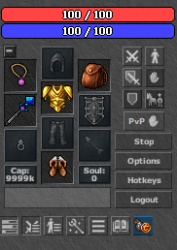
I made a new slot using this pr

I made it using store index, how i can add a command (!store) that open this slot so players can add items on it to give them extra bonus?
I am using latest otc, no icon to open it. and on old otc (there was a purse icon but not working)
Using tfs 1.3
 
Hello

I made a new slot using this pr

I made it using store index, how i can add a command (!store) that open this slot so players can add items on it to give them extra bonus?
I am using latest otc, no icon to open it. and on old otc (there was a purse icon but not working)
Using tfs 1.3
Im sure, OTC have Purse. And as i see in this link that you paste, you must create in items.xml container for this slot, that will "emulate" this purse.
 
Im sure, OTC have Purse. And as i see in this link that you paste, you must create in items.xml container for this slot, that will "emulate" this purse.
It is already registered in items.xml.
XML:
    <item id="26052" name="your store inbox">
        <attribute key="containerSize" value="20" />
    </item>
I changed item purse to be store inbox.
 
Soo this purse code was from 2016, im not sure this will be compatibile with new OTC
You will need to make it hmm little different name, and add new slto in OTC
I changed the code to store index, and item id also.

C++:
ITEM_STORE_INBOX = 26052,

C++:
    if (!player->inventory[CONST_SLOT_PURSE]) {
        player->internalAddThing(CONST_SLOT_PURSE, Item::CreateItem(ITEM_STORE_INBOX));
    }
 
Back
Top