
-
2026 staff recruitment is open! Check it out and consider applying!
You are using an out of date browser. It may not display this or other websites correctly.
You should upgrade or use an alternative browser.
You should upgrade or use an alternative browser.
!commands
- Thread starter hejd12345
- Start date


Okay.
Add this to your Talkactions.xml at data\talkactions:
Go to folder: data/talkactions/scripts and create commands.lua and paste this in:
Save it.
You have to adjust it for your commands that a player can use at this line:
For me it works on TFS 1.0 x64
Add this to your Talkactions.xml at data\talkactions:
Code:
<talkaction words="/commands" script="commands.lua"/>Go to folder: data/talkactions/scripts and create commands.lua and paste this in:
Code:
function onSay(cid, words, param)

local text = "Your player commands are as follows:\n"
local cmd = "!blessings\n!spells\n!frags\n!aol\nalana res 'Buy house\nalana grav 'name of player'\n!createguild 'name of guild'\n!joinguild 'name of guild'\n!buypremium\nalana som 'leave your house\n!online\n!changesex\n!uptime\n!deathlist 'name of player'\n!serverinfo"
local totaltext = text .. cmd
doPlayerPopupFYI(cid, "Player Commands:\n" .. totaltext)
--doShowTextDialog(cid, 2175, totaltext) instead of popup you can use a book instead just comment out the line above and uncomment this one
return TRUE
end
Save it.
You have to adjust it for your commands that a player can use at this line:
Code:
!blessings\n!spells\n!frags\n!aol\nalana res 'Buy house\nalana grav 'name of player'\n!createguild 'name of guild'\n!joinguild 'name of guild'\n!buypremium\nalana som 'leave your house\n!online\n!changesex\n!uptime\n!deathlist 'name of player'\n!serverinfo"For me it works on TFS 1.0 x64
Last edited:
And if you want to see all Commands that can be used paste this into your commands.lua:
This line set's wich file should be loaded in this case it's the talkaction.xml
If you change it like this:
You have to crate a new XML file at data\talkactions named "player.xml" and there you copy in your player commands like mine:
Result:
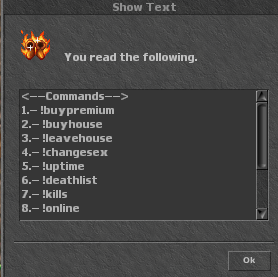
Code:
local myFile = "data/talkactions/talkactions.xml"

local useAccess = true --true / false

function onSay(cid, words, param, channel)
    local commands, acc, myAcc, x = {}, {}, getPlayerAccess(cid), 0
    local text = "<--Commands-->"
    if (io.open(myFile, "r") ~= nil) then
        for line in io.lines(myFile) do
            if (line:match('<talkaction ')) then
                if useAccess then
                    local access = 0
                    if (line:find('access=".*".*')) then
                        a = string.match(line, 'access=".*".*')
                        access = string.sub(a, string.find(a, '="') + 2, string.find(a, '" ') - 1)
                    end
                    table.insert(acc, tonumber(access))
                end
                if (line:find('words=".*".*')) then
                    line = string.match(line, 'words=".*".*')
                    word = string.sub(line, string.find(line, '="') + 2, string.find(line, '" ') - 1)
                    table.insert(commands, word)
                end
            end
        end
        for _i, i in ipairs(commands) do
            if useAccess then
                if myAcc >= acc[_i] then
                    text = text .. "\n" .. "" .. x + 1 .. ".- ".. i ..""
                    x = x + 1
                end
            else
                text = text .. "\n" .. "" .. x + 1 .. ".- ".. i ..""
                x = x + 1
            end
        end
        if useAccess then text = text .. "\n\nYour Access = " .. myAcc .. "" end
        text = text .. "\n\n" .. "Total " .. x .. " Commands."
        doShowTextDialog(cid, 9932, text)
    else
        error("File: \"" .. myFile .. "\" not found, please check directory or file.")
    end
    return TRUE
end
This line set's wich file should be loaded in this case it's the talkaction.xml
Code:
local myFile = "data/talkactions/talkactions.xml"If you change it like this:
Code:
local myFile = "data/talkactions/player.xml"You have to crate a new XML file at data\talkactions named "player.xml" and there you copy in your player commands like mine:
Code:
<?xml version="1.0" encoding="UTF-8"?>
<talkactions>
    <!-- player talkactions -->
    <talkaction words="!buypremium" script="buyprem.lua"/>
    <talkaction words="!buyhouse" script="buyhouse.lua"/>
    <talkaction words="!leavehouse" script="leavehouse.lua"/>
    <talkaction words="!changesex" script="changesex.lua"/>
    <talkaction words="!uptime" script="uptime.lua"/>
    <talkaction words="!deathlist" script="deathlist.lua"/>
    <talkaction words="!kills" script="kills.lua"/>
    <talkaction words="!online" script="online.lua"/>
    <talkaction words="!serverinfo" script="serverinfo.lua"/>
</talkactions>
Result:
Last edited:
No Problem.
If you don't want to display wich Acces the Player have just delte thoose lines:
This deletes the Total count of Player Commands and Acces Line in text Box.
On this Line you can change wich Items should be displayed at Text Box 
If you don't want to display wich Acces the Player have just delte thoose lines:
Code:
        if useAccess then text = text .. " " .. myAcc .. "" end
        text = text .. "\n\n" .. "Total " .. x .. " ."
This deletes the Total count of Player Commands and Acces Line in text Box.
Code:
doShowTextDialog(cid, 9932, text)
Last edited: