
Hi,
I've noticed you can set icons to be shown when specific condition is executed. For example, haste (utani hur);
you get this;
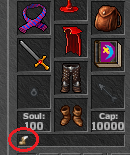
I've looked at the haste spell script and didn't find anything useful there, which means it must be inside the source
If anyone can point me in the right direction that would be cool!
TFS 1.0, if that helps
I've noticed you can set icons to be shown when specific condition is executed. For example, haste (utani hur);
you get this;
I've looked at the haste spell script and didn't find anything useful there, which means it must be inside the source
LUA:
local combat = Combat()
combat:setParameter(COMBAT_PARAM_EFFECT, CONST_ME_MAGIC_GREEN)
combat:setParameter(COMBAT_PARAM_AGGRESSIVE, 0)

local condition = Condition(CONDITION_HASTE)
condition:setParameter(CONDITION_PARAM_TICKS, 33000)
condition:setFormula(0.3, -24, 0.3, -24)
combat:setCondition(condition)

function onCastSpell(creature, var)
    return combat:execute(creature, var)
end
If anyone can point me in the right direction that would be cool!
TFS 1.0, if that helps


