
Where can you change the size/shape/color of the condition panel in the OTClient? For reference, that's the place where the icons for battle, burning, etc. appear:
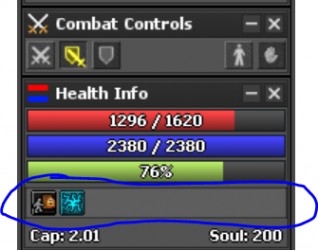
I have tried editing 40-healthinfo.otui where it says "condition panel":
But nothing changes. I have found how to edit the condition icons themselves, but not the bar where they appear.
Thanks
I have tried editing 40-healthinfo.otui where it says "condition panel":
Code:
 Panel
      id: conditionPanel
      layout:
        type: horizontalBox
      height: 22
      margin-top: 4
      padding: 2
      anchors.top: prev.bottom
      anchors.left: parent.left
      anchors.right: parent.right
      border-width: 1
      border-color: #00000077
background-color: #ffffff11Thanks
