sanderman14
New Member
I´ve got a server up and running and I can connect and play on it with my localhost (127.0.0.1)
But when I change the IP to my local ip (192.168.X.XXX) I don't get my character list and eventualy get the error that I can't connect to the game server.
Same goes for when I try with my global IP (from whatismyip)
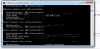
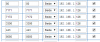
I've got my ports forwarded (see image)
Does anyone know what I'm doing wrong?
But when I change the IP to my local ip (192.168.X.XXX) I don't get my character list and eventualy get the error that I can't connect to the game server.
Same goes for when I try with my global IP (from whatismyip)
I've got my ports forwarded (see image)
Does anyone know what I'm doing wrong?
Attachments
-
 ports.png6.2 KB · Views: 11 · VirusTotal