• There is NO official Otland's Discord server and NO official Otland's server list. The Otland's Staff does not manage any Discord server or server list. Moderators or administrator of any Discord server or server lists have NO connection to the Otland's Staff. Do not get scammed!
  • 2026 staff recruitment is open! Check it out and consider applying!

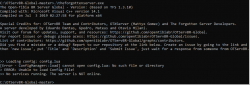
Couldn't establish connection

DreadShi

Member
Joined
May 18, 2019
Messages
180
Reaction score
7
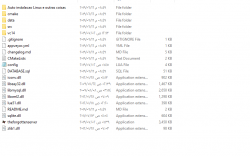
i get this message after running theforgottenserver "couldn't establish connection" and the cmd disappears
Code:
-- Combat settings
-- NOTE: valid values for worldType are: "pvp", "no-pvp" and "pvp-enforced"
worldType = "pvp"
hotkeyAimbotEnabled = true
protectionLevel = 7
pzLocked = 60 * 1000
removeChargesFromRunes = true
removeChargesFromPotions = true
removeWeaponAmmunition = true
removeWeaponCharges = true
timeToDecreaseFrags = 24 * 60 * 60 * 1000
whiteSkullTime = 15 * 60 * 1000
stairJumpExhaustion = 2 * 1000
experienceByKillingPlayers = false
expFromPlayersLevelRange = 75
dayKillsToRedSkull = 3
weekKillsToRedSkull = 5
monthKillsToRedSkull = 10
redSkullDuration = 30
blackSkullDuration = 45
orangeSkullDuration = 7

-- Connection Config
-- NOTE: maxPlayers set to 0 means no limit
-- NOTE: MaxPacketsPerSeconds if you change you will be subject to bugs by WPE, keep the default value of 25
ip = "127.0.0.1"
bindOnlyGlobalAddress = false
loginProtocolPort = 7171
gameProtocolPort = 7172
statusProtocolPort = 7171
maxPlayers = 0
motd = "Bem vindo ao OTBR-Global!"
onePlayerOnlinePerAccount = true
allowClones = false
serverName = "OTBR-Global"
statusTimeout = 5 * 1000
replaceKickOnLogin = true
maxPacketsPerSecond = 25
maxItem = 2000
maxContainer = 100

-- Version Manual
clientVersionMin = 1100
clientVersionMax = 1200
clientVersionStr = "Only support outdated 10.00 and versions 11.00 to 11.49"

-- Depot Limit
freeDepotLimit = 2000
premiumDepotLimit = 10000
depotBoxes = 17

-- GameStore
gamestoreByModules = true

-- Quest Sytem
loadQuestLua = true

-- Casting System
enableLiveCasting = true
liveCastPort = 7173

-- Expert Pvp Config
expertPvp = false

-- Deaths
-- NOTE: Leave deathLosePercent as -1 if you want to use the default
-- death penalty formula. For the old formula, set it to 10. For
-- no skill/experience loss, set it to 0.
deathLosePercent = -1

-- Houses
-- NOTE: set housePriceEachSQM to -1 to disable the ingame buy house functionality
housePriceEachSQM = 1000
houseRentPeriod = "never"

-- Item Usage
timeBetweenActions = 200
timeBetweenExActions = 500

-- Map
-- NOTE: set mapName WITHOUT .otbm at the end
mapName = "realmap"
mapAuthor = "OTBR-Global"

-- Market
marketOfferDuration = 30 * 24 * 60 * 60
premiumToCreateMarketOffer = true
checkExpiredMarketOffersEachMinutes = 60
maxMarketOffersAtATimePerPlayer = 100

-- MySQL
mysqlHost = "127.0.0.1"
mysqlUser = ""
mysqlPass = ""
mysqlDatabase = "database.sql"
mysqlPort = 3306
mysqlSock = ""
passwordType = "sha1"

-- Misc.
allowChangeOutfit = true
freePremium = true
kickIdlePlayerAfterMinutes = 15
idleWarningTime = 10 * 60 * 1000
idleKickTime = 15 * 60 * 1000
maxMessageBuffer = 4
emoteSpells = false
classicEquipmentSlots = false
allowWalkthrough = true
coinPacketSize = 1
coinImagesURL = "http://localhost/images/store/"
classicAttackSpeed = false

-- Rates
-- NOTE: rateExp is not used if you have enabled stages in data/XML/stages.xml
rateExp = 1
rateSkill = 50
rateLoot = 3
rateMagic = 25
rateSpawn = 1

-- Monster rates
rateMonsterHealth = 1.0
rateMonsterAttack = 1.0
rateMonsterDefense = 1.0

-- Monsters
deSpawnRange = 2
deSpawnRadius = 50

-- Stamina
staminaSystem = true

-- Scripts
warnUnsafeScripts = true
convertUnsafeScripts = true

-- Startup
-- NOTE: defaultPriority only works on Windows and sets process
-- priority, valid values are: "normal", "above-normal", "high"
defaultPriority = "high"
startupDatabaseOptimization = true

-- Status server information
ownerName = "OTBR-Global"
ownerEmail = ""
url = ""
location = "Brasil"

37426
 
you need to uplaod the database to your localhost and set the name properly in config.lua

Code:
-- MySQL
mysqlHost = "127.0.0.1"
mysqlUser = ""   most used nameuser is root
mysqlPass = ""  
mysqlDatabase = "database.sql" upload the database and sset the name here
mysqlPort = 3306
mysqlSock = ""
passwordType = "sha1"
 
you need to uplaod the database to your localhost and set the name properly in config.lua

Code:
-- MySQL
mysqlHost = "127.0.0.1"
mysqlUser = ""   most used nameuser is root
mysqlPass = "" 
mysqlDatabase = "database.sql" upload the database and sset the name here
mysqlPort = 3306
mysqlSock = ""
passwordType = "sha1"
but i think , befor 2 years i compiled a tfs and opend it without uploading my database?
i used to upload my database only when i needed to make a website
 
but i think , befor 2 years i compiled a tfs and opend it without uploading my database?
i used to upload my database only when i needed to make a website
Because with older TFS versions you had a default .s3db (SQLite) database file. Now you have to set up a database yourself with the schema.sql provided with the new TFS. Read this to learn how to set one up: Setting up your first server (https://docs.otland.net/ots-guide/running-your-first-ot-server/setting-up-your-first-server)
 
post your config.lua
Code:
-- Combat settings
-- NOTE: valid values for worldType are: "pvp", "no-pvp" and "pvp-enforced"
worldType = "pvp"
hotkeyAimbotEnabled = true
protectionLevel = 7
pzLocked = 60 * 1000
removeChargesFromRunes = true
removeChargesFromPotions = true
removeWeaponAmmunition = true
removeWeaponCharges = true
timeToDecreaseFrags = 24 * 60 * 60 * 1000
whiteSkullTime = 15 * 60 * 1000
stairJumpExhaustion = 2 * 1000
experienceByKillingPlayers = false
expFromPlayersLevelRange = 75
dayKillsToRedSkull = 3
weekKillsToRedSkull = 5
monthKillsToRedSkull = 10
redSkullDuration = 30
blackSkullDuration = 45
orangeSkullDuration = 7

-- Connection Config
-- NOTE: maxPlayers set to 0 means no limit
-- NOTE: MaxPacketsPerSeconds if you change you will be subject to bugs by WPE, keep the default value of 25
ip = "127.0.0.1"
bindOnlyGlobalAddress = false
loginProtocolPort = 7171
gameProtocolPort = 7172
statusProtocolPort = 7171
maxPlayers = 0
motd = "Bem vindo ao OTBR-Global!"
onePlayerOnlinePerAccount = true
allowClones = false
serverName = "OTBR-Global"
statusTimeout = 5 * 1000
replaceKickOnLogin = true
maxPacketsPerSecond = 25
maxItem = 2000
maxContainer = 100

-- Version Manual
clientVersionMin = 1100
clientVersionMax = 1200
clientVersionStr = "Only support outdated 10.00 and versions 11.00 to 11.49"

-- Depot Limit
freeDepotLimit = 2000
premiumDepotLimit = 10000
depotBoxes = 17

-- GameStore
gamestoreByModules = true

-- Quest Sytem
loadQuestLua = true

-- Casting System
enableLiveCasting = true
liveCastPort = 7173

-- Expert Pvp Config
expertPvp = false

-- Deaths
-- NOTE: Leave deathLosePercent as -1 if you want to use the default
-- death penalty formula. For the old formula, set it to 10. For
-- no skill/experience loss, set it to 0.
deathLosePercent = -1

-- Houses
-- NOTE: set housePriceEachSQM to -1 to disable the ingame buy house functionality
housePriceEachSQM = 1000
houseRentPeriod = "never"

-- Item Usage
timeBetweenActions = 200
timeBetweenExActions = 500

-- Map
-- NOTE: set mapName WITHOUT .otbm at the end
mapName = "realmap"
mapAuthor = "OTBR-Global"

-- Market
marketOfferDuration = 30 * 24 * 60 * 60
premiumToCreateMarketOffer = true
checkExpiredMarketOffersEachMinutes = 60
maxMarketOffersAtATimePerPlayer = 100

-- MySQL
mysqlHost = "localhost"
mysqlUser = "otserv"
mysqlPass = "O07QV0d5ETjUj00h"
mysqlDatabase = "otserv"
mysqlPort = 3306
mysqlSock = ""
passwordType = "sha1"

-- Misc.
allowChangeOutfit = true
freePremium = true
kickIdlePlayerAfterMinutes = 15
idleWarningTime = 10 * 60 * 1000
idleKickTime = 15 * 60 * 1000
maxMessageBuffer = 4
emoteSpells = false
classicEquipmentSlots = false
allowWalkthrough = true
coinPacketSize = 1
coinImagesURL = "http://localhost/images/store/"
classicAttackSpeed = false

-- Rates
-- NOTE: rateExp is not used if you have enabled stages in data/XML/stages.xml
rateExp = 1
rateSkill = 50
rateLoot = 3
rateMagic = 25
rateSpawn = 1

-- Monster rates
rateMonsterHealth = 1.0
rateMonsterAttack = 1.0
rateMonsterDefense = 1.0

-- Monsters
deSpawnRange = 2
deSpawnRadius = 50

-- Stamina
staminaSystem = true

-- Scripts
warnUnsafeScripts = true
convertUnsafeScripts = true

-- Startup
-- NOTE: defaultPriority only works on Windows and sets process
-- priority, valid values are: "normal", "above-normal", "high"
defaultPriority = "high"
startupDatabaseOptimization = true

-- Status server information
ownerName = "OTBR-Global"
ownerEmail = ""
url = ""
location = "Brasil"


tried 127.0.0.1 and it closes without showing me any line
 
everything is properly setup in here? are you sure that's the correct password?
the right mysql usernam? "otserv" and not "root" instead?
the databse name is otserv?
Code:
-- MySQL
mysqlHost = "localhost"
mysqlUser = "otserv"   -- try changing it to root
mysqlPass = "O07QV0d5ETjUj00h"  - if you haven't setup a password leave this in blank
mysqlDatabase = "otserv"  -that the name of the databse? did you name your db "otserv"?
mysqlPort = 3306
mysqlSock = ""
passwordType = "sha1"
 
everything is properly setup in here? are you sure that's the correct password?
the right mysql usernam? "otserv" and not "root" instead?
the databse name is otserv?
Code:
-- MySQL
mysqlHost = "localhost"
mysqlUser = "otserv"   -- try changing it to root
mysqlPass = "O07QV0d5ETjUj00h"  - if you haven't setup a password leave this in blank
mysqlDatabase = "otserv"  -that the name of the databse? did you name your db "otserv"?
mysqlPort = 3306
mysqlSock = ""
passwordType = "sha1"
yes :(
 
U sure that u have opened mysql on default port? + 100% started mysql?
It's doesn't matter if the ports aren't opened, the exe should succesfully open(if everything it's preoperly setup at config.lua file + database), i think he's making something wrong
 
It's doesn't matter if the ports aren't opened, the exe should succesfully open, i think he's making something wrong
not, if he run it from .exe it will close when return;

open CMD and then type cd dir_of_your_project
and then type
./theforgottenserver.exe
You wll see error.
 
Last edited:
Back
Top