• There is NO official Otland's Discord server and NO official Otland's server list. The Otland's Staff does not manage any Discord server or server list. Moderators or administrator of any Discord server or server lists have NO connection to the Otland's Staff. Do not get scammed!
  • 2026 staff recruitment is open! Check it out and consider applying!

Lua Create Duplicates Mounts

beenii

Well-Known Member
Joined
Jul 26, 2010
Messages
586
Solutions
1
Reaction score
58
hi, is possible create two or more mounts with same clientid? example:

XML:
    <mount id="82" clientid="739" name="Noctungra" speed="20" premium="yes" />
    <mount id="103" clientid="739" name="Super Noctungra" speed="40" premium="yes" />


need edit sources?
 
Last edited by a moderator:
You might be able to, best way is to try it :P
I don't see any issues seeing as we only send the client id and name, the id tag is only used by us.
So try it but change the id and name tag to something else.
 
Well this is an interesting idea.
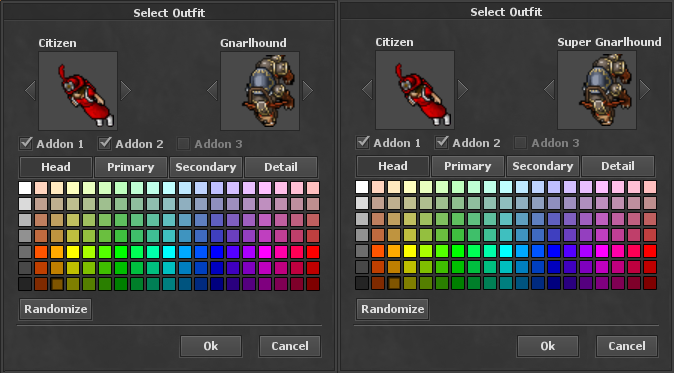
Trying with gnarlhound.
XML:
<mount id="31" clientId="506" name="Dragonling" speed="100" premium="yes" />
<mount id="32" clientId="515" name="Gnarlhound" speed="100" premium="yes" />
<mount id="33" clientId="515" name="Super Gnarlhound" speed="100" premium="yes" />

Initial test failed.
Converting Gnarlhound into dragonling.. in case it's a 'max mounts allowed' issue.
XML:
<mount id="31" clientId="506" name="Dragonling" speed="100" premium="yes" />
<mount id="32" clientId="506" name="Gnarlhound" speed="100" premium="yes" />
This works.

Just realised my god may not have the "all mounts" tag anymore.
Will give myself mount #33 through a script, using the Super Gnarlhound from the original test.
XML:
<mount id="31" clientId="506" name="Dragonling" speed="100" premium="yes" />
<mount id="32" clientId="515" name="Gnarlhound" speed="100" premium="yes" />
<mount id="33" clientId="515" name="Super Gnarlhound" speed="100" premium="yes" />
Works Perfectly.
4zZmx7l.png
 
Last edited by a moderator:
Well this is an interesting idea.
Trying with gnarlhound.
Code:
<mount id="31" clientId="506" name="Dragonling" speed="100" premium="yes" />
<mount id="32" clientId="515" name="Gnarlhound" speed="100" premium="yes" />
<mount id="33" clientId="515" name="Super Gnarlhound" speed="100" premium="yes" />

Initial test failed.
Converting Gnarlhound into dragonling.. in case it's a 'max mounts allowed' issue.
Code:
<mount id="31" clientId="506" name="Dragonling" speed="100" premium="yes" />
<mount id="32" clientId="506" name="Gnarlhound" speed="100" premium="yes" />
This works.

Just realised my god may not have the "all mounts" tag anymore.
Will give myself mount #33 through a script, using the Super Gnarlhound from the original test.
Code:
<mount id="31" clientId="506" name="Dragonling" speed="100" premium="yes" />
<mount id="32" clientId="515" name="Gnarlhound" speed="100" premium="yes" />
<mount id="33" clientId="515" name="Super Gnarlhound" speed="100" premium="yes" />
Works Perfectly.
4zZmx7l.png


You Try to climb the mount?

In the outfit window, if they appear, the problem is when you want to climb on the duplicate mounts.
With the players it is impossible, climb on duplicates, it is as if you do not have mount.

You might be able to, best way is to try it :p
I don't see any issues seeing as we only send the client id and name, the id tag is only used by us.
So try it but change the id and name tag to something else.

Creates conflicts by sending the same id of the client. Try it and you'll see it xD
 
Last edited by a moderator:
You Try to climb the mount?

In the outfit window, if they appear, the problem is when you want to climb on the duplicate mounts.
With the players it is impossible, climb on duplicates, it is as if you do not have mount.


Creates conflicts by sending the same id of the client. Try it and you'll see it xD

Please read the rules, you aren't allowed to double post.

That might be correct, but it worked for Xikini, but might be that the zippy client dosn't allow it.
 
I'll try again when I get home. I never actually "mounted" the mount. :s
But yeah, I am using the OTC client, not the regular one.

You try and tell me the result, try with players And not gods xD thank you so much friend.
 
Alright, so yeah this DOES NOT work.

While it will show up in the character menu, it's impossible to actually mount the "super mounts".
I tried 2 variations.

First, Gave both normal and Super mount.
Login -> choose super mount, mount the mount, but it defaults to the First iteration of client id that it finds. Meaning, it chooses the normal mount.
Aka: 33 and 32 has same client id. Select 33, save, mount the mount, get id 32.
Tested with "speed" 100 and 1000, and when you re-open the outfit selection window, it shows that you are riding the normal mount.

Second, Gave only the Super mount. (thinking we could give/take mounts and kind of make an upgrade system or something)
When attempting to mount the mount, it acts like I have no mount, and just opens the outfit selection screen.
I'm assuming, because of the same issue as above, where it finds the first client id in the list, and the client/server assumes that is the one you want to use.

Thirdly, I attempted to create a script to Force my character to use a different mount.. but again I can only choose the ClientID.. aka looktype of the mount, not the Mount ID.
So upon logging in, while only having the super mount, I forced the character to have that looktype, and everything broke. xD
My character had no mounts, and until I restarted server (and remade like 4 characters) I couldn't even see that mount in my client anymore.

Conclusion,
I couldn't make this work outside of the character selection window. :(
 
Alright, so yeah this DOES NOT work.

While it will show up in the character menu, it's impossible to actually mount the "super mounts".
I tried 2 variations.

First, Gave both normal and Super mount.
Login -> choose super mount, mount the mount, but it defaults to the First iteration of client id that it finds. Meaning, it chooses the normal mount.
Aka: 33 and 32 has same client id. Select 33, save, mount the mount, get id 32.
Tested with "speed" 100 and 1000, and when you re-open the outfit selection window, it shows that you are riding the normal mount.

Second, Gave only the Super mount. (thinking we could give/take mounts and kind of make an upgrade system or something)
When attempting to mount the mount, it acts like I have no mount, and just opens the outfit selection screen.
I'm assuming, because of the same issue as above, where it finds the first client id in the list, and the client/server assumes that is the one you want to use.

Thirdly, I attempted to create a script to Force my character to use a different mount.. but again I can only choose the ClientID.. aka looktype of the mount, not the Mount ID.
So upon logging in, while only having the super mount, I forced the character to have that looktype, and everything broke. xD
My character had no mounts, and until I restarted server (and remade like 4 characters) I couldn't even see that mount in my client anymore.

Conclusion,
I couldn't make this work outside of the character selection window. :(

it is very sad :(
I never imagined that duplicating a mount would be so complicated xD It just occurred to me yesterday, but it did not work out.

I had prepared this wonderful system on www.furera.net :
but I will have to use another alternative

16406423_1064266613719005_2643843878532570100_n.png


I think, and I'll edit my client,
i duplicate Sprite Noctungra of mount clientid="904", now have diferent clientid xD
If they want, they will have to use my personalized client.

super.png


If you find another alternative, please let me know. My solution is not the best.
 
Last edited:

Similar threads

Back
Top