1... Open Tibia.exe with a Hex Editor.
2... Search for "login01" text string.
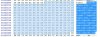
You should see all of this.
3... You can replace login01.tibia.com with an address with the same length. Such as examp01.no-ip.org
It must match up or in my experience it just corrupts the .exe
login01.tibia.com -> examp01.no-ip.org
login02.tibia.com -> examp01.no-ip.org
login03.tibia.com -> examp01.no-ip.org
login04.tibia.com -> examp01.no-ip.org
login05.tibia.com -> examp01.no-ip.org
tibia01.cipsoft.com -> example01.no-ip.org
tibia02.cipsoft.com -> example01.no-ip.org
tibia03.cipsoft.com -> example01.no-ip.org
tibia04.cipsoft.com -> example01.no-ip.org
tibia05.cipsoft.com -> example01.no-ip.org
4... When I do it, I change them all just so that it only tries to connect to the address you want it to.
NOTICE:
The dots in red are ones that you shouldn't overwrite at all. They are 00 in hex.
Code:
login01.tibia.com[SIZE=5][COLOR="#FF0000"]...[/COLOR][/SIZE]login02.tibia.com[COLOR="#FF0000"][SIZE=5]...[/SIZE][/COLOR]login03.tibia.com[COLOR="#FF0000"][SIZE=5]...[/SIZE][/COLOR]login04.tibia.com[COLOR="#FF0000"][SIZE=5]...[/SIZE][/COLOR]login05.tibia.com[COLOR="#FF0000"][SIZE=5]...[/SIZE][/COLOR]tibia01.cipsoft.com[COLOR="#FF0000"][SIZE=5].[/SIZE][/COLOR]tibia02.cipsoft.com[COLOR="#FF0000"][SIZE=5].[/SIZE][/COLOR]tibia03.cipsoft.com[COLOR="#FF0000"][SIZE=5].[/SIZE][/COLOR]tibia04.cipsoft.com[COLOR="#FF0000"][SIZE=5].[/SIZE][/COLOR]tibia05.cipsoft.com



