• There is NO official Otland's Discord server and NO official Otland's server list. The Otland's Staff does not manage any Discord server or server list. Moderators or administrator of any Discord server or server lists have NO connection to the Otland's Staff. Do not get scammed!

Diagonal delay/exhaust

Addams

OTMadness.com
Staff member
Global Moderator
Premium User
Joined
Sep 29, 2009
Messages
2,978
Solutions
344
Reaction score
1,843
Location
Egypt
GitHub
molegacy
Twitch
molegacy1
Where can I edit diagonal delay/exhaust? Player's speed is alright but the diagonal dash/movement has small delay which I wanna remove and make it like south/east/west/north moves/dash.
I am trying to edit it using this source
Fir3element/3777 (https://github.com/Fir3element/3777)
 
Solution
search on creature.cpp
Code:
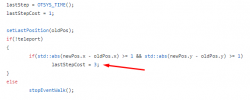
void Creature::onCreatureMove(const Creature* creature, const Tile* newTile, const Position& newPos, const Tile* oldTile, const Position& oldPos, bool teleport)

change to 1
37687
i think that's enough.
I tried on creature.cpp and player.cpp I changed getstepduration and setNextAction but I think I messed with it because now it doesn't move properly.
Can someone tell me what exactly should I change there? to make it 0 delay at all.
 
Last edited:
search on creature.cpp
Code:
void Creature::onCreatureMove(const Creature* creature, const Tile* newTile, const Position& newPos, const Tile* oldTile, const Position& oldPos, bool teleport)

change to 1
37687
i think that's enough.
 
Solution
search on creature.cpp
Code:
void Creature::onCreatureMove(const Creature* creature, const Tile* newTile, const Position& newPos, const Tile* oldTile, const Position& oldPos, bool teleport)

change to 1
View attachment 37687
i think that's enough.
Thank you, I messed a lot to do it.
 
This did indeed speed up the diagonal keys but still it has exhaust and isn't same as straight moves, Anything else I can edit? I want it to be like straight moves exactly without any delay at all.
 
Hi! I have a doubt. This is the current onCreatureMove function
C++:
void Creature::onCreatureMove(Creature* creature, const Tile* newTile, const Position& newPos,
                              const Tile* oldTile, const Position& oldPos, bool teleport)
{
    if (creature == this) {
        lastStep = OTSYS_TIME();
        lastStepCost = 1;

        if (!teleport) {
            if (oldPos.z != newPos.z) {
                //floor change extra cost
                lastStepCost = 1;
            } else if (Position::getDistanceX(newPos, oldPos) >= 1 && Position::getDistanceY(newPos, oldPos) >= 1) {
                //diagonal extra cost
                lastStepCost = 1;
                if (getPlayer()) {
                    lastStepCost -= 1;
                }
            }
        } else {
            stopEventWalk();
        }

There's a line that says that if player lastStepCost -= 1; and Position::getdistanceX(newPos, oldPos) >=1, that give me the idea that the value of lastStepCost must be higher or equal to 1 to work. What would happen if I set lastStepCost values to 0, would work to move without any delay at all as M0ustafa said?

I reduced lastStepCost to 1 in all lines that were mentioned, but still have delay, not the same exhaust but is not much different from normal diagonal step.
 
Last edited:
Back
Top