• There is NO official Otland's Discord server and NO official Otland's server list. The Otland's Staff does not manage any Discord server or server list. Moderators or administrator of any Discord server or server lists have NO connection to the Otland's Staff. Do not get scammed!
  • 2026 staff recruitment is open! Check it out and consider applying!

doors(Solved)

crispy_256

New Member
Joined
Sep 18, 2014
Messages
10
Reaction score
1
I'm running a pre compiled TFS 1.4.2. None of the doors have worked since the beginning. I've done a lot of customization and i thought i could just fix the doors later on down the road. No matter i do, when i "use" a door it just says "you cannot use this object" I've tried it on sooo many different door ids and it always comes back the same...can anyone point me in the right direction? I'm very new to this...and I've been using Copilot to help me figure things out...for the most part it's been great and i've learned a lot in just a week of tinkering around...but i cannot for the life of me figure out why none of my doors work. Thanks in advance.
 
Solution
You can also use Ctr+F to find items on map by their ID.. that means you can find all the locked doors on the map and change them manually if needed. You can also change all the doors at once with Ctrl+Shift+F but since you are on the huge RL map i would not advise that since some doors are meant to stay locked
I'm running a pre compiled TFS 1.4.2. None of the doors have worked since the beginning. I've done a lot of customization and i thought i could just fix the doors later on down the road. No matter i do, when i "use" a door it just says "you cannot use this object" I've tried it on sooo many different door ids and it always comes back the same...can anyone point me in the right direction? I'm very new to this...and I've been using Copilot to help me figure things out...for the most part it's been great and i've learned a lot in just a week of tinkering around...but i cannot for the life of me figure out why none of my doors work. Thanks in advance.
Im not the best for the job but check the global.lua and items.xml and compare them to open source to see if everything checks out.
Global.lua should have all the doors in one place by their ID.
 
Im not the best for the job but check the global.lua and items.xml and compare them to open source to see if everything checks out.
Global.lua should have all the doors in one place by their ID.
I think i've figured out where the issue might be coming from...I merged a lot of files from the data of a tibia real map...i reverted everything back to the original TFS data\ folder and doors in the forgotten map open and close...so i started slowly and carefully merging the folders one at a time and the culprit seems to be my actions.xml...now I just gotta figure out which tibia real map action entry is breaking my doors.
Post automatically merged:

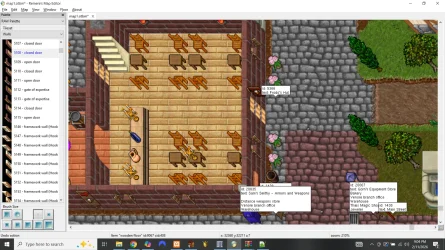
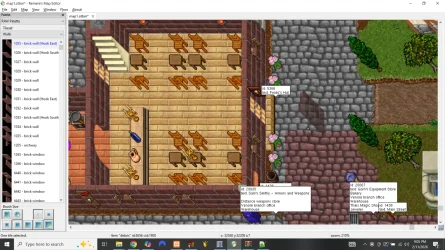
I got my doors fixed...that was a huge pain, but I got it. I've never used RME before and I'm not really understanding how it's supposed to work...The door to Frodo's shop is locked and I just want to replace it with an unlocked door...but when i delete the door the wooden floor suddenly extends past the wall...I looked for a few tutorials on youtube...and I didn't really feel like I could get a good answer. Could someone maybe help me understand what I'm doing wrong?


Screenshot (148).webpScreenshot (149).webp
 
Last edited:
you probably have the autoborder enabled, press A to disable it, then delete the door.
you can check if autoborder is enabled on disabled on the left bottom corner (where one tile selected is written on second image)
 
you probably have the autoborder enabled, press A to disable it, then delete the door.
you can check if autoborder is enabled on disabled on the left bottom corner (where one tile selected is written on second image)
Proud Of You Yes GIF
That was it, thanks bro!
 
You can also use Ctr+F to find items on map by their ID.. that means you can find all the locked doors on the map and change them manually if needed. You can also change all the doors at once with Ctrl+Shift+F but since you are on the huge RL map i would not advise that since some doors are meant to stay locked
 
Solution
Back
Top