• There is NO official Otland's Discord server and NO official Otland's server list. The Otland's Staff does not manage any Discord server or server list. Moderators or administrator of any Discord server or server lists have NO connection to the Otland's Staff. Do not get scammed!
  • 2026 staff recruitment is open! Check it out and consider applying!

Doubt with OtClient Modules

Helliot1

Owner of Empire Online
Joined
Jul 26, 2017
Messages
315
Solutions
1
Reaction score
60
I have a doubt with a module that I'm creating. I created the base of module, but I can't put for the Icon of the module appear on the TopMenu only when I'm online on the game. Like Inventory module.

Somebody can help me ?
Here is my Scripts

Testmod.Lua
LUA:
local testmodWindow = nil
local testmodButton = nil

function init()
  testmodWindow = g_ui.displayUI('testmod')
  testmodWindow:hide()

  testmodButton = modules.client_topmenu.addRightButton('testmodButton', tr('Testmod'), 'testmod', toggle)
end

function terminate()
  testmodWindow:destroy()
  testmodButton:destroy()
end

function toggle()
    if testmodWindow:isVisible() then
        testmodWindow:hide()
        testmodButton:setOn(false)
    else
        testmodWindow:show()
        testmodButton:setOn(true)
        testmodWindow:focus()
    end
end

function hide()
    testmodWindow:hide()
    testmodButton:setOn(false)
end

Testmod.Otui
LUA:
MainWindow
  id: testmodWindow
  !text: tr('Testmod')
  size: 480 340

  Button
    !text: tr('Ok')
    width: 64
    anchors.right: parent.right
    anchors.bottom: parent.bottom
    @onClick: modules.client_changelog.hide()
 
Solution
I also forgot to mention, I changed addRightButton to addRightGameToggleButton, because with the 1st function the button's appearance was glitching out due to the usage of setOn and whatnot.
Here are all 3 scripts from me, and below you can see testing results:

Lua

LUA:
local testmodWindow = nil
local testmodButton = nil
function init()
  print("Test to see if init is called.")
  testmodWindow = g_ui.displayUI('testmod')
  testmodWindow:hide()
  testmodButton = modules.client_topmenu.addRightGameToggleButton('testmodButton', tr('Testmod'), '/images/topbuttons/skills', toggle)
end
function terminate()
  testmodWindow:destroy()
  testmodButton:destroy()
end
function toggle()
    if testmodWindow:isVisible() then...
I have a doubt with a module that I'm creating. I created the base of module, but I can't put for the Icon of the module appear on the TopMenu only when I'm online on the game. Like Inventory module.

Somebody can help me ?
Here is my Scripts

Testmod.Lua
LUA:
local testmodWindow = nil
local testmodButton = nil

function init()
  testmodWindow = g_ui.displayUI('testmod')
  testmodWindow:hide()

  testmodButton = modules.client_topmenu.addRightButton('testmodButton', tr('Testmod'), 'testmod', toggle)
end

function terminate()
  testmodWindow:destroy()
  testmodButton:destroy()
end

function toggle()
    if testmodWindow:isVisible() then
        testmodWindow:hide()
        testmodButton:setOn(false)
    else
        testmodWindow:show()
        testmodButton:setOn(true)
        testmodWindow:focus()
    end
end

function hide()
    testmodWindow:hide()
    testmodButton:setOn(false)
end

Testmod.Otui
LUA:
MainWindow
  id: testmodWindow
  !text: tr('Testmod')
  size: 480 340

  Button
    !text: tr('Ok')
    width: 64
    anchors.right: parent.right
    anchors.bottom: parent.bottom
    @onClick: modules.client_changelog.hide()

In the .otmod file of this module, below
LUA:
scripts: [ ... ]
add
LUA:
  autoload: true
  autoload-priority: 1001

Also, you have an invalid indentation in your .otui at line 5, delete the space character there.
 
In the .otmod file of this module, below
LUA:
scripts: [ ... ]
add
LUA:
  autoload: true
  autoload-priority: 1001

Also, you have an invalid indentation in your .otui at line 5, delete the space character there.

It doesn't works. I think need some function to do it.
 
It doesn't works. I think need some function to do it.

No, I tested it out actually and it was fine. Just fix your otui indentation error, and also this:

testmodButton = modules.client_topmenu.addRightButton('testmodButton', tr('Testmod'), 'testmod', toggle)

This part is where you should provide a path for the icon you want to use, I'm not sure if you have this icon call "testmod.png" inside the folder or what, but I had to replace it since I didn't and it worked fine.
Also, can you post your .otmod file?
 
I also forgot to mention, I changed addRightButton to addRightGameToggleButton, because with the 1st function the button's appearance was glitching out due to the usage of setOn and whatnot.
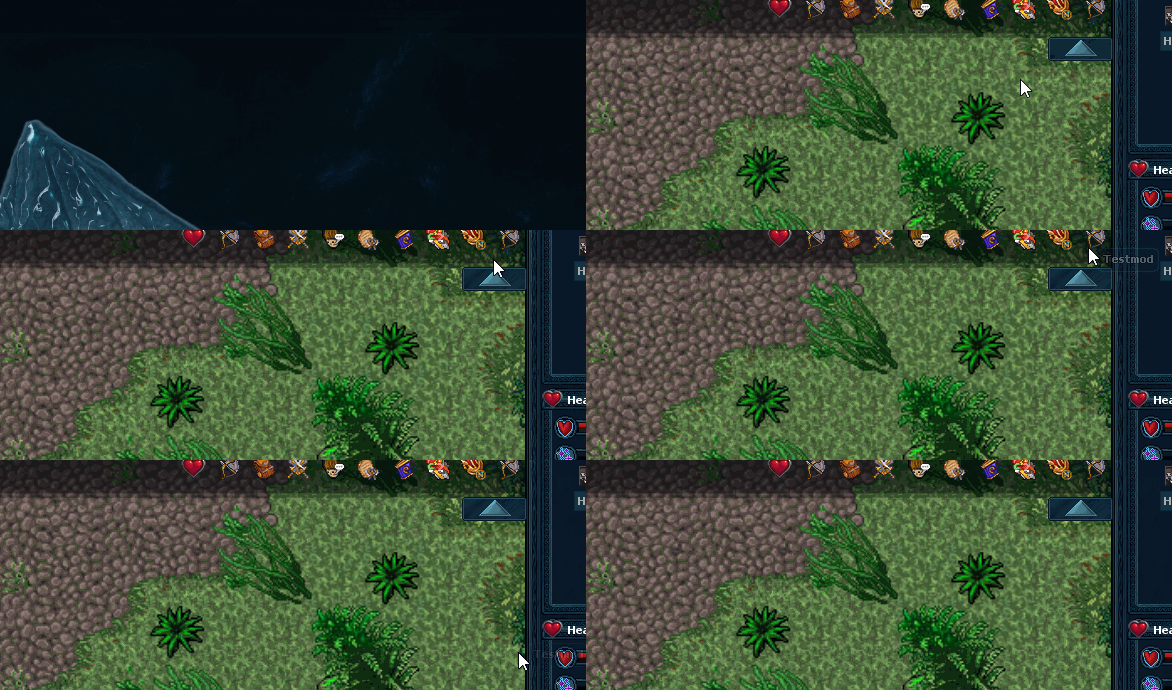
Here are all 3 scripts from me, and below you can see testing results:

Lua

LUA:
local testmodWindow = nil
local testmodButton = nil
function init()
  print("Test to see if init is called.")
  testmodWindow = g_ui.displayUI('testmod')
  testmodWindow:hide()
  testmodButton = modules.client_topmenu.addRightGameToggleButton('testmodButton', tr('Testmod'), '/images/topbuttons/skills', toggle)
end
function terminate()
  testmodWindow:destroy()
  testmodButton:destroy()
end
function toggle()
    if testmodWindow:isVisible() then
        testmodWindow:hide()
        testmodButton:setOn(false)
    else
        testmodWindow:show()
        testmodButton:setOn(true)
        testmodWindow:focus()
    end
end
function hide()
    testmodWindow:hide()
    testmodButton:setOn(false)
end

OTMOD

Code:
Module
  name: game_testmod
  description: Test Mod
  author: Author
  website: www.otclient.info
  sandboxed: true
  scripts: [ testmod ]
  autoload: true
  autoload-priority: 1001
  @onLoad: init()
  @onUnload: terminate()

OTUI

Code:
MainWindow
  id: testmodWindow
  !text: tr('Testmod')
  size: 480 340
  Button
    !text: tr('Ok')
    width: 64
    anchors.right: parent.right
    anchors.bottom: parent.bottom
    @onClick: modules.game_testmod.hide()


In this GIF you can see that as soon as I open the client and login, the button will be there:

1lsgEYa.gif


And here you can see that button works fine when you click it:

1Ichnze.gif
 
Solution
I also forgot to mention, I changed addRightButton to addRightGameToggleButton, because with the 1st function the button's appearance was glitching out due to the usage of setOn and whatnot.
Here are all 3 scripts from me, and below you can see testing results:

Lua

LUA:
local testmodWindow = nil
local testmodButton = nil
function init()
  print("Test to see if init is called.")
  testmodWindow = g_ui.displayUI('testmod')
  testmodWindow:hide()
  testmodButton = modules.client_topmenu.addRightGameToggleButton('testmodButton', tr('Testmod'), '/images/topbuttons/skills', toggle)
end
function terminate()
  testmodWindow:destroy()
  testmodButton:destroy()
end
function toggle()
    if testmodWindow:isVisible() then
        testmodWindow:hide()
        testmodButton:setOn(false)
    else
        testmodWindow:show()
        testmodButton:setOn(true)
        testmodWindow:focus()
    end
end
function hide()
    testmodWindow:hide()
    testmodButton:setOn(false)
end

OTMOD

Code:
Module
  name: game_testmod
  description: Test Mod
  author: Author
  website: www.otclient.info
  sandboxed: true
  scripts: [ testmod ]
  autoload: true
  autoload-priority: 1001
  @onLoad: init()
  @onUnload: terminate()

OTUI

Code:
MainWindow
  id: testmodWindow
  !text: tr('Testmod')
  size: 480 340
  Button
    !text: tr('Ok')
    width: 64
    anchors.right: parent.right
    anchors.bottom: parent.bottom
    @onClick: modules.game_testmod.hide()


In this GIF you can see that as soon as I open the client and login, the button will be there:

1lsgEYa.gif


And here you can see that button works fine when you click it:

1Ichnze.gif

Thanks!! Now it works

I just need change this part
LUA:
testmodButton = modules.client_topmenu.addRightGameToggleButton('testmodButton', tr('Testmod'), '/images/topbuttons/skills', toggle)
 

Similar threads

Replies
0
Views
371
Back
Top