• There is NO official Otland's Discord server and NO official Otland's server list. The Otland's Staff does not manage any Discord server or server list. Moderators or administrator of any Discord server or server lists have NO connection to the Otland's Staff. Do not get scammed!
  • 2026 staff recruitment is open! Check it out and consider applying!

Error 10060

Gubailovo

Well-Known Member
Joined
Dec 19, 2013
Messages
412
Solutions
2
Reaction score
71
Hello everyone. This topic has been raised more than once, but I have not found an answer to it. I opened the ports (7171 and 7172 tcp upd yupd) but still a long load then error 10060. And I added the server and client itself as allowed. After that, it began to load up to the list of characters. But then a long download and again an error. Tell me what to do (can add some more ports or programs. Thanks for any help earlier.

Sorry for my english
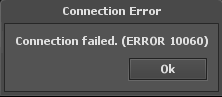
sFs1d8CQ.png
Post automatically merged:

maybe it's in the firewall settings? but I don’t understand this. Maybe there is a guide or video?
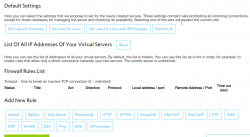


icNKUoPB.png
Post automatically merged:

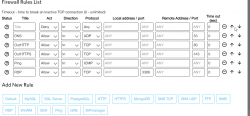
these rules are now


DGG4QxxU.png


I don’t know if this is the direction I think
 
Last edited:
Your WSAETIMEDOUT error means that
winsock said:
Connection timed out.A connection attempt failed because the connected party did not properly respond after a period of time, or the established connection failed because the connected host has failed to respond.

But I read it as:
logic said:
Why are you using Windows to host a server? Do you see this clusterfuck? Jank as fuck bro. How the fuck are you supposed to debug this shit?


Anyway, have you tried disabling your firewall entirely and seeing if the problem goes away? I would try that.

If you disable the firewall and
A.) The Problem goes away :: You know you have to adjust some firewall setting
b.) The Problem persists! The problem is obviously within your Windows Server install and not your firewall.
 
Continuing this topic. I launched another server 1098 on tfs 1.2, everything works stably. But the first server with the user client refuses to work. It produces error 10051 (with the same settings as the second server). Maybe there is a problem in the client?
 
What ports does the OTclient use? from a regular client everything starts normally(7.6). and from a custom one it gives an error 10051. but it goes locally normally. Where in the client can I find which ports are used?
this client
 

Attachments

Last edited:
Back
Top