• There is NO official Otland's Discord server and NO official Otland's server list. The Otland's Staff does not manage any Discord server or server list. Moderators or administrator of any Discord server or server lists have NO connection to the Otland's Staff. Do not get scammed!
  • 2026 staff recruitment is open! Check it out and consider applying!

Exclusive access to cave (with time) - TFS 1.x

tev

Banned User
Joined
Apr 19, 2013
Messages
113
Reaction score
6
* Player 1 use X item.
** He got exclusive access to hunt in Y cave for 24 hours.
*** Only he can enter this Y cave.

If another player 2 use X item, he will have exclusive access to hunt in Z cave (another cave) for 24 hours.
Only player 2 can enter this Z cave.

If caves are occupied, appears a message: "You can't use this now. Try again later!"
When the 24h it's over, you will got teleported to temple.

Sorry if I wrote something wrong, try to understand, please :(
 
I would personally use four scripts that includes 1 creature storage and 1 global storage for this event.

Action -> check global -> give creature + global storage
Login -> check global -> check storage -> teleport/remove storages
Step -> check global -> check storage -> teleport/remove storages
onThink -> check global -> check for players in area -> check storage -> teleport/remove storages
 
onThink -> check for players in area -> check storage -> teleport/remove storages
Do we really need a onThink? Maybe just a addEvent once the player enter the dungeon?
As I understand, the addEvent do not cancel just because the player logout? So, would it not be just fine with only addEvent & onLogin?
 
addEvent isn't always good to use due to it being a thread and its max time of execution is limited, if you used an existing technology, like say an npc of sorts, its onthink is always active and can track a player no matter where they are in the game, of course if they log out that is a whole story.. which really isn't an issue, but why not share the load with something which is just wasting away anyway :p
 
Last edited:
Do we really need a onThink? Maybe just a addEvent once the player enter the dungeon?
As I understand, the addEvent do not cancel just because the player logout? So, would it not be just fine with only addEvent & onLogin?
addEvent is fine, as long as nobody reloads any scripts. But if someone reloads scripts then addEvent would be removed. (at least that's how it is on 0.3.7)
Although you shouldn't be testing scripts on a Live Server, many server owners do anyways.
 
addEvent is fine, as long as nobody reloads any scripts. But if someone reloads scripts then addEvent would be removed. (at least that's how it is on 0.3.7)
Although you shouldn't be testing scripts on a Live Server, many server owners do anyways.
I am sure @Ninja told me before that the addEvent is NOT canceled when you reload a script.
 
addEvent isn't always good to use due to it being a thread and its max time of execution is limited, if you used an existing technology, like say an npc of sorts, its onthink is always active and can track a player no matter where they are in the game, of course if they log out that is a whole story.. which really isn't an issue, but why not share the load with something which is just wasting away anyway :p
By the way, using the addEvent in an already existing resource such as a NPC is hilarious. It would be kind of annoying remembering where you placed all your onThink events though. :p
I am sure @Ninja told me before that the addEvent is NOT canceled when you reload a script.
The addEvents are specific to each area of code. (again for 0.3.7.. idk about 1.x)
If you reload talkactions while you have a rainbow outfit enabled, that script will stop functioning if you are using a local addEvent.
If you place all your addEvents into data/lib/, you can get around this I believe.
I don't personally enjoy storing addEvents in a separate directory/file, so I use onThink in some cases. -shrugs-
 
By the way, using the addEvent in an already existing resource such as a NPC is hilarious. It would be kind of annoying remembering where you placed all your onThink events though. :p

The addEvents are specific to each area of code. (again for 0.3.7.. idk about 1.x)
If you reload talkactions while you have a rainbow outfit enabled, that script will stop functioning if you are using a local addEvent.
If you place all your addEvents into data/lib/, you can get around this I believe.
I don't personally use this method, so I use onThink. -shrugs-
Its not an addevent, you would be utilizing its onthink method to track the player or whatever as it is always firing even when not engaged with a player, creature etc..
 
Its not an addevent, you would be utilizing its onthink method to track the player or whatever as it is always firing even when not engaged with a player, creature etc..
slip of words, I meant onThink.
I was thinking about my response to Cornex while typing my reply to you. ;(
 
The addEvents are specific to each area of code. (again for 0.3.7.. idk about 1.x)
If you reload talkactions while you have a rainbow outfit enabled, that script will stop functioning if you are using a local addEvent.
If you place all your addEvents into data/lib/, you can get around this I believe.
I don't personally use this method, so I use onThink. -shrugs-
Yeah, if you use something like
Code:
function something()
    addEvent(something, 5000)
end

something()
direct in same script I guess it will stop? But if you run just addEvent(something, 5000) it should store in the memory outside the script, right?

edit, i will just test it lol haha
 
edit, i will just test it lol haha
haha, I was about to do the same.

--edit
Code:
function onSay(cid, words, param)
   doPlayerSendTextMessage(cid, MESSAGE_STATUS_CONSOLE_BLUE, "Words..")
   addEvent(doPlayerSendTextMessage, 5000, cid, MESSAGE_STATUS_CONSOLE_BLUE, "Words..")
   return true
end
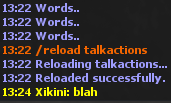
SSrFp3v.png

Works as I expected.
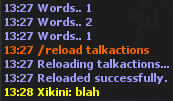
--edit 2
reworded script to make it less confusing
E2iDdfH.png
 
Last edited by a moderator:
haha, I was about to do the same.

--edit
Code:
function onSay(cid, words, param)
   doPlayerSendTextMessage(cid, MESSAGE_STATUS_CONSOLE_BLUE, "Words..")
   addEvent(doPlayerSendTextMessage, 5000, cid, MESSAGE_STATUS_CONSOLE_BLUE, "Words..")
   return true
end
SSrFp3v.png

Works as I expected.
--edit 2
reworded script to make it less confusing
E2iDdfH.png

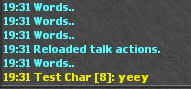
Used same script in tfs 1.2
ff5d5ab6ef5d2ead55961394850cd795.png
 
Back
Top