
Hi,
Just want to know how you can change the 'index' or whatever you call it of the spell effect/sprite.
I have this spell with the following dimensions:
32x5 (width)
32x3 (height)
Whenever I try to run it, it starts to run properly but not in the right position as it starts from right-bottom corner of the sprite (target based spell). Here is a little drawing to demonstrate that;
- blue circle (selected target)
- black squares (the entire spell)
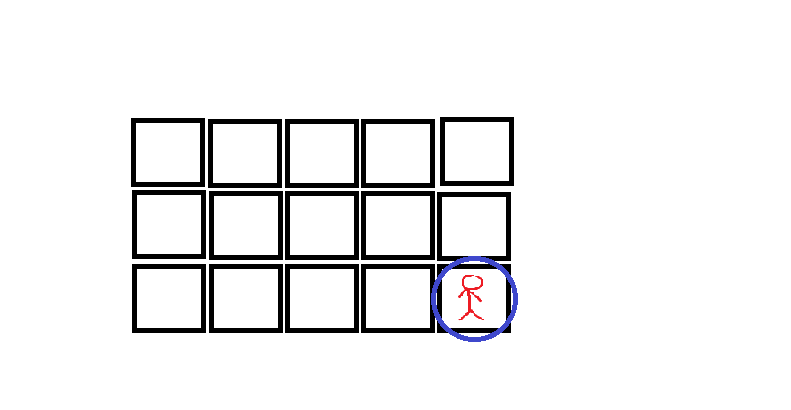
Now what I wanted to do is to make the spell start with center coordinates, so when the target is selected, it will play this way;
here is my code if needed;
Any help appreciated
Just want to know how you can change the 'index' or whatever you call it of the spell effect/sprite.
I have this spell with the following dimensions:
32x5 (width)
32x3 (height)
Whenever I try to run it, it starts to run properly but not in the right position as it starts from right-bottom corner of the sprite (target based spell). Here is a little drawing to demonstrate that;
- blue circle (selected target)
- black squares (the entire spell)
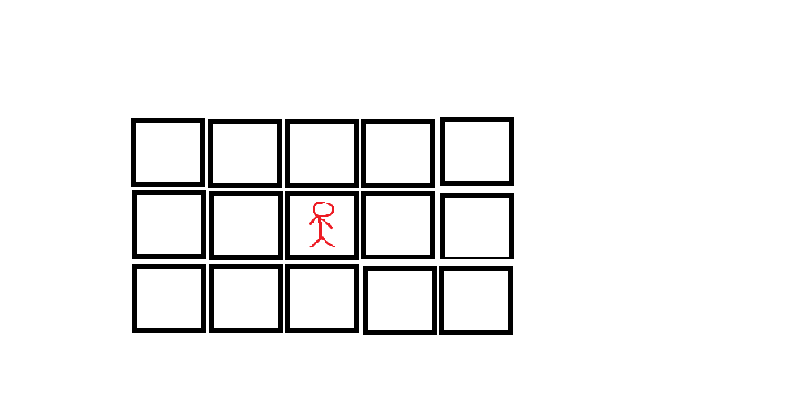
Now what I wanted to do is to make the spell start with center coordinates, so when the target is selected, it will play this way;
here is my code if needed;
LUA:
local combat = createCombatObject()
setCombatParam(combat, COMBAT_PARAM_TYPE, COMBAT_PHYSICALDAMAGE)
setCombatParam(combat, COMBAT_PARAM_DISTANCEEFFECT, 29)
setCombatFormula(combat, COMBAT_FORMULA_LEVELMAGIC, -90.2, 1, -95.2, 1)

function onCastSpell(cid, var)
local position1 = Player(cid):getPosition()
doSendMagicEffect(position1, 5)
return doCombat(cid, combat, var)
end
Any help appreciated
