
You are using an out of date browser. It may not display this or other websites correctly.
You should upgrade or use an alternative browser.
You should upgrade or use an alternative browser.
Gesior Permissions
- Thread starter Blasphemy
- Start date
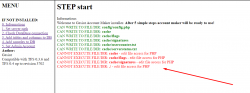


@Blasphemy Please search through the forums more before you start a new thread.
Linux - Gesior not create account.. anyone have this problem? (https://otland.net/threads/gesior-not-create-account-anyone-have-this-problem.270049/#post-2604388)
Sincerely,
Ralumbi(Caleb)
Linux - Gesior not create account.. anyone have this problem? (https://otland.net/threads/gesior-not-create-account-anyone-have-this-problem.270049/#post-2604388)
Sincerely,
Ralumbi(Caleb)
@Blasphemy Please search through the forums more before you start a new thread.
Linux - Gesior not create account.. anyone have this problem? (https://otland.net/threads/gesior-not-create-account-anyone-have-this-problem.270049/#post-2604388)
Sincerely,
Ralumbi(Caleb)
Well Agree with @Ralumbi and if you don't find it here It could even been search on google cause it seems like you did know a little bit what it was about, Or maybe just do google search "sudo edit file access"


OP
OP

Blasphemy
Well-Known Member
- Joined
- Jan 5, 2012
- Messages
- 387
- Reaction score
- 72
I always search deep in otland, but thete says "linux" I'm not usung linux... so i thought that topic wasnt related with my case, isnt it?@Blasphemy Please search through the forums more before you start a new thread.
Linux - Gesior not create account.. anyone have this problem? (https://otland.net/threads/gesior-not-create-account-anyone-have-this-problem.270049/#post-2604388)
Sincerely,
Ralumbi(Caleb)
Post automatically merged:
bump
Last edited:
You can right click your folder and set the permissions in properties (windows)
Make sure you set it to administrator.
Please let me know what you're using etc..
Make sure you set it to administrator.
Please let me know what you're using etc..
OP
OP
Blasphemy
Well-Known Member
- Joined
- Jan 5, 2012
- Messages
- 387
- Reaction score
- 72
Im using an old version of uniserv, but I can switch to another if its needed... I just need to test.You can right click your folder and set the permissions in properties (windows)
Make sure you set it to administrator.
Please let me know what you're using etc..
About permissions; I already did a process of permissions and isnt working yet, maybe I must use xamp for gesior, or not?
Permissions are os based, uniserv or xampp doesn't matter here. Let me guide you with screenshots:
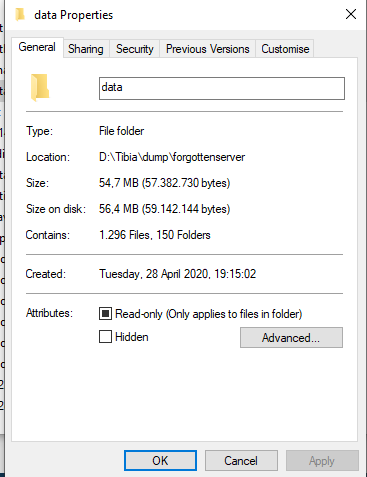
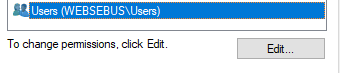
Then goto Security and select Users and click on the Edit button.
Then click on full control and click on apply
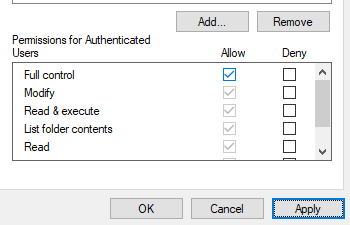
After this you will have full control of the folder. For testing purposes you can just give full control to the entire 'www' folder. If its not the user only try to give full control to the other users in the list as well. What also can be something is starting up uniserv as administrator by right-click on the .exe and "run as administrator".
I hope one of these things helps you out
Then goto Security and select Users and click on the Edit button.
Then click on full control and click on apply
After this you will have full control of the folder. For testing purposes you can just give full control to the entire 'www' folder. If its not the user only try to give full control to the other users in the list as well. What also can be something is starting up uniserv as administrator by right-click on the .exe and "run as administrator".
I hope one of these things helps you out
OP
OP
Blasphemy
Well-Known Member
- Joined
- Jan 5, 2012
- Messages
- 387
- Reaction score
- 72
Thank you a lot, I could do all steps you mentioned, but I still can't install gesior :/Permissions are os based, uniserv or xampp doesn't matter here. Let me guide you with screenshots:
Then goto Security and select Users and click on the Edit button.
Then click on full control and click on apply
After this you will have full control of the folder. For testing purposes you can just give full control to the entire 'www' folder. If its not the user only try to give full control to the other users in the list as well. What also can be something is starting up uniserv as administrator by right-click on the .exe and "run as administrator".
I hope one of these things helps you out
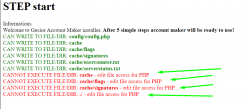
I think I'm going to toggle to Xampp and post results...
Thanks you a lot :>!