• There is NO official Otland's Discord server and NO official Otland's server list. The Otland's Staff does not manage any Discord server or server list. Moderators or administrator of any Discord server or server lists have NO connection to the Otland's Staff. Do not get scammed!
  • 2026 staff recruitment is open! Check it out and consider applying!

How make the Make the corresponding BORDER tiles walkables? sprites /editing

Felipe93

Ghost Member
Joined
Mar 21, 2015
Messages
2,035
Solutions
9
Reaction score
361
Location
Chile
well i got my sprites 7.72 as 7.4 im trying to Make the corresponding grass tiles walkables but im haven't succes at all

im having a similar problem like this guy : https://otland.net/threads/make-border-walkable.235198/
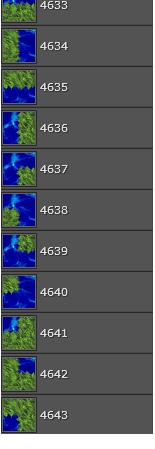
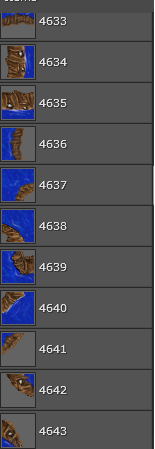
i going to explain i change these sprites :
wYnFH5C.png


to these ones :

fumTg85.png


WHEN I TRY TO FIND CID/SID od this border on item editor doesnt appear nothing i have put the number and looking 1 by one


the thing iswhen i try to walk over grass water border(where is supposed to i can walk)
it's if like the screen jumps any idea?

i wanna walk like in the screen or where supposed
to walk in these versions and have not screen jumps :
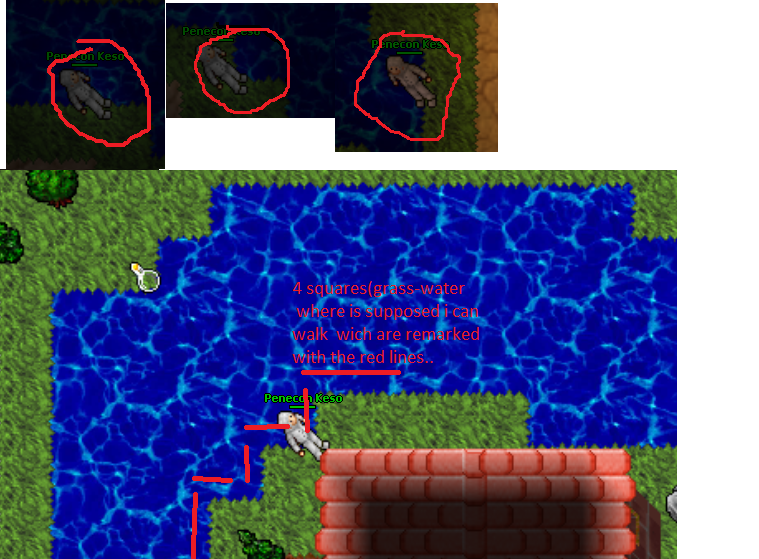
Ls0HDCa.png


PD : i've been trying change blocking path and blocking in demonic. dat editor and in object builder unpaassable. adding ground speed black path finder and no succes

too i have tried to find those cid/sid that the object builder and map shows but in ot item editor doesnt appear. dunno why

any tip or idea how make this walkable ?
script maybe or idea?

regards

ANYONE TO HELP? IM ABLE TO PAY A LITTLE
JUST NEED HELP ON THIS !
 
Last edited:
Please stop trying to create a server...
I think I have seen around 10 threads from you now or at least it seems to be like that because you always ask for another stuf..
 
if you dont have nothing good to say just ignore me... are you an admin or something always posting garbage against me?
any way if you are... just ignore me dont waste your time doing things of a kid 10 years old i want to do this.
you are not bound to tell me the answer or even help me dude...
 
well i got my sprtes 7.72 as 7.4 im trying to Make the corresponding grass tiles walkables but im haven't succes at all i have used object builder demonic dat editor and nothing
when i try to walk over grass water border(where is supposed to i can walk) like the screen jumps any idea?

PD i have been trying change blocking path and blocking in demonic dat editor and in object builder unpaassable and black path finder

Missing speed or rebuild items.otb with new .dat.
 
Missing speed or rebuild items.otb with new .dat.

missing speed ...in (item editor is set to 120) , in object builder ground speed is set to 150 and in demonic dat editor speed is set to 150

TO BE MORE SPECIFIC I NEED TO MAKE CHAR WALK OVER GRASS ID :4633 AND ID: 4644 (GRASS) and some other but with these i will learn
thats what show these diferent aplications so to how much i have to setup it?
and rebuild items.otb how to do it?
thanks thanks for u reply please help this is the finally thing i dont post anything more
i can share the files btw
regards
 
Last edited:
i did all steps edit dat add groundspeed unmark block and change cid in items otb and now
[20/2/2016 13:4:0] > ERROR: Unable to load items (OTB)!
any idea solution etc?
 
Edit the player metamethod and add your code inside this function, it may not work with a map click but it might just do what you want it to.
Code:
Player:onMoveCreature(creature, fromPosition, toPosition)
 
Edit the player metamethod and add your code inside this function, it may not work with a map click but it might just do what you want it to.
Code:
Player:onMoveCreature(creature, fromPosition, toPosition)
thanks about your reply and sorry my ignorance but where i must add this line?
 
i did all steps edit dat add groundspeed unmark block and change cid in items otb and now
[20/2/2016 13:4:0] > ERROR: Unable to load items (OTB)!
any idea solution etc?
if you are using OTX look for these lines in your config.lua
Code:
    confirmOutdatedVersion = false
    skipItemsVersionCheck = false
and turn them to true maybe you can load items.otb
 
if you are using OTX look for these lines in your config.lua
Code:
    confirmOutdatedVersion = false
    skipItemsVersionCheck = false
and turn them to true maybe you can load items.otb

ill try it i must add and say to you and all who help me whiout get mad alot of thanks !
really im very gratefull with the comunity

no succes @Olddies anyway thanks for the idea i didn't think in it
 
Back
Top