- Joined
- Dec 9, 2010
- Messages
- 151
- Solutions
- 1
- Reaction score
- 68
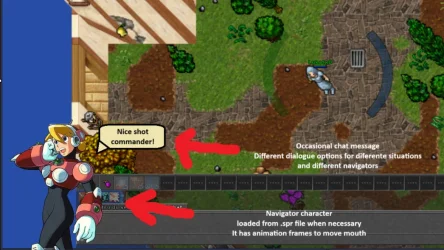
Hi guys, I'm designing an ot where the player is a mecha pilot. So to make it more imersive, I've thought of adding a crew/navigators at the corner of the screen.
I can add a navigator png and display it, but I would like it to be less static than that, even have a talk balloon sometimes just like the Ratha npc makes some snarky comments once in a while.
So I made it into a 128x128 outfit with animations which brings me to my current question: How do I make otc load it and display it? I opened the module "game_outfit" but I couldnt completely understand the serverData and how that attachedEffects work
Below is the otc part where it seems to have already loaded the outftis, but I'm not understanding the part where it gets them from the .spr file
I can add a navigator png and display it, but I would like it to be less static than that, even have a talk balloon sometimes just like the Ratha npc makes some snarky comments once in a while.
So I made it into a 128x128 outfit with animations which brings me to my current question: How do I make otc load it and display it? I opened the module "game_outfit" but I couldnt completely understand the serverData and how that attachedEffects work
Below is the otc part where it seems to have already loaded the outftis, but I'm not understanding the part where it gets them from the .spr file
LUA:
function showOutfits()
    window.presetsList:hide()
    window.presetsScroll:hide()
    window.presetButtons:hide()

    window.selectionList.onChildFocusChange = nil
    window.selectionList:destroyChildren()

    local focused = nil
    for _, outfitData in ipairs(ServerData.outfits) do
        local button = g_ui.createWidget("SelectionButton", window.selectionList)
        button:setId(outfitData[1])

        local outfit = table.copy(previewCreature:getCreature():getOutfit())
        outfit.type = outfitData[1]
        outfit.addons = outfitData[3]
        outfit.mount = 0
        outfit.familiar = 0
        outfit.auras = 0
        outfit.wings = 0
        outfit.shader = "Outfit - Default"
        outfit.healthBar = 0
        outfit.effects = 0
        button.outfit:setOutfit(outfit)