
• There is NO official Otland's Discord server and NO official Otland's server list. The Otland's Staff does not manage any Discord server or server list. Moderators or administrator of any Discord server or server lists have NO connection to the Otland's Staff. Do not get scammed!
  • 2026 staff recruitment is open! Check it out and consider applying!

Item Editor - Name and flags are marked in red, reloading attributes erase flags

lukatxd

Well-Known Member
Joined
Dec 9, 2010
Messages
135
Solutions
1
Reaction score
58
Hello people, I'm using this item editor GitHub - ottools/ItemEditor (https://github.com/ottools/ItemEditor)
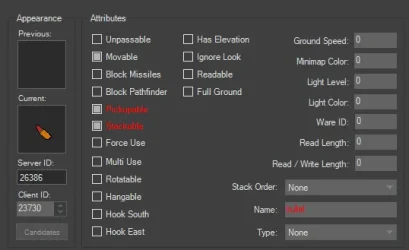
But why is everything I click, marked in red? Yesterday even the sprite was marked in red as well (idk what is different from yesterday to today)
1773184923897.webp

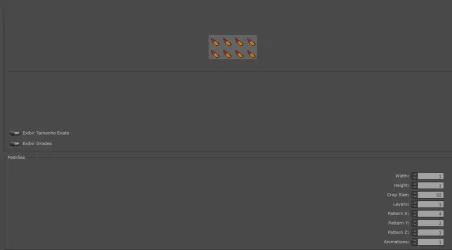
I also tried to add this new type of ammo, and it crashes my client, I even had to delete the Gm inventory from the database. I copied the gold coin standard on the object builder, but I cant find anywhere else where I should try to add the bullet
1773185052934.webp
 
Solution
The red marked attributes, sometimes sprites too, are basically mismatches between your otb and spr+dat files.

If you add something in Object Builder, e.g. new item, updated sprite, after compiling the final dat+spr, you need to open your otb file in your Item Editor and refresh those attributes that you have changed, or add same new items to this otb file.

In ItemEditor click from top menu "View" -> "Show Mismatched Items" and you will see what attributes are off, you can then select each single item on the list and press Ctrl+R, or do it for all items at once by clicking "Update Item List" from the same menu.

For the new items, just click "Edit" -> "Create Missing Items".

Save otb and everything should work now.
The red marked attributes, sometimes sprites too, are basically mismatches between your otb and spr+dat files.

If you add something in Object Builder, e.g. new item, updated sprite, after compiling the final dat+spr, you need to open your otb file in your Item Editor and refresh those attributes that you have changed, or add same new items to this otb file.

In ItemEditor click from top menu "View" -> "Show Mismatched Items" and you will see what attributes are off, you can then select each single item on the list and press Ctrl+R, or do it for all items at once by clicking "Update Item List" from the same menu.

For the new items, just click "Edit" -> "Create Missing Items".

Save otb and everything should work now.
 
Solution
The red marked attributes, sometimes sprites too, are basically mismatches between your otb and spr+dat files.

If you add something in Object Builder, e.g. new item, updated sprite, after compiling the final dat+spr, you need to open your otb file in your Item Editor and refresh those attributes that you have changed, or add same new items to this otb file.

In ItemEditor click from top menu "View" -> "Show Mismatched Items" and you will see what attributes are off, you can then select each single item on the list and press Ctrl+R, or do it for all items at once by clicking "Update Item List" from the same menu.

For the new items, just click "Edit" -> "Create Missing Items".

Save otb and everything should work now.

I see, so it being red doesnt mean its wrong or "not accepted". It was weird because I could use the added items and their flags were working.
You made me realize that Oject Builder has a tab that applies these attributes to items and I wasnt paying enough attention to see it.

It was also weird that item editor would only reload my custom items everytime.
Thank you for the response.
Now to figure why stacked bullets crash my otc lol
 
I see, so it being red doesnt mean its wrong or "not accepted". It was weird because I could use the added items and their flags were working.
You made me realize that Oject Builder has a tab that applies these attributes to items and I wasnt paying enough attention to see it.

It was also weird that item editor would only reload my custom items everytime.
Thank you for the response.
Now to figure why stacked bullets crash my otc lol
We've all been there, my first steps in these apps were pretty similar, experienced weird bugs and stuff, until someone told me this could be the reason. And your issues with client crash and corrupted inventory fits into this scenario I guess.

There are some people developing tools to remove some steps in the process of adding and editing those item files, for example eliminate a need to use Item Editor at all.
 
Back
Top