• There is NO official Otland's Discord server and NO official Otland's server list. The Otland's Staff does not manage any Discord server or server list. Moderators or administrator of any Discord server or server lists have NO connection to the Otland's Staff. Do not get scammed!
  • 2026 staff recruitment is open! Check it out and consider applying!

Item stacking issue

strutZ

Australian OT Member {AKA Beastn}
Joined
Nov 16, 2014
Messages
1,393
Solutions
7
Reaction score
552
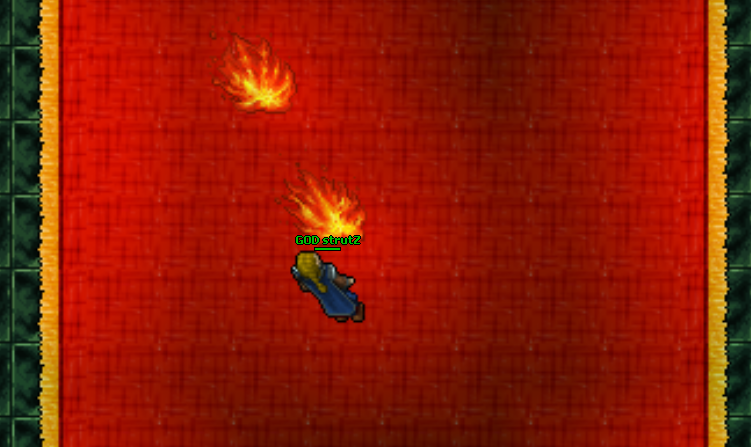
Hey guys i'm using latest tfs 1.2 and was just wondering if anyone else has noticed this problem. When i am walking on the red carpet (pic below) any blood, potion fluid or portals that are made, seem to be created below the carpet instead of on top of it.. Is this a simple fix? been pulling my hair out.
2WSwQAS.png
 
Well the carpet sits on top of the ground tile if that is any help, if you were to delete the carpet tile you would see the ground tile unless you mapped it to not have a ground tile.

I would run a test and see what the stack order is, ground, carpet, field etc.
 
Well the carpet sits on top of the ground tile if that is any help, if you were to delete the carpet tile you would see the ground tile unless you mapped it to not have a ground tile.

I would run a test and see what the stack order is, ground, carpet, field etc.

Yeah i know deleting the carpet has it underneath i tried adding stackpos but didnt work... Here is the script i'm using to give you an idea.


Code:
local teleportToPosition = Position(32271, 32261, 12)

local function removeTeleport(position)
    local teleportItem = Tile(position):getItemById(1387)
    if teleportItem then
        teleportItem:remove()
        position:sendMagicEffect(CONST_ME_POFF)
    end
end

function onKill(creature, target)
    local targetMonster = target:getMonster()
    if not targetMonster or targetMonster:getName():lower() ~= 'firebreath' then
        return true
    end

    local position = targetMonster:getPosition()
    position:sendMagicEffect(CONST_ME_TELEPORT)
    local item = Game.createItem(1387, 1, position)
    if item:isTeleport() then
        item:setDestination(teleportToPosition)
    end
    targetMonster:say('You have deafeated firebreath! Enter the teleport to claim your reward. It will dissapear in 10 seconds.', TALKTYPE_MONSTER_SAY, 0, 0, position)

    --remove portal after 10 secs.
    addEvent(removeTeleport, 10 *1000, position)
    return true
end

I tried doing
Code:
local teleportToPosition = Position{32271, 32261, 12, stackpos = 2}
all the way up to 4 without success so its fucken annoying lol
 
Position is a metatable you can't use brackets, Position in essence can thought being defined like this.
Code:
function Position(a, b, c, d)
    return {x = (a > -1 and a < 65536) and a or 0, y = (b > -1 and b < 65536) and b or 0, z = (c > -1 and c < 16) and c or 7, stackpos = (d > -1 and d < 256) and d or 255}
end
 
Use the red carpet with id 1798 instead, the one you are using is always on top.

@Codex NG
Calling Position is redirected to the positionCreate function, you can call it with a table, but you have to name the fields x, y, z and stackpos:
Position{x = 32271, y = 32261, z = 12, stackpos = 2}
 
Back
Top